
A shopper in Berlin puts a $60 order in her basket, and by the time it reaches her door that order has crossed four borders. The price is in dollars, the card converts it to euros, customs adds duties, and a courier delivers it a week later. A store shopping for the top 10 ecommerce platforms for international selling is really shopping for the tool that makes those four crossings cheapest and least surprising, and the pages below price each one on that single $60 order.
One Order, Four Borders: Price, Currency, Duties, Delivery
Take the $60 order and follow it. The price is the first border. The store lists the product at $60, and the shopper in Berlin sees either $60 or the euro equivalent, depending on whether the platform prices in local currency. The currency is the second border. The card network converts the payment, and the conversion quietly takes 1 to 3 percent, which is $0.60 to $1.80 on a $60 order.
The duties are the third border. Customs adds a charge the shopper may or may not see at checkout. The delivery is the fourth border, and it is the one the shopper remembers, because a parcel that arrives late or with a surprise bill is a customer who never orders again.
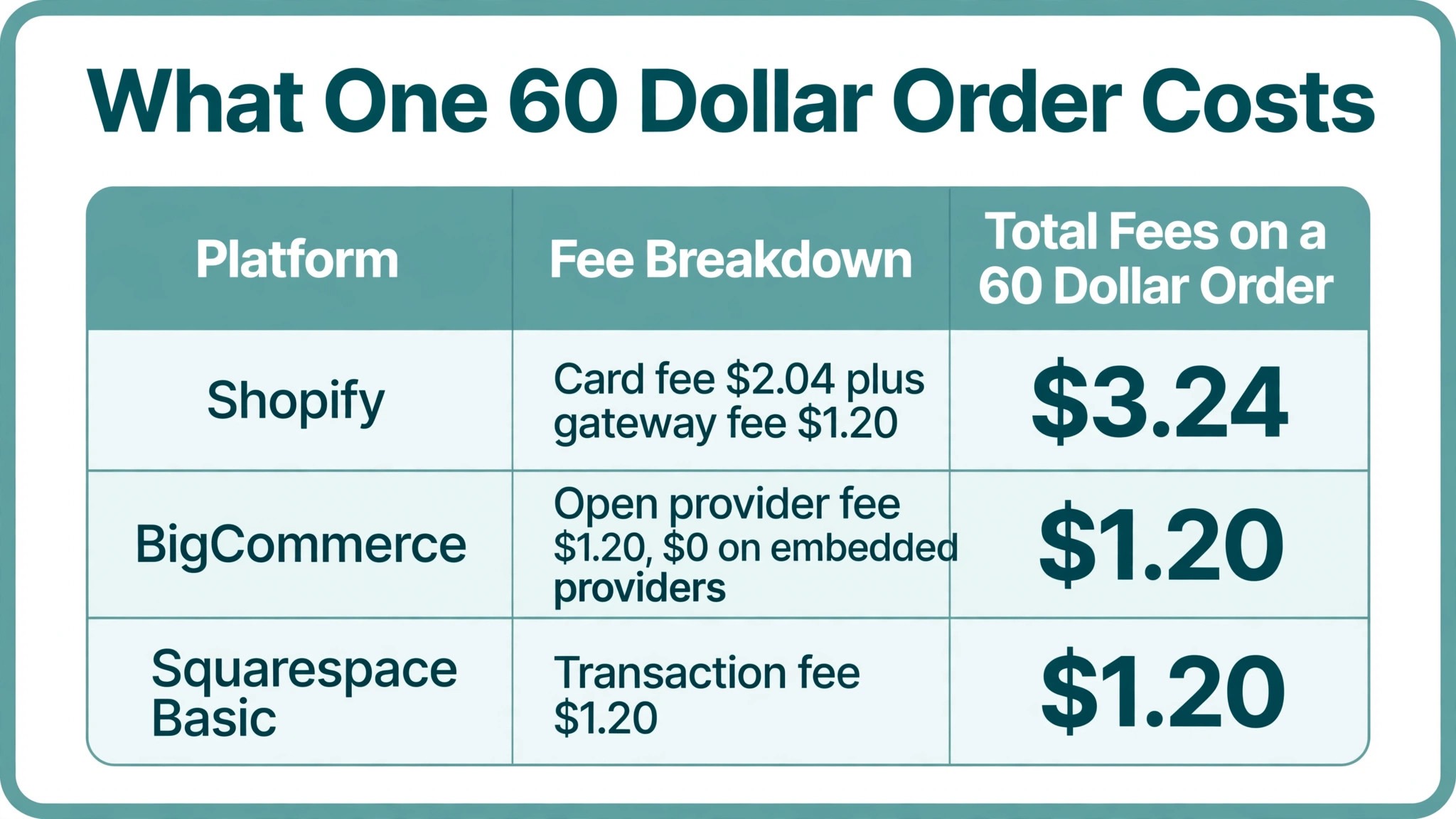
Here is the same order priced on the two most common platforms, so the borders are visible in dollars. On Shopify Basic, the card rate is 2.9 percent plus 30 cents on a United States order, which is $2.04 on a $60 order, and a third-party gateway adds another 2 percent, which is $1.20, so the order costs $3.24 in platform and gateway fees before the subscription. On BigCommerce Core, the open payment provider fee is 2 percent, which is $1.20 on the same order, with no fee on embedded providers. The subscription is $29 a month on either platform, so the order itself, not the monthly fee, is where the platforms part ways.
A shopper in Berlin wants prices in euros, a checkout in German and a delivery date that includes customs. A shopper in Tokyo wants prices in yen and a payment method that is not a credit card. The platform has to handle all of that before the shopper reaches the payment button, because a checkout that shows dollars and a United States address form loses the sale before the card comes out.
| Tool | Main job | Best for | Starting price |
|---|---|---|---|
| Shopify | Hosted store with Markets | stores selling abroad without a developer | $29 a month |
| BigCommerce | Hosted store with B2B depth | stores with high volume and B2B sales | $29 a month |
| WooCommerce | Free WordPress store plugin | stores wanting full control | Free |
| Adobe Commerce | Enterprise commerce platform | enterprise stores selling worldwide | Quote-based |
| Wix | Simple hosted store builder | small stores starting abroad | $29 a month |
| Squarespace | Design led hosted store | design led stores selling abroad | $16 a month |
| PrestaShop | Free open source store | stores wanting free open source software | Free |
| OpenCart | Free open source store | developers building a custom store | Free |
| Salesforce Commerce Cloud | Enterprise cloud commerce | large brands with a Salesforce stack | Quote-based |
| Shift4Shop | Free store with own payments | stores on a zero budget | Free |
The best pick in this guide is Shopify, starting at $29 a month on annual billing, because Shopify Markets lets a store sell in multiple currencies, show local duties at checkout and run one catalogue across countries from a single login. BigCommerce is the pick for a store that wants deeper B2B tools, and WooCommerce is the pick for a store that wants full control over its own hosting and checkout. The ten platforms below compare price, currency support and cross-border fees, so a store can pick the platform its international customers will actually complete a checkout on.
What Does Currency Conversion Cost You per Order?
Currency conversion is the quietest fee in international selling, and it is the one most stores never see on an invoice. A store that prices in dollars and lets the card network convert loses 1 to 3 percent on every order, while a store that prices in local currency through Shopify Markets or a WooCommerce multi-currency plugin keeps that margin. On a $60 order the loss is $0.60 to $1.80, which sounds small until it is multiplied across a month.
Work it across a month of sales. A store taking $1,000 a month internationally loses $10 to $30 to conversion alone, and a store taking $10,000 a month loses $100 to $300, before the subscription or the card fees are counted. The gateway and conversion fees together run 2 to 3 percent on every order, so a store taking $10,000 a month internationally pays $200 to $300 in fees before the subscription is counted. A store that prices in local currency keeps 1 to 3 percent of that margin, which is more than the subscription costs, so the currency decision matters more than the platform decision.
The trade is the setup. Pricing in local currency means the store has to set prices per country, watch exchange rates and keep the catalogue consistent across currencies. A hosted platform like Shopify does that work inside Markets, and the store pays $29 a month for the privilege. An open source platform like WooCommerce does it through a multi-currency plugin, and the store pays in setup time instead. Either way, the top 10 ecommerce platforms for international selling are separated less by their monthly price than by how honestly they handle the conversion, because a store that hides the conversion in the card network pays for it on every order without ever seeing the line.
Shopify vs BigCommerce
Shopify and BigCommerce charge the same monthly prices on their first three plans, $39, $105 and $399 billed monthly, or $29, $79 and $299 on annual billing. The difference is not the price, it is the rules around the price. BigCommerce ties each plan to a sales cap, while Shopify does not, and BigCommerce charges an open payment provider fee where Shopify charges a third-party gateway fee.
On international selling, Shopify has the edge for a small store, since Shopify Markets is simpler to set up and the app store has a local payment app for nearly every market. BigCommerce has the edge for a store that sells B2B across borders, since customer groups, price lists and quote tools are built into the platform rather than added through apps. Growth at $79 a month on annual billing covers $100,000 in annual sales and adds customer groups and price lists, which is the depth a wholesale store needs.
The verdict splits by growth. A store that expects to pass $30,000 in annual sales quickly should take Shopify, because BigCommerce will move it to Growth at $79 a month the moment it crosses the cap. A store that sells mostly B2B and values the built-in catalogue tools should take BigCommerce, because the cap is a fair price for the depth it gets.
There is also a third path that many stores take without planning it, which is starting on Shopify for the speed, then moving the B2B catalogue to BigCommerce once the wholesale orders grow, and running both platforms for a year while the move settles. That path means two subscriptions and two catalogues, so a store that already sells wholesale should skip it and start on BigCommerce.
The 10 Tools in Detail
The ten profiles below are priced per international order, because the top 10 ecommerce platforms for international selling are bought by the order, not by the monthly fee. Each one starts with what the plan costs, then what it does at the four borders from the first section, then where it stops being the right buy.
1. Shopify
Shopify is the hosted store platform with Shopify Markets for multi-currency selling, duties calculation and local payment apps in one login. Shopify starts at $29 a month on annual billing for Basic. Shopify Markets is the reason stores buy it, since one catalogue can sell in many currencies with duties shown at checkout.
Here is the worked example on the $60 order from the opening. The card rate is 2.9 percent plus 30 cents, which is $2.04, and a third-party gateway adds another 2 percent, which is $1.20, so the order costs $3.24 in fees. A store that can use Shopify Payments skips the $1.20 and pays $2.04, which is the cheapest hosted checkout in this guide for a store on its own payment rails.
Shopify gives three days free, a brief window, so a store selling abroad should load real products and test checkout on day one. The app store adds local payment methods for nearly every market a small store will reach, and the setup needs no developer, which is the whole point for a small store going global.
The trade is the gateway fee. A store that cannot use Shopify Payments pays an extra 2 percent on every order, which is $20 on every $1,000 of sales, and that fee never goes away. The cap is the other side of the trade, because Shopify has no sales cap at all, so a store that passes $30,000 in annual sales quickly pays no more than the store that is still at $3,000.
What I would do, if this were my store, is start on Shopify Basic, run the first three countries through Markets, and place a real test order in each currency before spending a dollar on international advertising. The $29 a month is the cheapest honest price for a store that wants to sell abroad without hiring a developer, and the test order is the cheapest insurance in the whole guide.
2. BigCommerce
BigCommerce is a hosted store platform with strong B2B tools, customer groups and price lists, renamed from Standard to Core on 1 June 2026. BigCommerce starts at $29 a month on annual billing for Core. The B2B depth is the best here, since customer groups, price lists and quotes are built in rather than added through apps.
Core caps annual sales at $30,000 before an automatic move to Growth at $79 a month, so a fast-growing store pays more sooner. Growth covers $100,000 in annual sales, which is the headroom a wholesale store needs, and the platform charges no extra fee on embedded payment providers. On the $60 order, the open payment provider fee is 2 percent, which is $1.20, and a store on embedded providers pays no platform fee on the payment at all.
BigCommerce allows fifteen days at no cost, enough for a high-volume store to trial B2B pricing on genuine orders. The trade is the cap. A store expecting fast growth should take Shopify, because BigCommerce will move it to Growth at $79 a month the moment it crosses $30,000 in annual sales, and the move is automatic, not a choice.
3. WooCommerce
WooCommerce is a free WordPress plugin that turns a site into a store, with the store choosing its own hosting, payment gateway and extensions. WooCommerce is a free plugin for WordPress, with hosting and extensions extra. The control is total, since a store can choose a local gateway per country, set its own checkout flow and keep its own data.
Here is the worked example. The software costs $0, so the $60 order costs only the gateway fee the store chose, with no platform fee on top. A store selling to Asia can add a local gateway per country, and a store selling to Europe can price in euros through a multi-currency plugin, keeping the 1 to 3 percent the card network would otherwise take.
The trade is the work. WooCommerce needs hosting, maintenance and paid extensions, so a store without a developer pays in time what it saves in subscription. WooCommerce has no free trial, so the first paid month is the real test, and a store that cannot maintain a WordPress site should take Shopify instead.
4. Adobe Commerce
Adobe Commerce, formerly Magento Commerce, is the enterprise platform for large stores selling across many countries and channels. Adobe Commerce sells on quote-based pricing. The flexibility is unmatched, since a large store can model any catalogue, any price rule and any checkout flow it needs.
The trade is the team it demands. Adobe Commerce does not publish a price and needs a developer team, so a small store should not consider it at all. It suits an enterprise store selling worldwide, where the catalogue bends to any market and the checkout carries any local payment method the business needs.
5. Wix
Wix is a hosted store builder with drag and drop design, multi-currency support and built-in payments for small stores. Wix starts at $29 a month on annual billing for Core. The simplicity is the point, since a small store can build a good-looking international storefront in a day without a developer.
The trade is the depth. Wix lacks the app depth and the B2B tools of Shopify and BigCommerce, so a growing store will outgrow it sooner, and the international tools cover the basics rather than the hard cases. Wix can be used free for a fortnight, and a small store starting abroad can build its first listings inside that time.
6. Squarespace
Squarespace is a design-led hosted platform with store, website and marketing tools in one login, aimed at small design-conscious stores. Squarespace starts at $16 a month on annual billing for Basic. The design quality is the best here, since the templates make a small store look like a large one from the first day.
The trade is the international depth and the transaction fee. Basic charges a 2 percent transaction fee, which is $1.20 on a $60 order, and lacks the international depth of Shopify, so a store selling abroad should take Core at $23 a month or higher, where the transaction fee drops to zero. Squarespace offers two weeks without charge, during which a design-led store can publish real product pages and judge the result.
7. PrestaShop
PrestaShop is a free open source store platform with multi-currency, multi-language and multi-store support built in. PrestaShop is free open source software, with hosting and modules extra. The multi-store and multi-language support is built in, so a store can run several country storefronts from one back office.
The trade is the running cost. PrestaShop needs hosting, maintenance and paid modules, so the free software still costs money to run properly, and the store pays in modules what it saved in subscription. PrestaShop has no free trial, so the first paid month is the real test, and a store without a developer should think twice before choosing it.
8. OpenCart
OpenCart is a free open source store platform with multi-currency support and a large extension marketplace. OpenCart is free open source software, with hosting and extensions extra.
- The extension marketplace is large, so a store can add a local payment gateway or a shipping rule without building it from scratch.
- The software costs $0, so the $60 order costs only the gateway fee the store chose.
- The trade is the developer it needs, because OpenCart needs a developer to run well.
- The design quality lags behind the hosted platforms without paid themes, so budget for a theme as well as the hosting.
9. Salesforce Commerce Cloud
Salesforce Commerce Cloud is the enterprise commerce platform for large brands, with AI-driven merchandising and a deep Salesforce integration. Salesforce Commerce Cloud sells on quote-based pricing.
Why would a large brand pay for a quote-only platform?
Because the Salesforce integration is the reason large brands buy it, since the store, the CRM and the marketing automation share one customer record. A shopper who browses in Berlin and buys in Tokyo is one customer in one system, not two records in two tools.
What is the catch?
It does not publish a price and needs a large team, so it suits an enterprise rather than a growing store. Salesforce Commerce Cloud has no free trial, so the first paid month is the real test, and a store that is not already on Salesforce should look at Adobe Commerce first.
10. Shift4Shop
Shift4Shop is a hosted store platform that is free when the store processes payments through Shift4, with paid plans above it. Shift4Shop offers a free tier when the store uses Shift4 payments. The free tier is genuinely usable, since a small store can sell online with no monthly fee and only pay processing costs.
The trade is the tie-in. The free tier ties the store to Shift4 payments, so a store that wants another gateway must move to a paid plan, and the international payment options narrow to what Shift4 supports. Shift4Shop has no free trial, so the first paid month is the real test, and it suits a store on a zero budget that is happy to stay on one payment provider.
Best Pick by Job
The pick changes with the market, so this table is organised by where the store sells, not by feature count. Find your market, then read the row.
| Market | First pick | Second tool | Why this pair works |
|---|---|---|---|
| First three countries, no developer | Shopify | Wix | Shopify Markets handles currency and duties, Wix covers the basics for less |
| High volume and B2B abroad | BigCommerce | Shopify | BigCommerce has the B2B depth, Shopify has the larger app store |
| Full control, one gateway per country | WooCommerce | PrestaShop | WooCommerce controls every part of checkout, PrestaShop runs many storefronts |
| Enterprise, selling worldwide | Adobe Commerce | Salesforce Commerce Cloud | Adobe Commerce bends to any market, Salesforce adds the CRM behind it |
| Zero budget, first sales abroad | Shift4Shop | WooCommerce | Shift4Shop is free with its own payments, WooCommerce is free plus hosting |
A store that wants the fastest route abroad should take Shopify, starting at $29 a month on annual billing, because Shopify Markets handles currency, duties and local payments without a developer. A store with high volume and B2B sales should take BigCommerce at the same price, and a store that wants full control should take WooCommerce for free plus hosting. Those three picks cover nearly every reader of a top 10 ecommerce platforms for international selling guide.
How to Choose the Top 10 Ecommerce Platforms for International Selling
Start with the countries the store will sell to in the first year, because the list decides the payment methods and the currency support needed. A store selling to Europe and North America can take Shopify or BigCommerce and cover both with one setup. A store selling to Asia needs local payment methods, which means WooCommerce with a local gateway or Shopify with a regional app. A store selling to one country only does not need an international platform at all.
- List the payment methods each target country uses, since a store that cannot take the local method loses the sale at checkout.
- Check whether duties must be shown at checkout, since a store that hides duties gets returns and complaints instead of repeat orders.
- Ask whether the catalogue needs different prices per country, since only the platforms with multi-currency pricing handle that cleanly.
- Count the apps the store will need, since a hosted platform with a large app store is cheaper than an open source platform with paid plugins.
A store that works through those four questions is left with two platforms to choose between, in minutes. The tiebreaker is a test checkout in the target currency, since a checkout that shows the wrong currency or the wrong address form is the fastest way to lose an international sale.
The top 10 ecommerce platforms for international selling are separated by that test more than by their monthly price, because a platform that passes the test in three countries is ready, and one that fails it is not, whatever the brochure says.
Who Pays the Duties When the Parcel Arrives?
The duties question is the one that loses repeat customers, and it is the least understood part of selling abroad. Duties are the customs charges on goods crossing a border, and someone has to pay them. Either the shopper pays them at checkout, which is called duties paid, or the shopper pays them at the door, which is called duties unpaid, and the difference between the two decides whether the shopper orders again.
Shopify Markets calculates duties at checkout and shows the shopper the full landed cost before paying, which is the honest version. The shopper sees the price, the duty and the delivery in one total, and the parcel arrives with nothing extra to pay. A store that hides the duties gets the sale and loses the customer, because a shopper who discovers a customs bill after delivery rarely orders again, and often sends the parcel back.
The store still needs to set the tax rules per country, since Shopify calculates the duty but the store owns the tax registration. The store should also check whether it needs to register for tax in each country, since the duty calculation and the tax registration are separate jobs, and a platform that calculates one does not automatically handle the other. BigCommerce and WooCommerce handle duties through apps and plugins, which work well once set up, and the test is the same, which is whether the shopper sees the full cost before paying.

Do You Need a Separate Store for Each Country?
No, and a separate store per country is usually the most expensive way to sell abroad. Shopify Markets, BigCommerce and WooCommerce all let a store sell to many countries from one catalogue with local currency and language, and one catalogue means one set of prices to keep, one inventory count and one place where a product change lands everywhere at once.
A separate store is only needed when the catalogue, the pricing or the legal entity differs by country. A store that runs separate storefronts must also keep the inventory in sync, which is a second job that a single catalogue avoids, and a product that sells out in one store while sitting in another is the cost of that second job. The trade is the local feel. A single catalogue with local currency and language is close enough for most stores, and a separate storefront is worth it only when the local market needs different products, different prices or a different company behind it.
The top 10 ecommerce platforms for international selling all handle the single-catalogue route, and the platforms that do it worst are the ones that force a second storefront for a second currency. Check that before you buy, because a platform that needs a second store for a second currency will need a third store for a third, and the subscriptions multiply with the countries.
Frequently Asked Questions
What does one international order actually cost on Shopify?
On a $60 order, the card rate of 2.9 percent plus 30 cents costs $2.04, and a third-party gateway adds another 2 percent, which is $1.20, so the order costs $3.24 in fees. A store on Shopify Payments skips the $1.20 and pays $2.04. The subscription is $29 a month on annual billing, and currency conversion adds 1 to 3 percent when the store prices in dollars instead of local currency.
Which platform is cheapest for international selling?
WooCommerce, PrestaShop and OpenCart cost nothing for the software, since they are free and open source, and the store pays only hosting and gateway fees. Shift4Shop is free when the store uses Shift4 payments. Among the hosted platforms, Shopify and BigCommerce both start at $29 a month on annual billing, and Squarespace starts at $16 a month.
Does Shopify handle duties and taxes automatically?
Yes, Shopify Markets calculates duties at checkout and shows the shopper the full landed cost before paying. The store still needs to set the tax rules per country, since Shopify calculates the duty but the store owns the tax registration. The store should also check whether it needs to register for tax in each country, since the duty calculation and the tax registration are separate jobs.
Can I sell in multiple currencies on BigCommerce?
Yes, BigCommerce supports multi-currency pricing, and the Core plan at $29 a month covers the basics. The sales cap is the limit to watch, since Core moves a store to Growth at $79 a month once annual sales pass $30,000, and Growth covers $100,000 in annual sales.
Is WooCommerce good for international selling?
Yes, WooCommerce is strong for international selling when the store has a developer, since the store can choose a local gateway per country and control the checkout fully. A store without a developer should take Shopify instead, since WooCommerce needs hosting, maintenance and paid extensions.
Do I need a separate store for each country?
No, Shopify Markets, BigCommerce and WooCommerce all let a store sell to many countries from one catalogue with local currency and language. A separate store is only needed when the catalogue, the pricing or the legal entity differs by country. A store that runs separate storefronts must also keep the inventory in sync, which is a second job that a single catalogue avoids.
The Ledger: Selling Abroad, Honestly Priced
Here is the whole guide as a ledger on one $60 international order, so the decision fits on one page. Find your row, check the order cost, and buy the platform that matches the store you actually run.
| Store | What you pay a month | What one 60 dollar order costs in fees | What you get |
|---|---|---|---|
| Fastest route abroad, no developer | 29 dollars, Shopify Basic | 2.04 dollars on Shopify Payments, 3.24 dollars on a third-party gateway | Markets, duties at checkout, local payment apps |
| High volume and B2B | 29 dollars, BigCommerce Core | 1.20 dollars open provider fee, no fee on embedded providers | Customer groups, price lists, no gateway surcharge on embedded payments |
| Full control, own gateway per country | 0 dollars plus hosting, WooCommerce | Gateway fee only, no platform fee | Total control, local gateway per country, own data |
| Small store, design first | 16 dollars, Squarespace Basic | 1.20 dollars transaction fee, 0 dollars on Core at 23 dollars | The best-looking storefront in this guide |
| Zero budget | 0 dollars, Shift4Shop with Shift4 payments | Processing costs only | A working store with no monthly fee |
The platform matters less than the checkout. Set up multi-currency pricing, add the local payment method for each country, show duties at checkout, and test a real order in the target currency before launching. A store that follows those steps keeps its international shoppers, and a store that skips the test loses them at the payment button.
The top 10 ecommerce platforms for international selling are separated by that test more than by any monthly price, so place a test order from each target country with a local card, and follow it through delivery to confirm the duties, the tax and the shipping time all match what the checkout promised.