
Mailchimp vs Klaviyo looks like a simple price comparison until you send your first campaign from a real store, and then the difference becomes obvious. Mailchimp is the friendly all rounder that helps almost any small business send newsletters, announcements and simple automations without a steep learning curve. Klaviyo is the ecommerce specialist that turns orders, browsing, carts and customer behaviour into email and SMS revenue, with segmentation and flows that go far deeper. If you run a newsletter, a service business or a small shop with simple email needs, Mailchimp will feel easier and often cheaper at small list sizes. If you run a store where email and SMS must earn their keep every month, Klaviyo will usually pay for itself, even when the headline price looks higher.
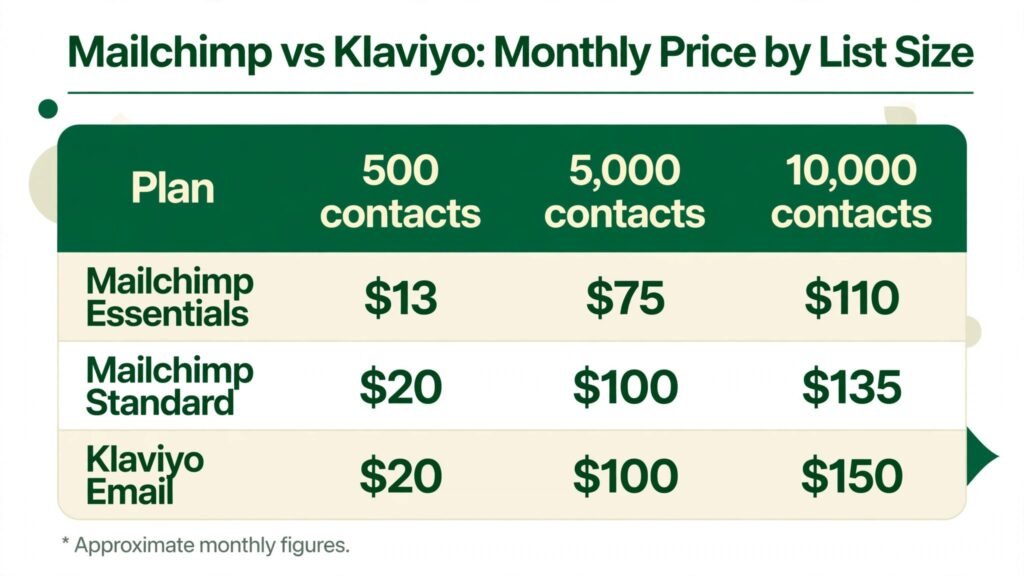
Prices quoted here reflect publicly listed October 2026 figures, and you should check checkout before you commit, because both vendors price by contact or profile count and rates change as your list grows. At 500 contacts, Mailchimp Essentials is commonly listed at about $13 a month and Standard at about $20, while Klaviyo email is commonly listed at about $20 a month. At 5,000 contacts, both Mailchimp Standard and Klaviyo sit around $100 a month in common listings, and at 10,000 contacts Klaviyo is around $150 while Mailchimp Standard is around $135 and Premium is far higher. The lesson is that small list pricing favours Mailchimp, mid list pricing is close, and the real cost difference comes from what each platform counts, what each plan unlocks, and how much revenue each automation actually generates.
The Core Difference in One Idea
Mailchimp thinks in audiences and campaigns. You build a list, design a campaign, send it, and look at opens and clicks. That model fits newsletters, announcements, events and service businesses, where the goal is to stay in touch and drive a clear action. Klaviyo thinks in customer profiles and behaviour. Every order, product view, cart event and purchase builds a richer profile, and flows trigger from that behaviour without you having to send a manual campaign each time. That model fits ecommerce, where the goal is to recover carts, win back lapsed buyers, recommend the next product and grow customer lifetime value.
That difference explains almost every other difference in this guide. Mailchimp is easier to learn because its model is simpler. Klaviyo is more powerful for stores because its model is built around buying behaviour. A business that picks the wrong model will feel it in daily work: a store on Mailchimp will build workarounds for segmentation and revenue tracking, while a newsletter on Klaviyo will pay for depth it never uses and face a steeper setup.
How This Guide Tests Them
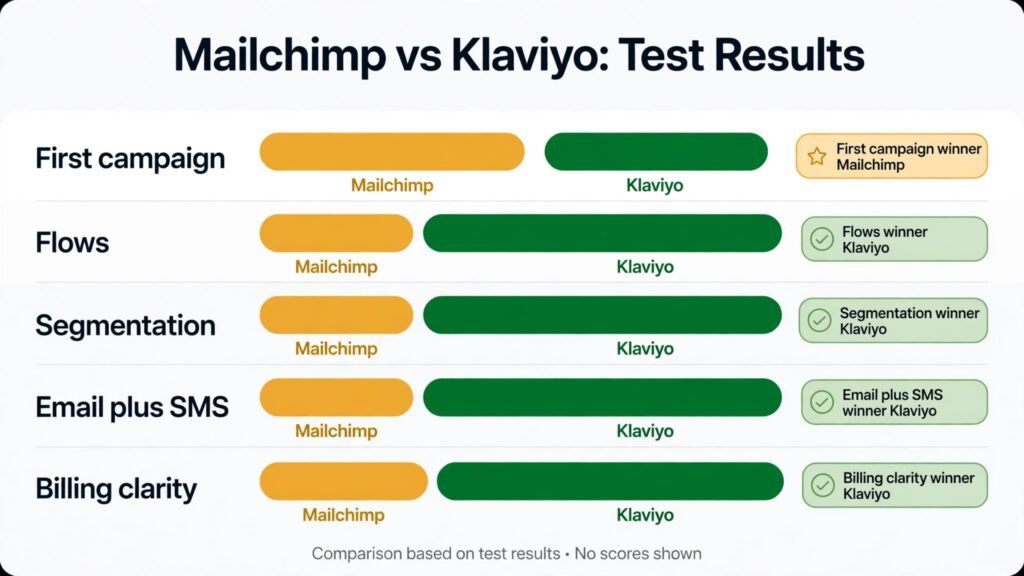
We tested both platforms on the jobs that decide email value: building a list cleanly, designing a campaign fast, setting up the flows that earn money while you sleep, segmenting by real behaviour, adding SMS without breaking trust, reporting revenue honestly, and keeping the bill fair as the list grows. Each test below ends with a verdict, and the pricing section shows the same list sizes on both platforms so you can compare like with like. We also looked at deliverability habits, because a beautiful campaign that lands in spam or promotions with no engagement is not a marketing asset, it is a cost.
We did not judge on template count alone. A template library matters for a beginner, but after a month most businesses reuse a small set of proven templates, and the value shifts to flows, segmentation, testing and reporting. If you are choosing for the long term, weight the automation and data tests more heavily than the first campaign test, because the first campaign is one day and the flows run every day.
Mailchimp in Depth: Easy, Familiar and Broad
Mailchimp remains the easiest on ramp to email marketing for a general business. The editor is visual, templates cover common needs, signup forms and landing pages are quick to set up, and a new user can send a first newsletter within an hour without training. For a consultant, a creator, a restaurant, a service business or a nonprofit, that speed matters, because email is one job among many, not a full time discipline. Mailchimp also covers more than email: it includes landing pages, social posting tools, basic CRM style contacts, surveys and reporting in one account, which suits a small team that wants one tool for many small jobs.
Mailchimp AI help includes content generation, subject line suggestions and send time optimisation on higher plans, and those features genuinely speed up campaign creation for a solo sender. The platform also has a long history, a large help library and many integrations, so a small business can connect a website, a booking tool or a store without hiring a specialist. For a business that sends a weekly newsletter and occasional promotions, Mailchimp is often all the email tool it will ever need, and paying for more depth would be wasteful.
The limits appear when a store grows. Segmentation on lower plans is simpler, advanced automations and predictive tools sit on Standard and Premium, and revenue attribution for a store is less deep than Klaviyo. A store that wants flows based on detailed purchase history, predicted lifetime value, churn risk and product affinity will find Mailchimp workable but less precise, and will spend more time building segments by hand. Mailchimp also counts contacts in a way that can surprise owners, because unsubscribed and non subscribed contacts can count toward billing until they are archived or deleted, so list hygiene becomes a billing task, not just a deliverability task.
Mailchimp Pricing, Best For and Watch Outs
Mailchimp offers a free plan with limited contacts and sends, which suits a very small list testing email for the first time. Essentials at about $13 a month for 500 contacts adds more sends, A/B testing and basic automations, Standard at about $20 a month for 500 contacts adds advanced automations, behavioural targeting, send time optimisation and predictive segmentation, and Premium is a much higher tier for large senders that need advanced segmentation, phone support and onboarding. At 5,000 contacts, Essentials is commonly listed around $75 a month and Standard around $100, while at 10,000 contacts Essentials is around $110 and Standard around $135. Check checkout for your exact contact count, because Mailchimp pricing steps up in bands and a few hundred extra contacts can move you to the next band.
Mailchimp is best for newsletters, creators, consultants, service businesses, restaurants, nonprofits and small stores with simple email needs. It is also the better choice for a team that sends campaigns rather than managing complex flows, and for a business that wants one familiar tool for email, landing pages and basic audience management. Watch out for billing counts: archive unsubscribed and inactive contacts regularly, and review audience settings, because paying for contacts you cannot email is a common waste. Watch out also for feature gating: if you need advanced automations and predictive tools, price Standard or Premium from the start, not Essentials, because upgrading later after building on a limited plan creates rework.
Klaviyo in Depth: Built for Stores That Live on Repeat Orders
Klaviyo is built around one question: what did this customer do, and what should happen next. When a shopper views a product, abandons a cart, buys for the first time, buys again, or goes quiet for ninety days, Klaviyo can trigger a flow, update a segment and personalise the next message without manual work. That behaviour first design is why Shopify and WooCommerce stores adopt Klaviyo at scale, and why its dashboards report revenue per flow, per campaign and per segment in a way that a store owner can act on. If email is a revenue channel rather than a newsletter, that reporting changes budgeting decisions.
Segmentation is where Klaviyo pulls away. You can build segments from orders, product categories, purchase frequency, average order value, predicted lifetime value, churn risk, browsing behaviour and engagement, and combine those conditions without exporting data to a spreadsheet. Predictive analytics, including customer lifetime value and next order date estimates where eligibility rules are met, help a store focus on buyers most likely to return, rather than blasting the whole list with the same offer. That precision also protects deliverability, because engaged segments get more relevant mail and unengaged contacts can be suppressed or win back tested separately.
SMS is the other major Klaviyo strength. Email and SMS live in the same profile, so a store can send an email first, follow with a text for high intent buyers, and measure combined revenue without stitching two tools together. SMS costs are separate and billed by message credits, so a store must price SMS volume carefully, and compliance matters: consent, opt out handling and quiet hours are not optional extras. Done well, SMS can lift cart recovery and launch revenue. Done carelessly, it can annoy customers and damage a brand faster than email ever could.
Klaviyo Pricing, Best For and Watch Outs
Klaviyo offers a free plan with up to 250 active profiles and a limited monthly send allowance, which is enough to test flows and build a first segment. Paid email pricing is commonly listed at about $20 a month for 500 profiles, about $60 for 2,500, about $100 for 5,000 and about $150 for 10,000, with all features included on paid email plans rather than gated by tier. SMS is billed separately through mobile message credits, and combined email plus SMS plans cost more, so a store that adds SMS should budget for message volume, not just profile count. Check checkout for your exact profile count and for SMS credit pricing in your country, because SMS rates vary by region and carrier.
Klaviyo is best for ecommerce stores on Shopify, WooCommerce and BigCommerce, especially stores with repeat purchases, subscriptions, product launches and seasonal campaigns. It is also strong for brands that rely on flows for welcome, cart recovery, post purchase, winback and VIP treatment. Watch out for profile counting: Klaviyo bills on active profiles, which includes emailable profiles, so cleaning suppressed and unengaged profiles still matters, even though the counting model is cleaner than Mailchimp for many stores. Watch out also for setup time: Klaviyo rewards a proper integration, data check and flow build, and a rushed setup with broken product data will produce weak segments and misleading reports.
Test 1: Send a First Campaign in an Hour
The task was to import a small list, build a newsletter, preview it on mobile, and send it. Mailchimp won on speed and comfort for a beginner, because the editor, templates and checklist feel familiar and the send flow has fewer decisions. Klaviyo also completed the task, but its interface asks more questions about profiles, segments and data, which can slow a first time sender who just wants to announce a sale. Verdict: Mailchimp wins for first campaign speed, Klaviyo wins once the sender has a store integration and reuses segments, because later campaigns start from behaviour rather than a blank list.
Test 2: Flows That Earn While You Sleep
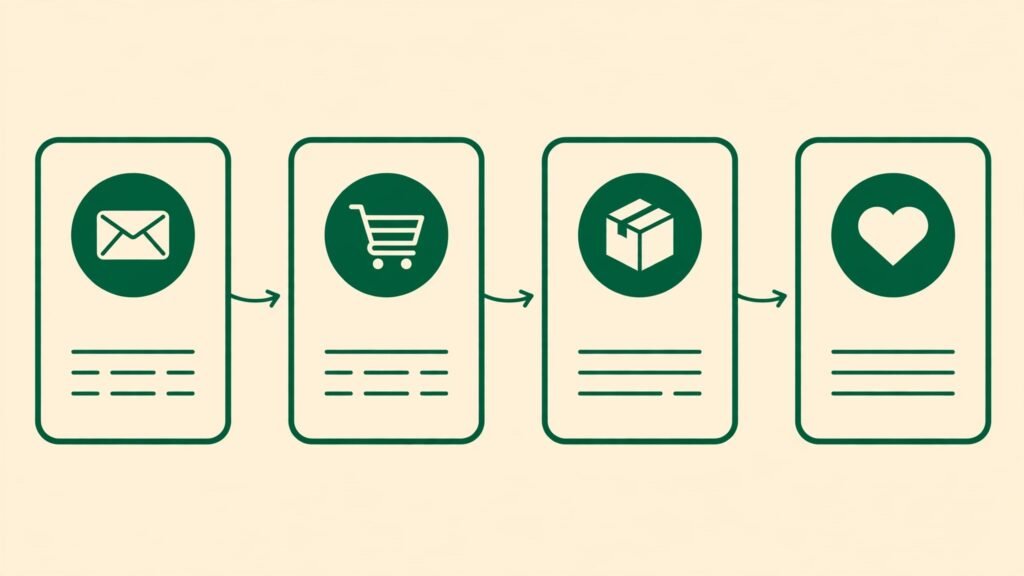
The task was to build a welcome flow, an abandoned cart flow, a post purchase flow and a winback flow, then check revenue reporting after a simulated month. Klaviyo won by a clear margin. Flows were deeper, triggers were tied to real store events, branching by purchase and engagement was easier, and revenue per flow was visible without extra reporting work. Mailchimp customer journeys can cover welcome and basic cart flows, and they are improving, but for a store they felt like a simpler version of the same idea, with less precise triggers and less detailed revenue attribution. Verdict: Klaviyo wins this test, and for a store this test alone often justifies the switch.
Test 3: Segmentation by Real Behaviour
The task was to build five segments: buyers of a specific category in the last ninety days, high value buyers who have not purchased in six months, engaged subscribers who clicked in the last thirty days, first time buyers who need education, and browsers who viewed a product three times without buying. Klaviyo built all five from profile data without exports, and the segments updated as behaviour changed. Mailchimp built the simpler segments well, but the deeper purchase and browsing combinations required more manual work and, on lower plans, hit feature limits. Verdict: Klaviyo wins for behaviour segmentation, Mailchimp is sufficient for list, tag and basic engagement segments.
Test 4: Email Plus SMS as One System
The task was to run a launch where email went first and SMS went only to high intent buyers who had not opened the email, with a single revenue report. Klaviyo won because email and SMS share a profile, consent and reporting, so the team could suppress, sequence and measure without merging reports. Mailchimp SMS is available as a paid add on on higher plans in selected countries, and it can work for simple text campaigns, but it does not match Klaviyo depth for ecommerce sequencing and combined revenue tracking. Verdict: Klaviyo wins for email plus SMS stores, Mailchimp is acceptable for a business that needs occasional texts rather than a sequenced channel.
Test 5: Growing the List Without Growing the Bill Unfairly
The task was to model a list growing from 500 to 10,000 contacts, with twenty percent of contacts becoming unsubscribed or inactive over time. Mailchimp bill grew faster in effective terms, because unsubscribed contacts can still count until archived, so a list that looks like 8,000 reachable contacts can bill like 10,000. Klaviyo bill also grew with profiles, but active profile counting and suppression tools made the effective cost per reachable customer clearer, and the team could see which profiles were actually emailable. Both platforms reward list hygiene, but Mailchimp hygiene is a billing necessity, while Klaviyo hygiene is mainly a deliverability and focus task. Verdict: Klaviyo wins on billing clarity for ageing lists, Mailchimp wins on headline price for a clean small list.
Pricing at 500, 5,000 and 10,000 Contacts
Compare the same list size, and compare the plan that includes the features you need, not just the cheapest plan. At 500 contacts, Mailchimp Essentials at about $13 a month is cheaper than Klaviyo at about $20, but Essentials lacks advanced automations, so a store that needs flows should compare Mailchimp Standard at about $20, which matches Klaviyo on price. At 5,000 contacts, Mailchimp Standard and Klaviyo both sit around $100 a month in common listings, so the decision should turn on features and revenue, not price. At 10,000 contacts, Mailchimp Standard at about $135 is cheaper than Klaviyo at about $150, but Mailchimp Premium for full advanced features is far higher, around $230 in some listings, while Klaviyo includes its full feature set at its listed price.
SMS changes the maths again. A store sending 5,000 texts a month must add SMS credit costs to either platform, and Klaviyo SMS pricing varies by country and message volume, so budget SMS separately and test with a small high intent segment before scaling. Also budget for the hidden cost of a weak flow: a store that saves $20 a month on a cheaper plan but loses two cart recoveries a week has not saved money. Track revenue per flow for a month on any trial, and let that number, not the subscription line, decide the upgrade.
| Area | Mailchimp | Klaviyo |
| Best for | Newsletters, service businesses, general small business | Ecommerce stores, repeat orders, SMS plus email |
| Free plan | Limited contacts and sends | Up to 250 profiles, limited sends |
| Price at 500 contacts | Essentials about $13, Standard about $20 | Email about $20 |
| Price at 5,000 contacts | Essentials about $75, Standard about $100 | Email about $100 |
| Price at 10,000 contacts | Essentials about $110, Standard about $135 | Email about $150 |
| Billing counts | Contacts including unsubscribed until archived | Active profiles |
| Flows | Good for welcome and basic journeys | Deep, behaviour triggered, revenue tracked |
| Segmentation | Good for basic and engagement segments | Deep purchase, browsing and predictive segments |
| SMS | Paid add on, selected countries | Integrated, billed by message credits |
| Learning curve | Low | Medium, setup matters |
A Month of Sending on Each Platform
In week one, Mailchimp feels like a win for a general business. The first newsletter goes out, the report is easy to read, and the team feels productive. Klaviyo week one feels like setup: connect the store, check product data, build segments, test flows, and only then send. That setup week is the reason some stores quit Klaviyo early, and it is a mistake, because the value of Klaviyo arrives in weeks two to four, when flows start recovering carts and winning back buyers without manual campaigns.
By week four, the pattern is clear. A Mailchimp business has sent four newsletters and learned which subject lines work, which is useful, but the work repeats each week. A Klaviyo store has sent fewer manual campaigns, but its welcome, cart, post purchase and winback flows have run every day, and its dashboard shows revenue by flow, so the owner knows which automation deserves more attention. That difference compounds: after six months, the Klaviyo store has a system that earns while the team focuses on product and service, while the Mailchimp business still depends on the next campaign to generate the next sale.
The exception is a business that does not sell online or does not repeat purchase. For a consultant who sends a monthly insight letter, a restaurant that announces a seasonal menu, or a nonprofit that shares impact stories, Mailchimp weekly rhythm is the right rhythm, and Klaviyo depth would sit unused. The month test should therefore ask one question: after thirty days, did the tool create a system, or did it just send mail? Stores need a system. Newsletters need good mail. Choose accordingly.
Mistakes to Avoid With Email Platforms
The first mistake is buying on the smallest list price and ignoring the price at your list size in six months. Model 500, 5,000 and 10,000 contacts before you commit, and include SMS if you plan to use it. The second mistake is never cleaning the list. Archive unsubscribed contacts in Mailchimp, suppress unengaged profiles in Klaviyo, and remove hard bounces promptly, because list hygiene protects deliverability and controls cost on both platforms. The third mistake is sending the same offer to the whole list every time. Segmentation is not a fancy extra, it is the difference between relevant mail that gets opened and bulk mail that gets ignored or marked as spam.
The fourth mistake is building flows and never checking revenue per flow. A flow that looks active but earns nothing should be fixed, paused or replaced, and a flow that earns well deserves more traffic and better creative. The fifth mistake is adding SMS without clear consent and a clear value for the subscriber. Texting a buyer who only agreed to email will damage trust, and a text that only repeats the email adds annoyance without value. The sixth mistake is judging deliverability by open rates alone. Check bounce rates, spam complaints, unsubscribes and placement, and warm up a new sending domain properly, because a platform cannot rescue a sender reputation that list practices have damaged.
Who Should Buy Which Tool
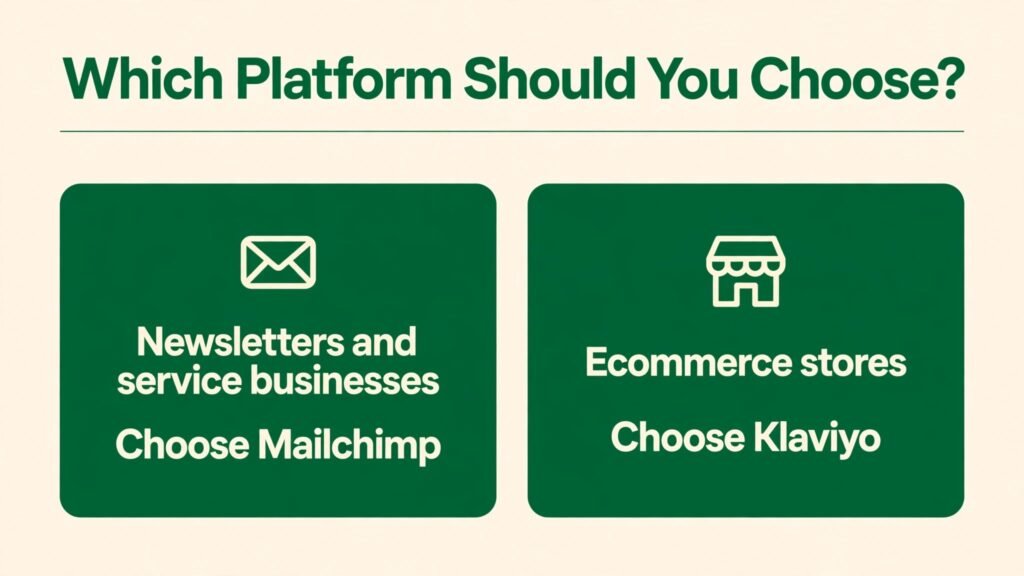
Buy Mailchimp if you send newsletters, run a service business, manage a small shop with simple email needs, or want the easiest start with the lowest small list cost. Buy Klaviyo if you run an ecommerce store, rely on repeat orders, need deep behaviour segmentation, want revenue per flow reporting, or plan to use email and SMS as one system. A store that is growing fast should lean Klaviyo early, because migrating flows, segments and history later is more work than setting Klaviyo up correctly at the start. A business that is unsure should trial Mailchimp for a newsletter and Klaviyo for a store flow, and compare revenue and time, not just interface preference.
For related reading, mailchimp alternatives covers other email tools if you want a wider field, and best AI tools for ecommerce product photos may help with the visual side of store campaigns. If your store also needs a broader marketing system, hubspot alternatives compares CRM led options alongside email specialists.
Before you commit to a yearly plan, run one more check that many buyers skip: send a test campaign to a small engaged segment and review the report line by line, including bounces, unsubscribes, spam complaints and revenue attribution. A platform can look perfect in a demo and still reveal weak reporting or confusing billing once real data flows through it. Also confirm your sending domain setup, including authentication records, because a clean domain reputation protects every campaign you send, no matter which tool you choose. That short test gives you evidence, not just an opinion, for the final decision.
Frequently Asked Questions
Is Mailchimp or Klaviyo cheaper?
Mailchimp is cheaper for a clean small list on Essentials, at about $13 a month for 500 contacts against about $20 for Klaviyo. At 5,000 contacts the prices converge around $100 a month for comparable plans, and at 10,000 contacts the gap depends on which Mailchimp plan you need. Check checkout for your exact contact band.
Which is better for a Shopify store?
Klaviyo is better for most Shopify stores, because its integration, behaviour segments, flows and revenue reporting are built for ecommerce. Mailchimp can work for a small Shopify store with simple needs, but a growing store will usually outgrow its segmentation and flow depth.
Mailchimp is better for most newsletters, because it is easier to set up, cheaper at small sizes, and focused on campaigns rather than store behaviour. A creator or service business that sends regular updates will find Mailchimp faster and simpler.
Does Klaviyo include SMS?
Yes, Klaviyo includes SMS as a separate billed channel, with message credits priced by volume and country, and email plus SMS share a customer profile and reporting. Mailchimp SMS is a paid add on on higher plans in selected countries, so check availability and pricing before planning a text programme.
Can I migrate from Mailchimp to Klaviyo later?
Yes, lists, segments and templates can be migrated, but flows must be rebuilt in Klaviyo, and history and engagement data need careful mapping. A store that expects to need Klaviyo depth within a year should start there, because migration work grows with list size and flow count.
Which tool is easier for beginners?
Mailchimp is easier for beginners who want to send campaigns quickly. Klaviyo takes longer to set up correctly, especially for a store, but that setup pays back through automated flows and deeper segments once the integration is clean.
How do I keep email costs down on either platform?
Clean your list regularly, archive or suppress contacts you cannot email, segment by engagement so you send fewer irrelevant messages, and review your contact band before a large import. Small hygiene habits can keep you on a lower tier for months and improve deliverability at the same time.
The Final Pick: Mailchimp vs Klaviyo
For a newsletter or a service business, Mailchimp wins on ease, familiarity and small list price. For an ecommerce store, Klaviyo wins on flows, segmentation, SMS integration and revenue reporting, and that win grows as the store grows. If you sell online and email must earn money, choose Klaviyo and invest a proper week in setup, because a well built flow system will repay that week many times over. If you send mail to stay in touch and drive occasional action, choose Mailchimp and keep the system simple, because the best email tool is the one your team actually uses every week, not the one with the longest feature list.