
Remote brainstorming usually fails for a plain reason. One or two confident voices fill the call, quieter people stop contributing, and the meeting ends with a long list of notes and no decision anyone can remember the next morning. The board looks busy, the chat looks active, and yet nothing moves. If that pattern sounds familiar, the problem is rarely a lack of creativity on your team. It is a lack of structure. When you use Miro for remote brainstorming with a clear frame, silent thinking time, a voting rule, and a written decision, the same group produces fewer ideas that matter more, and leaves with owners and dates instead of a vague promise to follow up.
This guide gives you that structure. You will learn how to set up a board that guides people without a long explanation, how to run a 60 minute session that protects thinking time, how to vote in a way that surfaces priorities instead of popularity, and how to turn winning ideas into action items your project tool can actually track. It also covers Miro pricing, the limits that catch teams out, the mistakes that turn a board into clutter, and a copy-ready session template you can reuse for product ideas, marketing campaigns, process fixes, and team planning.
Prices quoted here reflect publicly listed figures from late 2026, so check the checkout page before you pay, because Miro changes plan details more often than most teams expect.
Why Remote Brainstorming Goes Wrong Without a Board
A video call alone is a poor place to brainstorm. People cannot think and listen at the same time, so the first idea spoken tends to anchor the whole discussion. Someone with a strong opinion shapes the direction before quieter colleagues have finished forming a thought. Time pressure makes it worse. When the facilitator asks for ideas out loud, the group hears three or four suggestions, discusses the first one for ten minutes, and runs out of time before the better ideas surface.
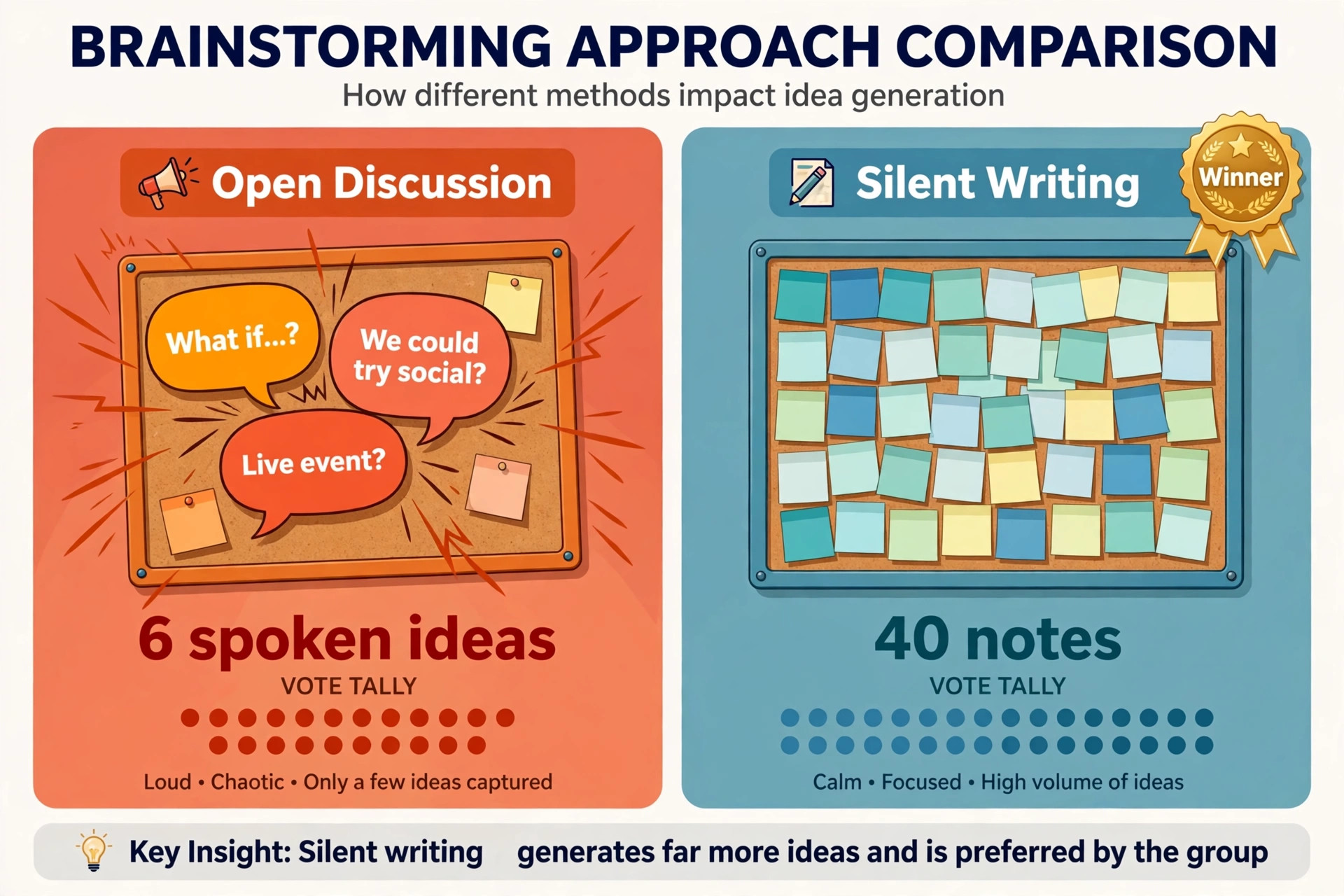
A shared board changes the physics of the meeting. That parallel writing is the reason teams that use Miro for remote brainstorming start with silent writing rather than open debate. Everyone writes at the same time, in the same place, without waiting for a turn to speak. That parallel writing matters more than any single Miro feature. In a ten minute silent block, eight people can produce forty notes. In ten minutes of open discussion, the same group might produce six spoken ideas, and two of them will dominate the rest of the hour. The board also leaves a record.
Spoken ideas vanish when the call ends, but sticky notes stay grouped, voted on, and linked to decisions, so a person who missed the call can still see what was chosen and why.
There is a second, less obvious benefit. A board forces the facilitator to define the question before the session starts. A vague prompt such as “ideas for growth” produces vague notes. A framed prompt such as “ways to cut onboarding time for new trial users in the first seven days” produces notes a team can test. Miro does not fix a bad question, but building the board forces you to write the question down, add examples of the kind of answer you want, and decide in advance how the group will choose. That preparation is half the value of the session, and it happens before anyone joins the call.
How to use Miro for remote brainstorming in a 60 minute session
A 60 minute session works because it is long enough for real thinking and short enough to protect attention. Longer sessions rarely produce better ideas. They produce fatigue, repetition, and a board so crowded that voting becomes a chore. If your topic genuinely needs more time, run two 60 minute sessions on different days rather than one two hour marathon. The gap between sessions lets people reflect, and the second session starts from grouped themes instead of a blank board.
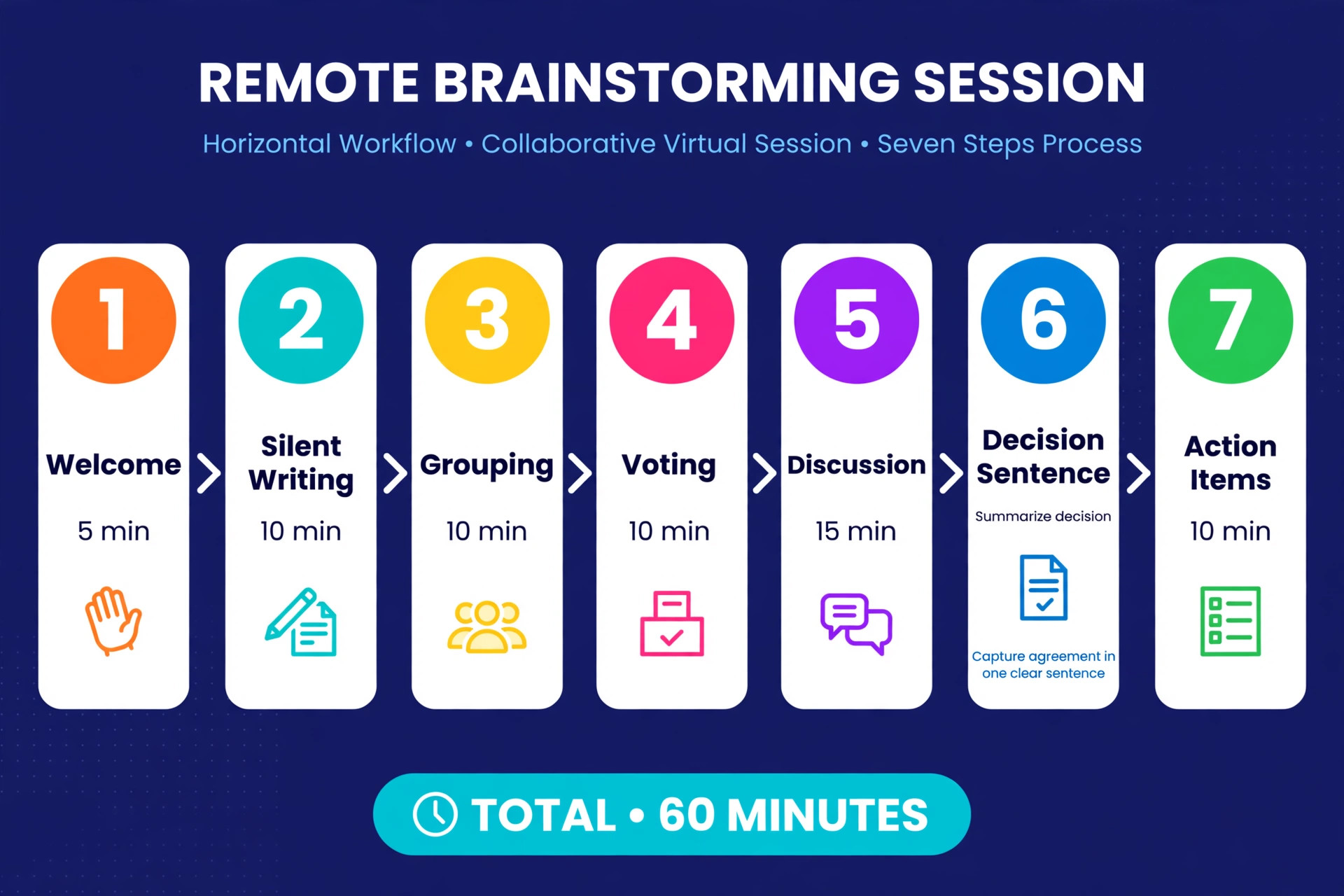
The agenda below is the backbone of this guide, and the template section later turns it into a board you can copy. Five minutes open the session. The facilitator states the problem in one sentence, the decision the group must reach, and the rules for the hour. Ten minutes follow for silent individual writing, with the timer visible and cameras optional. Ten minutes go to grouping, where the facilitator clusters similar notes and asks short clarification questions only. Ten minutes go to voting, using the workflow detailed later in this guide. Fifteen minutes go to discussion of the top voted clusters, and the facilitator writes a decision sentence for each one.
The final ten minutes convert decisions into action items, with one owner and one date per item, and a short recap of what happens next.
That split is deliberate. Discussion gets less time than most facilitators expect, because discussion without a vote tends to reward the loudest argument rather than the strongest idea. Voting comes before long discussion, so the group debates only the ideas that already earned support. If a low voted idea deserves a hearing, the facilitator can still raise it, but the group does so knowingly, as an exception, not by accident. Keep the timer visible for every block. When the timer ends, move on, even if one cluster feels unfinished. An unfinished cluster can become a follow-up task. A session that overruns its first block will overrun every block after it.
Build the Board Before Anyone Joins
A good brainstorming board has six frames, laid out left to right in the order the session will use them. Frame one holds the problem statement, the decision to be made, and the agenda. Frame two holds the warm-up or context, such as two or three facts the group needs before writing ideas. Frame three is the idea space, an open area with a clear instruction and a colour rule. Frame four is the grouping area, where clusters form. In practice many facilitators group inside the idea space itself, but a separate grouping frame keeps the original notes intact and makes the move from raw ideas to themes visible.
Frame five is the voting area, containing only the clustered themes, not every raw note. Frame six holds decisions and action items.
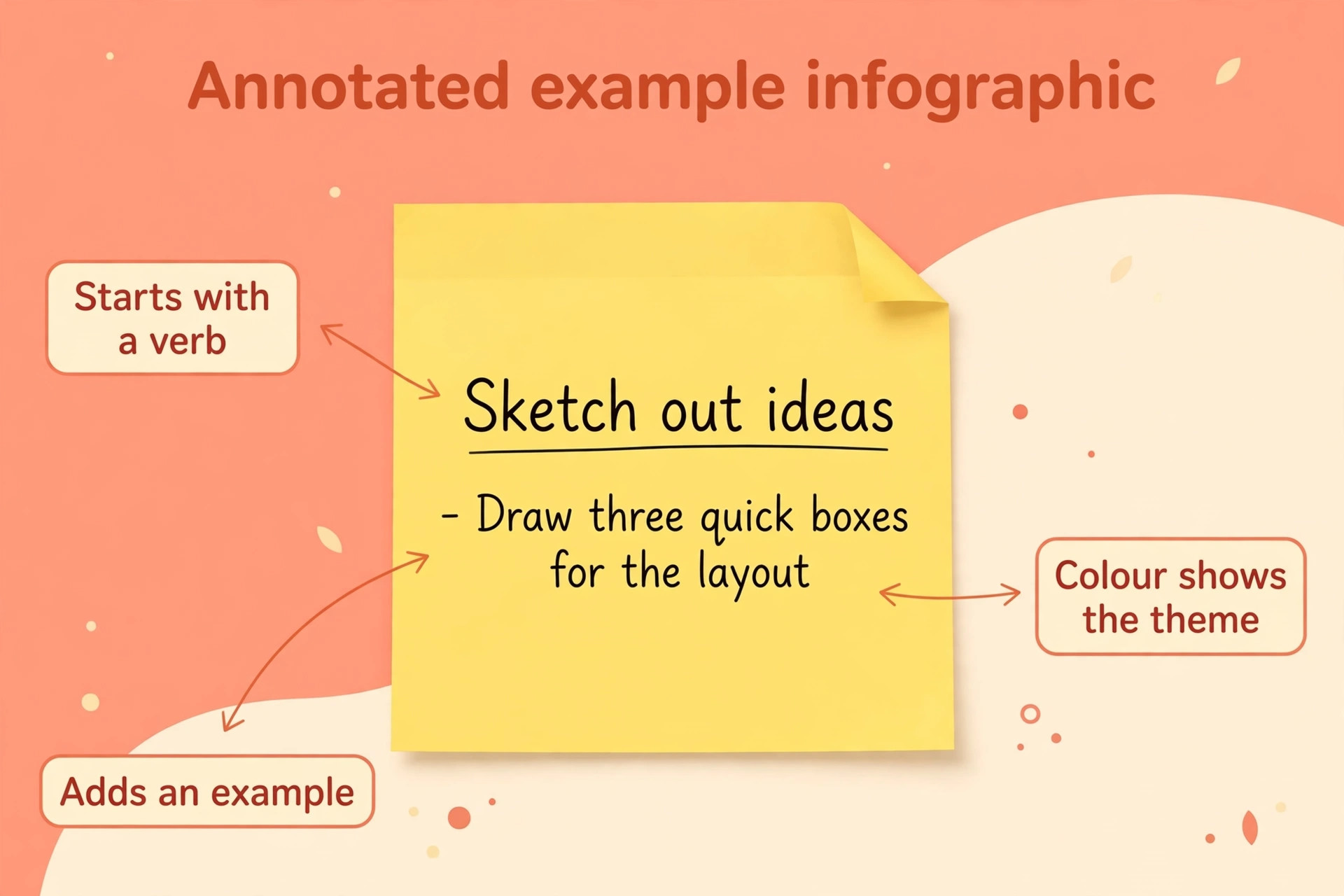
Write instructions as actions, not labels. A frame titled “Discussion” tells people nothing. A frame titled with the sentence “Add one sticky note per customer complaint you heard this month” tells people exactly what to do. The same applies to the idea frame. Replace a generic heading with the prompt, the format, and an example. For instance, write “Write one idea per note, start with a verb, and add one example note in yellow so people can copy the format.” One example note prevents twenty minutes of confusion about how detailed a note should be.
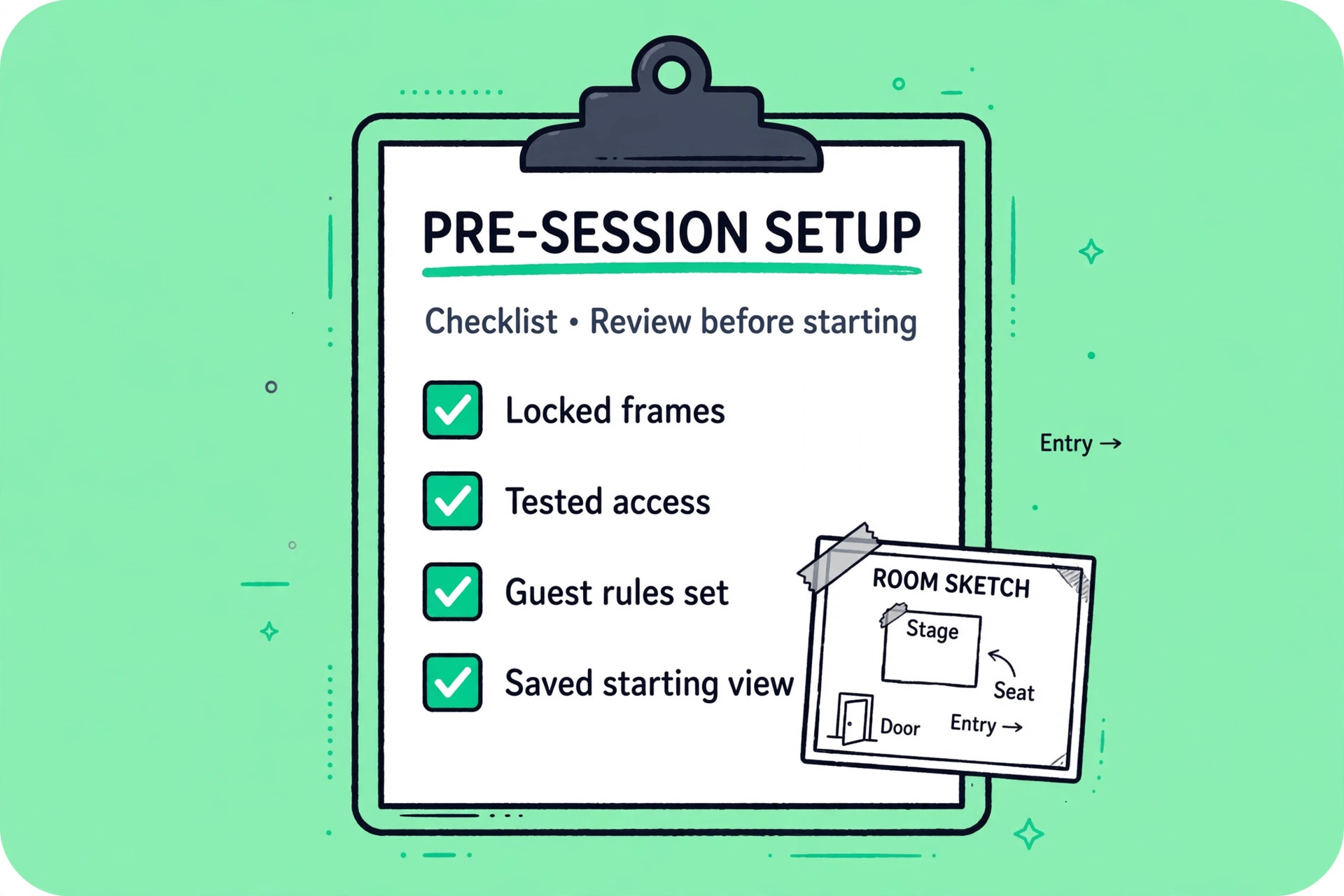
When you use Miro for remote brainstorming, lock everything except the writing areas. Miro lets you lock frames, headings, instructions, and example notes so participants cannot drag them by accident. A single accidental drag can move the agenda off screen and cost five minutes of confused searching. Locking takes two minutes during setup and saves that disruption every time. Also set the starting view to frame one, so everyone lands on the problem statement rather than a random corner of a large board. Test the board with one colleague before the live session. Ask that person to add a note, move it, and vote, and fix anything that confuses them.
A five minute test catches broken permissions, missing voting access, and unclear instructions before they affect eight people at once.
Set Permissions, Guests, and Access Without Surprises
Access is where remote sessions most often stall in the first five minutes. Someone cannot edit, someone else can see the board but cannot vote, and the facilitator spends the opening block fixing permissions instead of framing the problem. Decide access before invitations go out. Board editors can add notes, move items, and vote. Viewers can watch but cannot contribute, which defeats the purpose of a brainstorming session. Commenters sit in between, and they are useful for stakeholders who should react without rearranging the board.
For guests from outside your organisation, check your plan before you use Miro for remote brainstorming with clients or contractors. Guest editing is a paid plan feature in Miro, and the exact guest rules differ by tier, so confirm what your plan allows before you invite clients or contractors as editors. A common workaround is to keep external guests as commenters and let an internal facilitator move their suggestions onto the board, but that workaround slows the session and should be a deliberate choice, not a discovery mid-call. Send the board link with the calendar invite, not five minutes before the session, and ask participants to open it once in advance.
That single request reveals access problems while there is still time to fix them.
Finally, plan for people who cannot attend live. Miro boards support async contribution, and a well built board lets absent colleagues add notes before the session and read decisions after it. Set a clear async window, such as notes accepted until one hour before the live session, and state whether async notes will be voted on with live notes or reviewed separately. Async input widens the idea pool, especially across time zones, but only if the rules are clear. Notes added after voting, with no owner and no decision attached, become board clutter rather than contribution.
The Session Template You Can Copy for Every Topic
The template below is the overview-proof element of this guide, a session plan you can copy onto any board and adapt to product, marketing, operations, or planning topics. It has seven parts, and each part names its frame, its time, its facilitator action, and its participant output. Copy the structure, then change only the problem statement, the prompt, and the voting rule to fit your topic. Keeping the structure stable across sessions is a feature, not a weakness. Returning participants learn the rhythm, spend less time learning the board, and spend more time thinking.
Part one is the welcome frame, five minutes. The facilitator states the problem in one sentence, the decision the group must reach, and the rule that every idea gets written before it gets judged. Participant output is one check-in note per person, a single sentence on what success looks like for this topic. The facilitator also shows two or three facts, such as a customer complaint count, a conversion rate, or a deadline.
Part three is silent writing, ten minutes. The facilitator starts the timer, turns on private mode if the group needs it, and stays quiet. Participants write one idea per note, aiming for five to eight notes each. Private mode hides notes until the facilitator reveals them, which reduces anchoring, because early notes cannot steer later ones. Use private mode for sensitive topics, such as process problems or team feedback, and for groups where senior voices tend to dominate. For light topics, open writing is faster and creates energy as notes appear in real time.
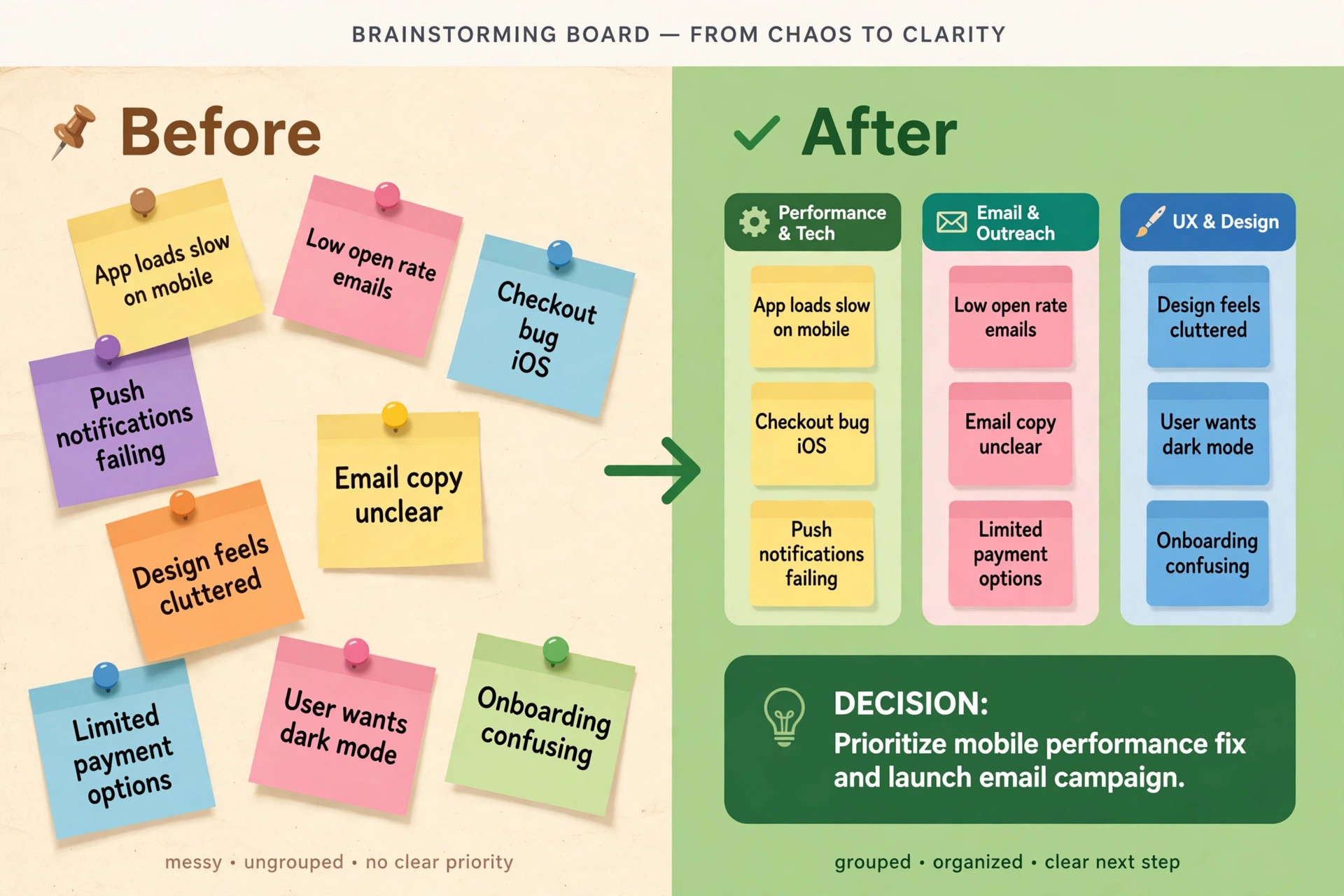
Part four is grouping, ten minutes. The facilitator reveals notes, drags duplicates together, and asks only neutral clarification questions, such as what a note means or what example sits behind it. Participants correct misgrouped notes and suggest short theme labels in plain words. Do not debate merit during grouping. A note that looks weak may belong to a strong theme, and judging it early kills the theme before it forms.
Part five is the voting workflow, ten minutes, and it is the step teams that use Miro for remote brainstorming most often rush. Part six is decision discussion, fifteen minutes, where the group discusses only the top voted clusters and writes one decision sentence per cluster. Part seven is action items, ten minutes, where each decision becomes a card with an owner, a date, and a next step, as detailed later in this guide. End the session by reading the decisions aloud and stating what happens next, who sends the summary, and when the group reviews progress. A session that ends with a recap feels finished.
A session that ends when the timer runs out feels abandoned, even if the board is full.
The Voting Workflow That Turns Ideas Into Priorities
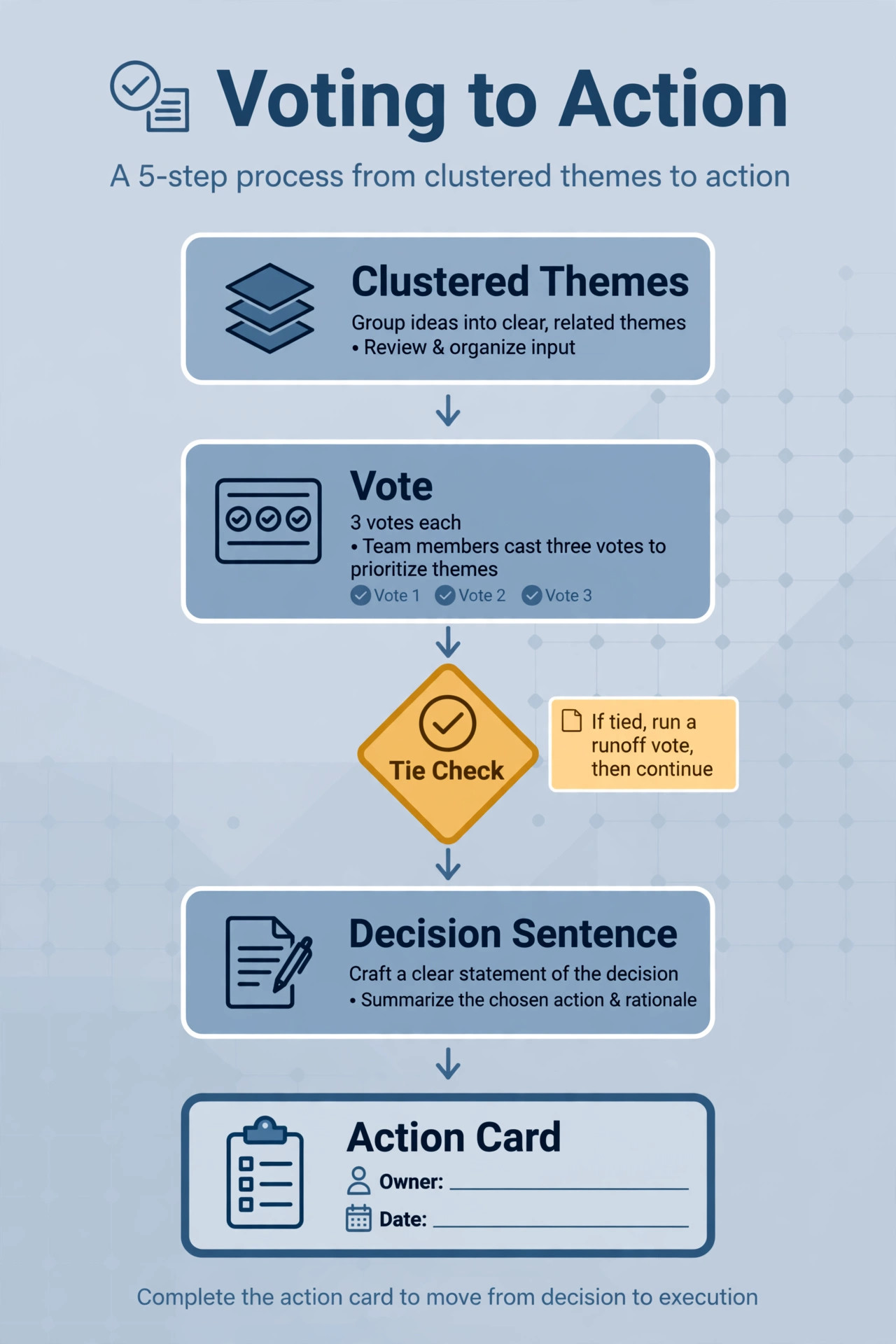
Voting is the step that most teams rush when they use Miro for remote brainstorming, and rushing it is why brainstorming so often ends in a tie or a polite compromise that pleases nobody. A good voting workflow has four decisions made before voting opens. How many votes does each person get. Whether votes can be stacked on one item or spread across items. What the voting area contains. And what happens to the result. Announce all four before anyone votes, because changing the rules after votes appear looks unfair, even when the change is innocent.
Start with the voting area. Vote on clustered themes, not on every raw note. A board with eighty raw notes and three votes per person produces scattered votes and no clear winner, because similar ideas split the vote. A board with eight to twelve themes and three votes per person produces a readable ranking. If you have more than twelve themes, merge further or run a first vote to cut the list, then a second vote on the survivors. The extra round takes five minutes and saves a muddled result.
Give each person three votes for a typical session, and allow stacking. Three votes force a choice without forcing false precision. Five or more votes let people vote for everything they mildly like, which flattens the ranking. One vote each forces an early winner but hides second choices that might be easier to deliver. Stacking, placing all three votes on one theme, lets a person signal strong conviction, which matters when a theme needs a champion to survive discussion. Miro voting lets the facilitator set the number of votes per person and the voting area, and results can be shown as counts on each item.
Announce whether results are anonymous or visible, and keep that choice consistent, because visible votes can pull later voters toward early leaders.
Run voting in silence, with a timer, and do not discuss while votes are being placed. Discussion during voting turns the vote into a debate, and the people who speak first influence the people still deciding. When the timer ends, reveal the ranking, and read the top three themes aloud. Then state the rule that a vote is not a decision. The group still needs to write a decision sentence for each selected theme, name an owner, and agree what done looks like. That sentence is what prevents the common failure where a team votes for “improve onboarding” and nobody knows whether that means a new email sequence, a product tour, or a pricing change. A vote ranks themes.
A decision sentence commits the team to a specific action.
Turn Winning Ideas Into Action Items That Survive the Call
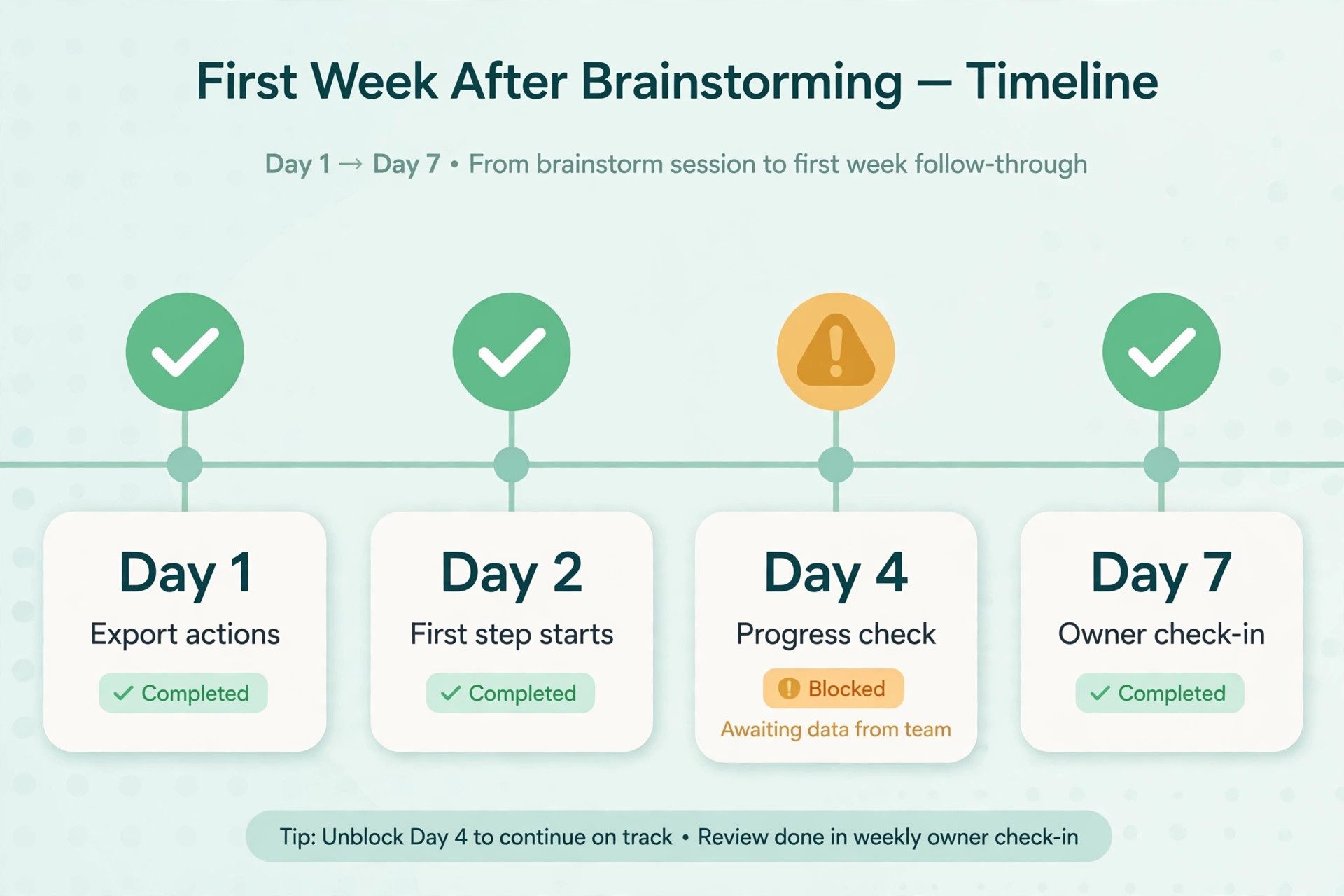
The gap between a good session and a good outcome is almost always the handoff. A board full of voted themes means nothing if the actions live only on the board, where nobody checks them after the call. Convert each decision into a card on the action frame, with five fields. The decision sentence. The owner, one person, not a team. The due date. The first next step, small enough to start within two working days. And the measure of done, one sentence that says how the group will know the action worked.
One owner per action is a rule worth defending. Shared ownership usually means no ownership, because each person assumes the other will start. If two people must collaborate, name one owner and one contributor, and write both names on the card. The owner is accountable for progress. The contributor helps. That distinction prevents the familiar status update where everyone reports that someone else was supposed to begin.
Due dates should be real dates, not “next week” or “soon”. A date forces a conversation about capacity, and it gives the follow-up review something to check. If an action genuinely cannot start for a month, write that date and the reason, such as waiting for a budget decision, rather than leaving the card undated. Undated cards accumulate on boards and teach the team that action items are optional. A dated card with a blocker is honest. An undated card is a wish.
Teams that use Miro for remote brainstorming should export actions to the tool where work already lives. Miro integrates with project tools such as Asana, Jira, and Trello, and a card can become a task with its owner and date carried across. If your team does not use an integration, copy the action list into that tool manually before the day ends, and link back to the board from the task. The board remains the record of why the decision was made. The project tool becomes the place where progress is tracked. Keeping actions only on the board works for a week, then fails, because boards are for thinking, and task tools are for tracking.
The link between them is what makes both useful.
Miro Pricing and How to Choose a Plan for Brainstorming
Miro pricing is simple at the top level and easy to misread in the details, so price the plan by the features your sessions actually need, not by the headline rate. The free plan costs nothing and includes three editable boards, which is enough to test a session format with a small group, but not enough to run a team that brainstorms weekly, because each new session either reuses a board or consumes one of the three. The Starter plan is listed at about 8 dollars per member per month on annual billing, or about 10 dollars on monthly billing, with unlimited boards, private boards, and timer and voting tools.
For most small teams that use Miro for remote brainstorming weekly, Starter is the right starting point, because it removes the board limit that blocks regular sessions.
The Business plan is listed at about 20 dollars per member per month on annual billing, or about 25 dollars on monthly billing, and adds unlimited workspaces, guest access, single sign-on, advanced integrations, and higher AI credit allowances. The jump from Starter to Business is large, so do not buy Business for brainstorming alone unless you need one of its specific features. The features that most often justify Business are guest editing for regular external collaborators, single sign-on for company security policy, and advanced integrations that move actions into other tools automatically. If none of those apply, Starter plus a manual export of action items is cheaper and works well.
Enterprise pricing is quoted on request. For a team of ten, the annual maths is straightforward. Starter at about 8 dollars per member per month costs about 80 dollars per month, or about 960 dollars per year, before taxes and any changes at checkout. Business at about 20 dollars costs about 200 dollars per month, or about 2,400 dollars per year, for the same ten people. That gap of about 1,440 dollars per year should buy a specific capability, not a vague sense of being on a better plan.
Watch the seat rules before you invite widely. Miro bills per member, and members are people with full editing access, while visitors and guests follow different rules by plan. A team that invites every stakeholder as a member will pay for seats that are used once a quarter. A tighter rule works better. Give paid seats to regular facilitators and contributors, use guest or visitor access where your plan allows for occasional participants, and review the member list before renewal. Removing a member often takes effect at renewal rather than immediately, so a seat audit a month before renewal saves more than an audit after the bill arrives.
Mistakes That Turn a Miro Board Into Clutter
The first mistake is starting with a blank board and a vague question. A blank board invites the group to spend the first fifteen minutes deciding what the session is about, and the notes that follow reflect that confusion. Always start with a written problem, a decision to be made, and one example note. The second mistake teams make when they use Miro for remote brainstorming is letting discussion replace voting. Discussion feels productive, but without a vote it rewards confidence over quality, and the session ends with the ideas of the people who spoke most, not the ideas the group actually preferred.
The third mistake is voting on raw notes instead of themes. Raw note voting splits support across similar ideas and produces a winner that nobody strongly supports. Group first, vote second, every time. The fourth mistake is skipping the decision sentence. A voted theme without a decision sentence is still just a topic, and the action items that follow it will be vague. Write the sentence during the session, while the discussion is fresh, not after the call, when the reasoning has faded.
The fifth mistake is assigning actions to teams instead of people, or leaving actions without dates. Both errors look harmless on the day and kill follow-through within a week. The sixth mistake is inviting too many people. A brainstorming session with twenty participants produces a crowded board and a voting result that nobody owns. For large groups, split into breakout frames with a shared voting area, or run parallel sessions and bring the top themes together for a final vote. Eight to twelve participants is a strong size for a single board. Beyond that, structure matters more than enthusiasm.
The seventh mistake is treating Miro AI as a replacement for facilitation. AI clustering, summaries, and idea suggestions can speed up grouping and recap, but they cannot decide what matters to your customers, your budget, or your deadline. Use AI to draft a summary, then correct it by hand before sharing it. Use AI to suggest missing angles, then let the group judge whether those angles fit the problem. A board that reads like an AI summary, with generic themes and no specific customer detail, will not survive contact with real work, because the team will not recognise its own thinking in it.
For related reading, the guide to best AI tools for project managers helps you move action items into a tracking tool after the session, and asana vs monday compares two common homes for those actions. If your sessions also need strong meeting notes, best AI meeting notes tools covers transcription options that pair well with a Miro board.
Frequently Asked Questions
Can I run a good session on the Miro free plan?
Yes, for a small group and a single session, because the free plan includes core board tools and three editable boards. The limit appears when you run sessions regularly, because you will either reuse boards, which mixes old notes with new ones, or run out of editable boards. Starter removes that limit and adds private boards, timer and voting tools, which is why most regular facilitators upgrade.
How many people should join one brainstorming board?
Eight to twelve participants works well for a single board, because everyone can write, vote, and discuss without crowding the discussion. Below four people, a shared document may be faster. Above twelve, split the group into breakout frames or parallel sessions, then bring the top themes together for a final vote, so the board stays readable and the ranking stays meaningful.
Should voting be anonymous or visible?
Anonymous voting usually produces a more honest ranking, especially when senior people join the session, because participants rank ideas without worrying about who wrote them. Visible voting can help in small, trusting teams, where seeing who supports a theme helps find a champion for it. Choose one approach, state it before voting, and keep it consistent for that session.
How many votes should each person get?
Three votes per person works well for a board with eight to twelve themes, because it forces a choice without forcing false precision. Allow stacking, so a person can place all three votes on one theme to signal strong support. If you have more than twelve themes, vote once to narrow the list, then vote again on the survivors, rather than giving everyone more votes to spread thinly.
What happens if voting ends in a tie?
Use a rule stated before voting, not a debate after it. Give the facilitator a casting choice, or run a thirty second runoff vote between the tied themes only, then record the result on the board. Either rule works, provided the group knows it in advance. Without a tie rule, a tie can consume the discussion time meant for the themes that already won.
How do I stop action items from dying after the session?
Give each action one owner, one date, and one first step that can start within two working days, then export the actions to the project tool where work already lives. Schedule a fifteen minute check-in one week later with the action frame open, and review progress there. Actions that live only on the board, without an owner and a date, rarely survive the week after the call.
The Board Is Only Half the Session
A Miro board will not make a team creative on its own. What it does, when the session is framed well, is give creativity a fair process. Silent writing gives quiet people the same starting weight as confident speakers. Grouping turns scattered notes into themes the group can judge. Voting turns preference into a ranking the group can defend. Decision sentences turn a ranking into a commitment. Action items, with owners and dates, turn a commitment into work that can be checked a week later. Each step is small, and together they are the difference between a lively call and a useful one.
Start with the next session you already have planned, not with a perfect template library. Build six frames, write one clear problem sentence, add one example note, lock the instructions, and run the 60 minute agenda exactly as written here. Vote before you discuss, write decision sentences during the session, and export actions before the day ends. After two sessions, adjust the timing to fit your group, keep the structure, and let returning participants learn the rhythm. That rhythm is the real asset. A team that trusts the process will bring better ideas to the board, because people contribute more when they know their notes will be read, ranked fairly, and turned into work.
That trust is built one well run session at a time, and Miro, used this way, is simply the board that makes that trust visible.