
Your voice is competing with a fan, a keyboard, traffic outside the window, a washing machine in the next room, or a colleague talking two desks away. That is the real problem behind the search for the best microphone for a noisy room. Most roundups ignore it. They rank microphones by sound quality in a quiet studio, then assume the winner will somehow stay clean in your living room. It will not. A microphone that sounds airy in a treated room can sound worse in a noisy room than a cheaper dynamic microphone, because it hears everything, including the room itself.
This guide takes a different route. It starts with your room and your noise, then gives a verdict for that situation, and it names the picks it rejects and why. You will learn why a dynamic cardioid microphone usually wins in a noisy space, how close you need to sit, what software can and cannot fix, and how much each realistic setup costs in total. Prices here are ranges seen in current retail listings in October 2026. Check the price at checkout before you buy, because prices move with sales and bundles, and the total changes once you add a boom arm, a cable or an audio interface.
The Short Verdict by Situation
For a typical home office with a fan, keyboard noise and thin walls, buy the Shure MV7+. It is a dynamic microphone with USB-C and XLR outputs, onboard denoising and auto level control, and it works without an audio interface. For a tighter budget, buy the Samson Q2U. It is also dynamic and dual output, it costs far less, and it gets the most important thing right, which is close, directional pickup.
For a dedicated podcast studio where you already own a strong audio interface, buy the Shure SM7B, but only if you can feed it enough clean gain. For a room with loud, unpredictable noise such as children, pets, a television in the next room or street noise through a window, no microphone alone will save the recording. In that case, change the recording time, close the door, move closer, and use a dynamic microphone plus a noise gate and light denoising together. That is why the best microphone for a noisy room is a situation choice, not a single winner for every room. That short list is deliberately narrow.
It does not include a popular condenser microphone, and that omission is the point. In a quiet room, condenser sensitivity gives you detail and air. In a noisy room, it gives you the fridge, the street and the echo off bare walls.
Why a Noisy Room Punishes the Wrong Microphone
A microphone does not know which sound you want. It converts every pressure change that reaches its capsule into signal. What it can do is favour sound from one direction, favour sound that is close, and respond less to sound that is far away or off to the side. Those three properties matter more in a noisy room than brand or a famous studio pedigree.
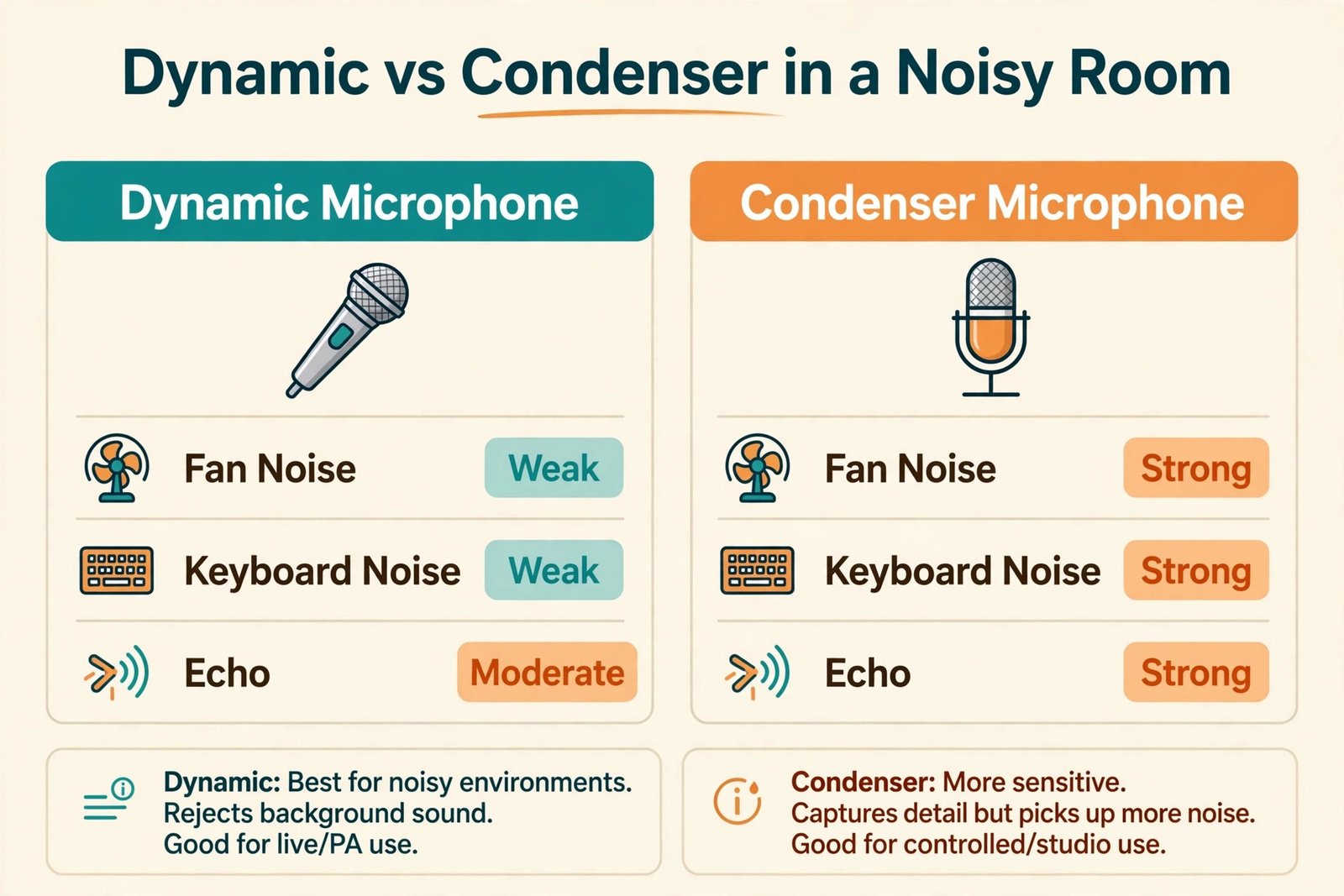
Dynamic microphones are less sensitive than most condenser microphones, and in a noisy room that lower sensitivity is a feature, not a weakness. A dynamic capsule needs more sound energy to move, so a voice spoken a few inches away dominates, while a fan ten feet away stays low in the mix. A condenser capsule moves easily, so it picks up the same fan, plus room reflections, plus the faint hum of a computer, at a level that forces you to work harder in editing. That is why broadcast studios and live stages have relied on dynamic microphones for decades. They were built for rooms that are not perfect.
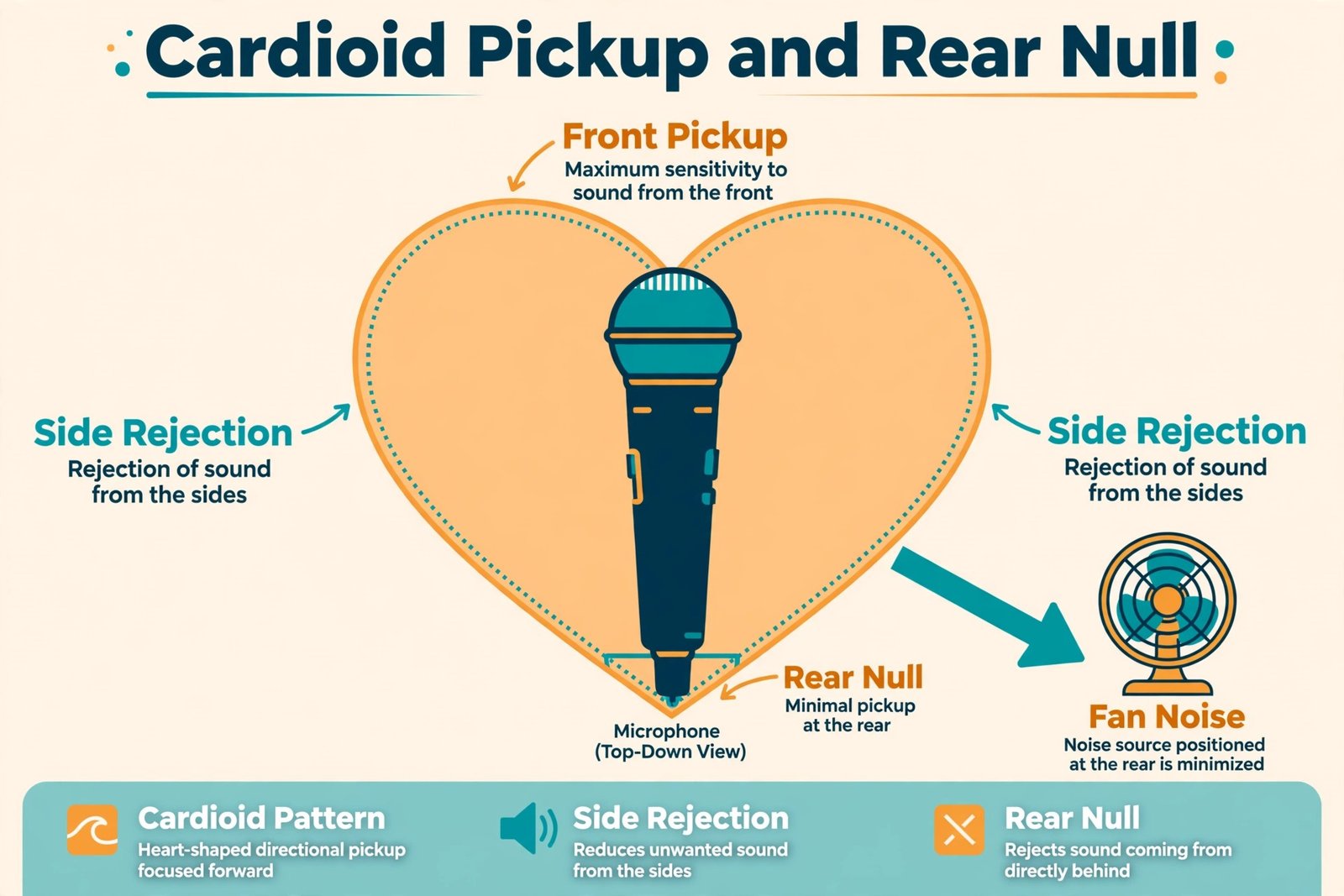
Polar pattern is the second half of the story. A cardioid pattern picks up best from the front, less from the sides and least from directly behind. If you point the rear of a cardioid microphone at the noisiest thing in the room, you get free rejection before any software runs. A supercardioid pattern is tighter still, which can help in a very noisy space but punishes you if you move off axis. An omnidirectional pattern picks up from all directions and should be avoided for a noisy room unless you are recording a group around a table on purpose.
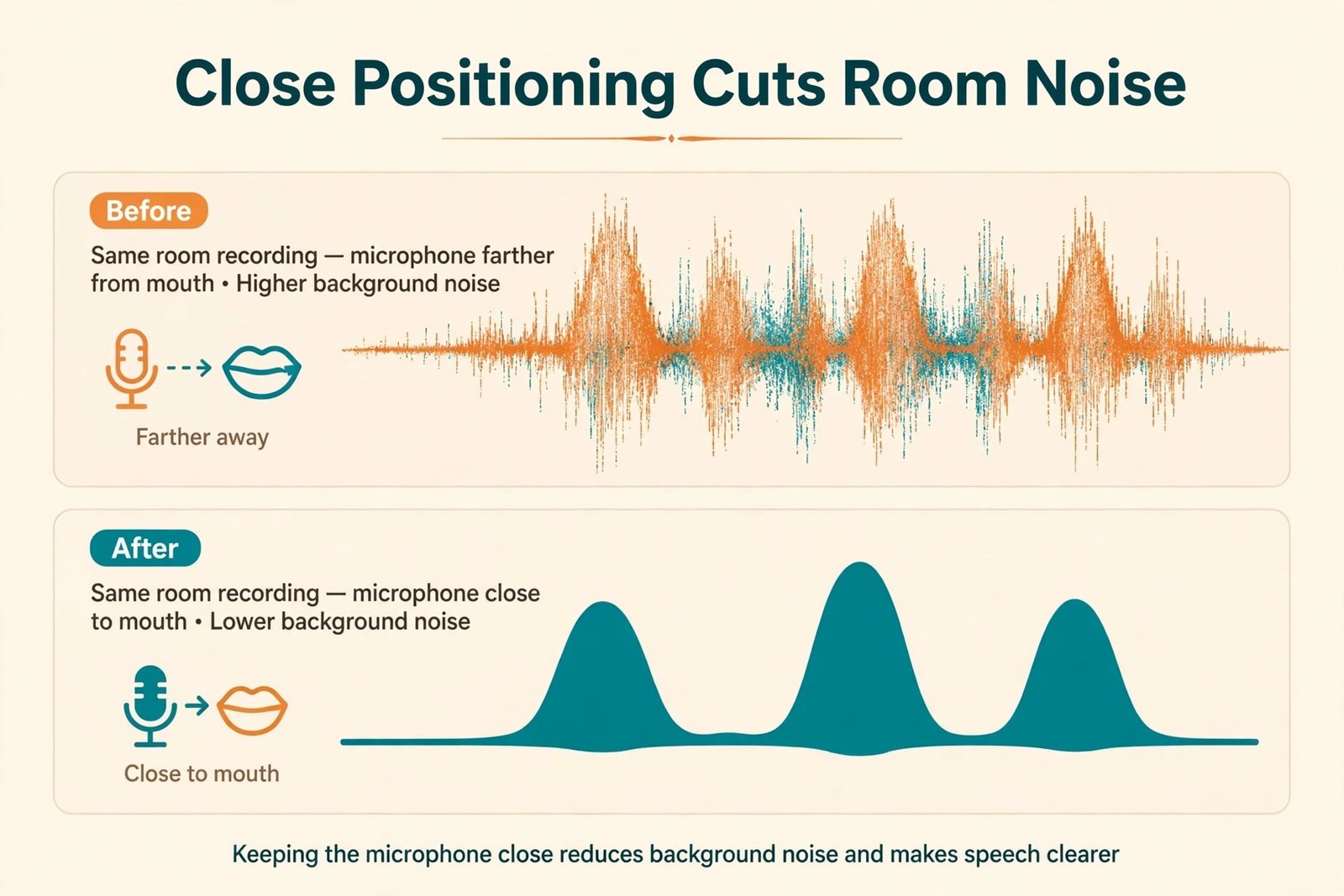
Distance beats almost everything else. Sound level falls quickly as distance grows, so halving the distance between your mouth and the microphone raises your voice far more than it raises the room noise. Shure’s own support guidance for its MV7 range makes the same point. It says to speak as close as possible to the microphone, orient the microphone away from unwanted noise, and remember that no microphone can distinguish desired sound from undesired sound on its own. Record the same sentence from two feet away, then from four inches away, and listen to how much room disappears in the second take.
The Decision Table by Room Type and Noise Source
This is the overview proof element for this guide, and it is the table to use before you read any individual pick. Find the row that matches your room and your main noise source, read the verdict, then read the rejection reason, because the rejection often tells you more than the recommendation.
| Room and main noise | Verdict | Why it wins here | Rejected pick and reason |
|---|---|---|---|
| Home office, fan and keyboard noise | Shure MV7+ over USB-C | Dynamic cardioid pickup plus onboard denoising and auto level control, with no interface needed | Large diaphragm condenser, because it captures fan hum and key clicks at a level that is hard to clean |
| Shared flat, voices and television nearby | Samson Q2U or Shure MV7+, close on a boom arm | Close dynamic pickup keeps your voice ahead of voices in the next room | Any desk stand condenser, because it sits far from your mouth and picks up the whole room |
| Dedicated podcast room, treated or partly treated | Shure SM7B with a strong interface | Broadcast tone and strong rear rejection, with enough gain to stay clean | A cheap USB condenser, because it cannot match the SM7B for tone or rejection once the room is controlled |
| Small untreated bedroom, echo and hard walls | Rode PodMic USB, close and on axis | Dynamic pickup, internal pop filter and shock mount, plus USB processing | An omnidirectional meeting microphone, because it hears every reflection equally |
| Laptop calls, café or coworking noise | Shure MV6 over USB-C | Small dynamic microphone with real time denoising, built for calls without an interface | A laptop built in microphone, because it sits far away and has no directional rejection |
| Budget desk, first microphone, unknown room | Samson Q2U | Low price, dual USB and XLR outputs, and a forgiving dynamic sound | A flashy RGB condenser, because looks do not fix sensitivity in a noisy room |
| Loud intermittent noise, dogs, children, traffic bursts | No microphone alone, use timing plus a dynamic microphone plus a gate | Loud bursts pass through any pickup pattern, so timing, distance and a gate matter more than the model | Any claim that software alone removes barking or a door slam cleanly, because it leaves artifacts in the voice |
How to Choose the Best Microphone for a Noisy Room
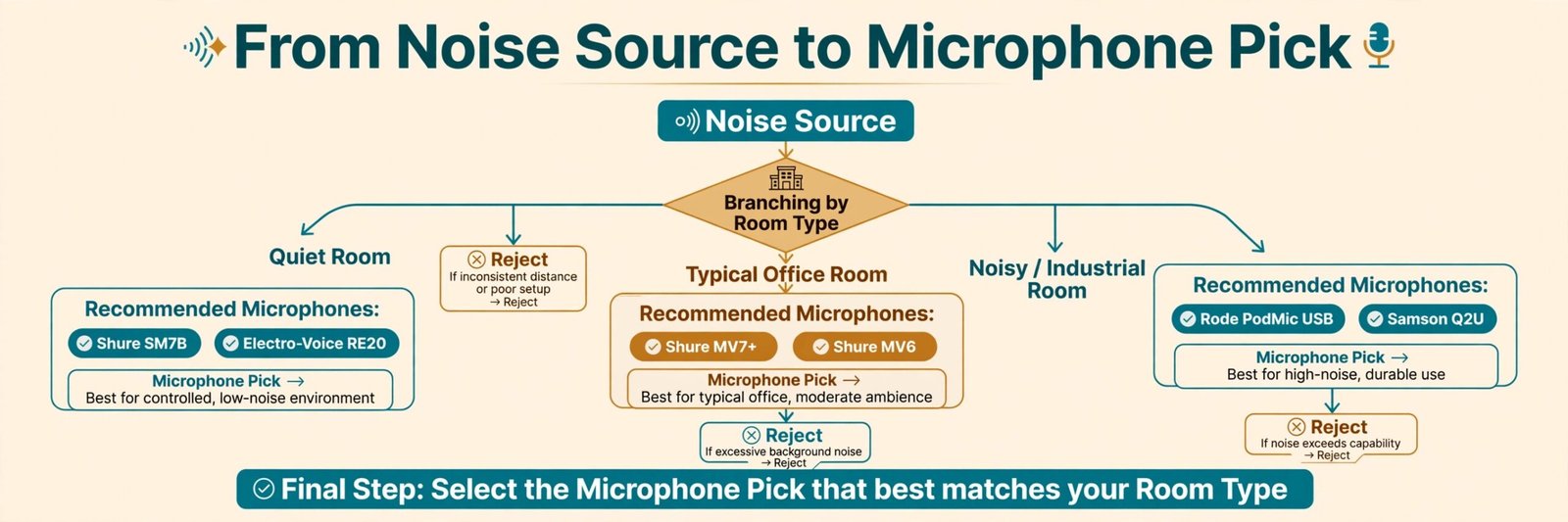
Choosing the best microphone for a noisy room is a sequence, not a single product decision. Start with the noise, then the distance, then the connection, then the budget. Skipping the first step is how people buy a well reviewed microphone, place it two feet away on a desk stand, and then blame the microphone when the recording still sounds like the room.
First, name your loudest noise and where it comes from. Constant low noise such as a fan or air conditioning can be reduced by a dynamic microphone, a high pass filter and light denoising. Short sharp noise such as key clicks can be reduced by a shock mount, a boom arm and a noise gate, because the microphone is no longer sitting on the desk that transmits the vibration. Voices and television are the hardest, because they are in the same frequency range as your voice. For those, distance and a door are more useful than any filter.
Second, decide how close you will actually sit. If you move around, lean back, or turn to a second monitor, you need a microphone that forgives movement, or a boom arm that moves with you. If you sit still, a tighter pattern and a closer position will give you the cleanest result. Test your real habit before you buy. Record with a phone held four inches from your mouth, then from twelve inches, and notice how much you drift.
Fourth, set a total budget, not a microphone budget. A microphone on a desk stand, far from your mouth, will underperform a cheaper microphone on a boom arm, close to your mouth. Add the arm, the cable, a pop filter if one is not included, and, for XLR, the interface or booster. If the total exceeds your limit, step down a microphone tier rather than dropping the arm. The arm is part of the noise rejection system in a noisy room.
The Picks by Situation, With Prices and Trade Offs
Shure MV7+ for the Typical Home Office
The Shure MV7+ is the default answer for most noisy home offices, and it earns that position by removing friction. It is a dynamic cardioid microphone with USB-C and XLR outputs, a touch panel for mute and level, a headphone output, and onboard processing that includes auto level, a digital pop filter, a real time denoiser and EQ controls through the MOTIV Mix app. Plug it into a laptop, sit close, turn on the denoiser for a fan, and you get a clean, broadcast style voice without learning an audio interface. For a buyer weighing the best microphone for a noisy room on ease of use alone, this is the model to beat.
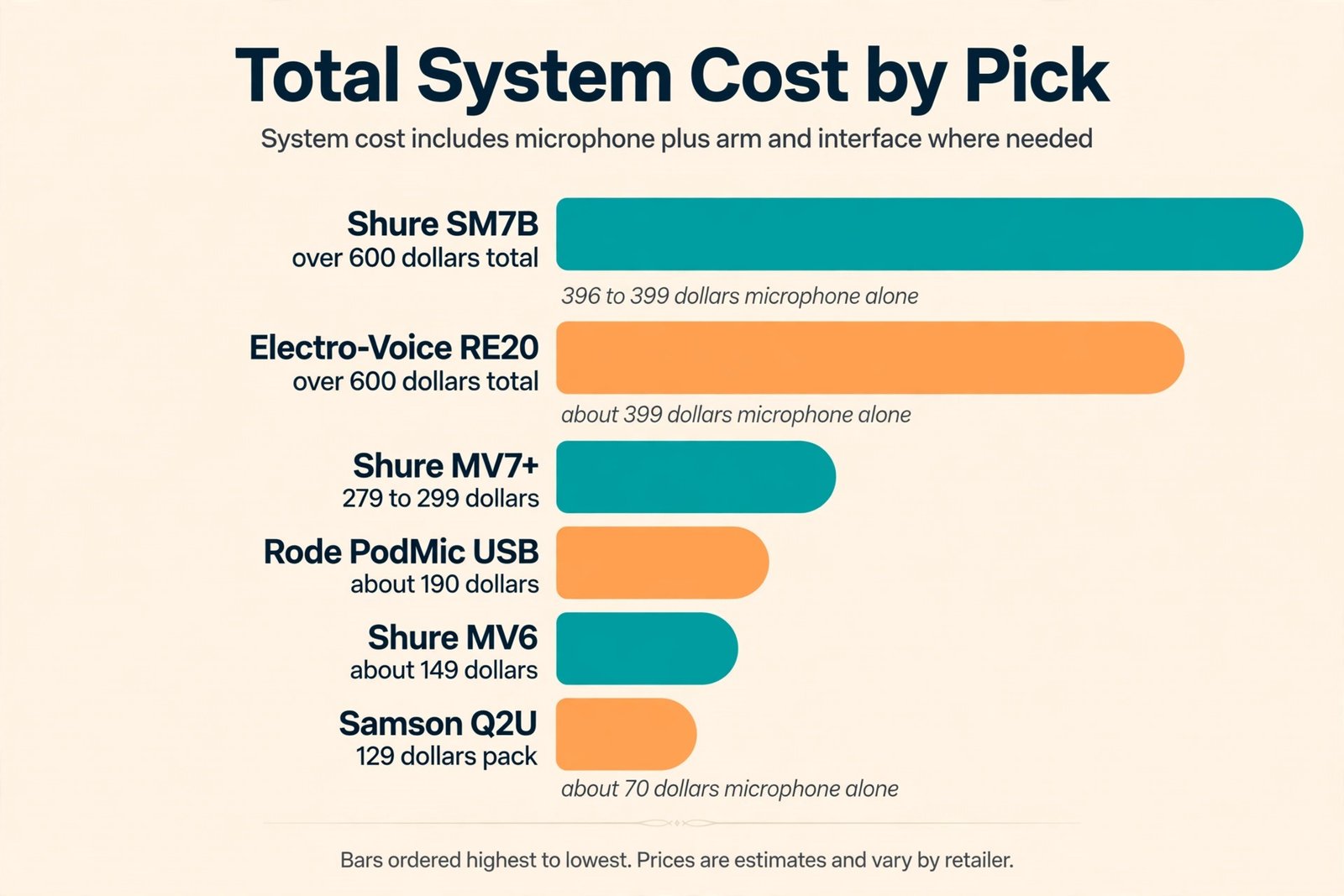
The price range seen in current listings is about 279 dollars to 299 dollars for the microphone alone, with bundles that add a stand costing more. The total cost stays close to the headline price, because you do not need an interface or a booster to use it over USB. You will still want a boom arm, because the included mount is a desk mount in many bundles and a desk mount transmits keystrokes. The MV7+ is heavy at about 573 grams, so pair it with an arm rated for that weight, or it will droop and drift off axis.
Buy it if you work from home, stream, record a podcast, or take calls in a room with a fan and thin walls. Avoid it if your main problem is loud intermittent noise from another room, because no onboard denoiser will remove that cleanly. Shure MV7+ product information gives the full feature list, and the Shure support note on background noise is worth reading before you expect software to do the whole job.
Rode PodMic USB for a Small Untreated Bedroom
The Rode PodMic USB is the pick for a small bedroom with hard walls and echo, where you want a full broadcast sound without a large budget for an interface. It is a dynamic cardioid microphone with XLR and USB-C outputs, an internal pop filter, an internal shock mount, a swing mount, and a headphone output. Over USB it adds Rode’s Revolution preamp and APHEX processing, which includes a noise gate, a compressor and a high pass filter. That combination helps in an untreated room, because the gate can close between sentences and the processing can add presence without raising the room level as much as a raw gain increase would.
The price seen in current listings is about 190 dollars. That sits between the budget Q2U and the MV7+, and the value case is strong if you like the PodMic sound and you want XLR for later. The trade off is size and weight. At about 900 grams it needs a sturdy arm, and it takes up more desk space than a compact USB microphone. It also has fewer physical controls than the MV7+, so you will use software for deeper changes. Buy it if you record in a small untreated room and you want a rich broadcast tone.
Avoid it if your desk is small, your arm is light, or you need to pack the microphone away after every session. Rode PodMic USB at B and H lists the current price and full specifications.
Samson Q2U for a Tight Budget and a First Microphone
The Samson Q2U proves you do not need to spend a lot to get the right type. It is a dynamic cardioid microphone with USB and XLR outputs, a headphone output, an on and off switch, and a package that in many listings includes a tripod stand, a foam windscreen, a USB cable and an XLR cable. It sounds less polished than the MV7+ or the PodMic USB out of the box, but its rejection behaviour is the same in principle, and that matters more in a noisy room than a small difference in tone that EQ can partly close.
The price seen in current listings is about 70 dollars for the microphone on its own in older listings, and about 129 dollars for a recording pack with a stand upgrade. Compare what is in the box before you judge the headline figure. A pack that includes a usable stand and both cables can be better value than a bare microphone that needs those parts added. The Q2U uses an older mini USB connection on many units, which is less convenient than USB-C. Buy it if you are buying your first microphone, you are unsure whether podcasting will stick, or you need a second microphone for a guest.
Avoid it if you want the strongest onboard processing, because the Q2U gives you a clean raw signal and expects you to add a gate or denoising in software. Samson Q2U recording pack at Sweetwater shows a current pack price and contents.
Shure SM7B for a Dedicated Studio With a Real Gain Chain
The Shure SM7B is the classic broadcast microphone, and in a controlled room it still sets the standard for tone and rejection. It is a dynamic cardioid microphone with XLR output only, internal shock mounting, and a built in pop filter. It has no USB output, no onboard denoiser, and no headphone output. That simplicity is a strength in a studio, because there is less to go wrong, and a weakness everywhere else, because you must supply everything else yourself.
The price seen in current listings is about 396 dollars to 399 dollars for the microphone alone. That headline figure misleads first time buyers, because the SM7B needs a lot of gain, typically around 60 decibels, and many basic interfaces cannot deliver that cleanly. If your interface cannot, you will hear hiss, and you will need a better interface or an inline booster, which adds cost. Add a boom arm, an XLR cable, and the interface or booster, and the total system cost can easily pass 600 dollars. That total is worth it if audio is your job.
It is not worth it if you only need clean calls, because the MV7+ will get you most of the way there for less total spend. Buy it if you already own a strong interface and you record in a dedicated space. Avoid it if you plan to plug it into a cheap interface and hope for the best. Shure SM7B at Best Buy lists a current price for the microphone alone.
Shure MV6 for Calls, Streams and a Small Desk
The Shure MV6 is the pick for people whose main problem is calls and streams in a noisy room, not a full podcast studio. It is a compact dynamic microphone with USB-C output, a real time denoiser, auto level control, a digital pop filter, and a headphone output. It is smaller and lighter than the MV7+, it sits easily on a small desk, and it is designed to be used close, which is exactly what a noisy room needs.
The price seen in current listings is about 149 dollars. That makes it the cheapest Shure dynamic USB option in this guide, and the total cost stays low because it needs no interface. The trade off is that it has no XLR output, so it cannot grow into a studio interface setup later. If you know you will never build an XLR studio, that limit does not matter. If you think you might, the MV7+ or the PodMic USB is the better long term buy. Buy it if you take calls, teach online, stream games, or record short videos in a room with a fan or keyboard noise. Avoid it if you need XLR or you record two people.
Electro-Voice RE20 for a Voice That Moves
The Electro-Voice RE20 is the pick for a voice that moves. Its Variable-D design reduces the proximity effect, which is the bass boost that happens when you get very close to most cardioid microphones. Leaning in or drifting back changes your tone less, which helps if you gesture, turn to notes, or record standing up. It is a dynamic cardioid microphone with XLR output only and a built in pop filter. It needs a capable interface, like the SM7B, and it is not a plug and play laptop microphone.
The price seen in current listings is about 399 dollars for the microphone alone, before an interface, arm and cable. That puts its total system cost in the same range as the SM7B, so choose between them on voice and habit, not on price. Choose the RE20 if you move while you talk. Choose the SM7B if you sit still and you want the classic podcast tone. Avoid both if you do not own a strong interface, because either microphone will sound worse on a weak gain chain than a good USB dynamic will sound on its own.
What to Reject, and Why Rejection Matters More Than Ranking
Reject a large diaphragm condenser as the best microphone for a noisy room unless the room is treated and quiet. Models in this class sound detailed and open, and that openness is the problem. They will record a fan, a fridge, a street, and the echo off a bare wall at a level that forces you to denoise aggressively, and aggressive denoising makes a voice sound thin and processed. If you already own one, sit much closer, add soft material to the room, and use a gate.
Reject the idea that a single software plugin will fix a bad recording. Noise suppression and denoising help with constant noise. They struggle with voices, music, barking, door slams and other sounds that overlap your voice in frequency and time. When they try, they often remove parts of your voice as well, leaving a watery sound that listeners notice more than the original noise. Software is the last step, not the first plan.
The Setup That Does More Than the Microphone
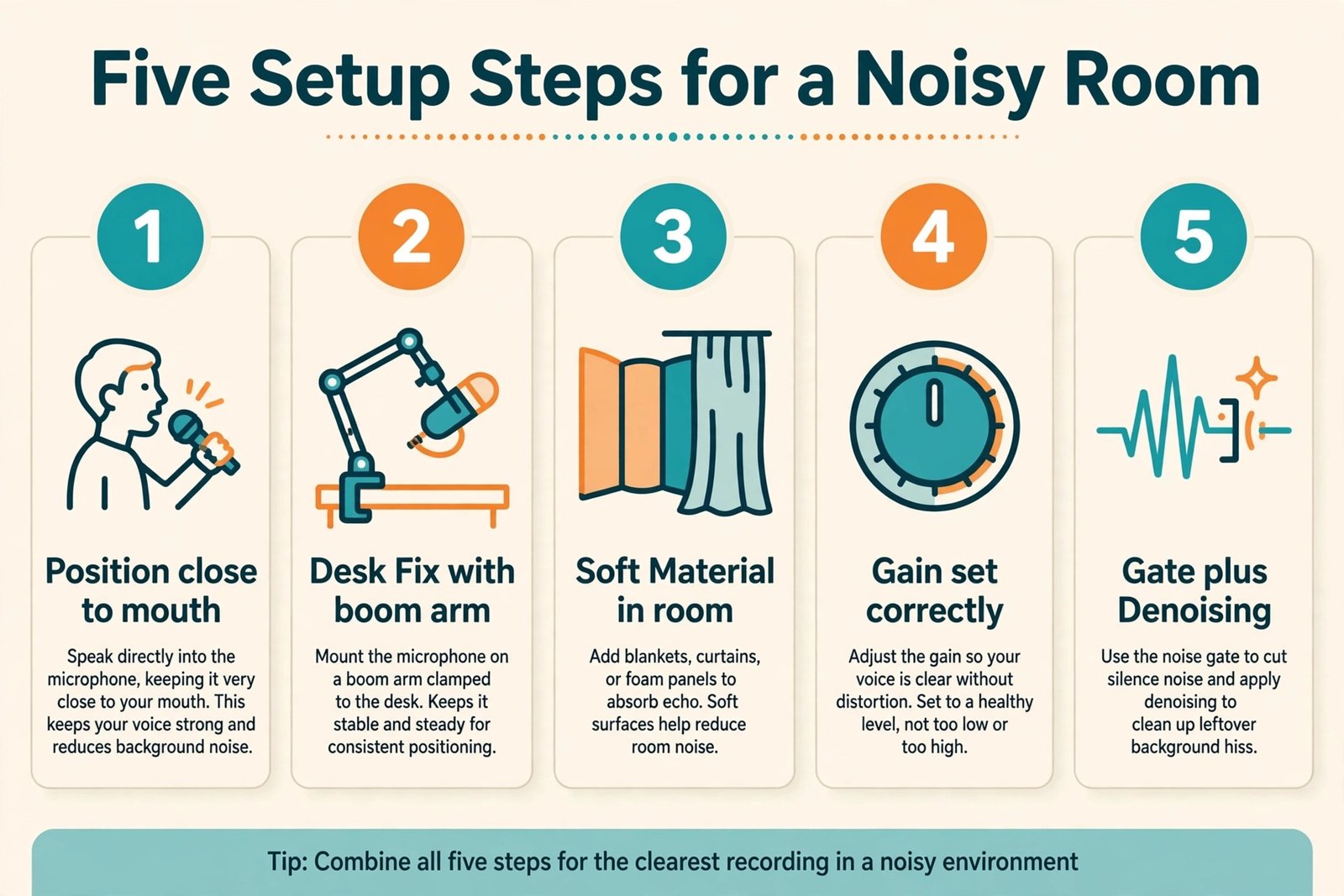
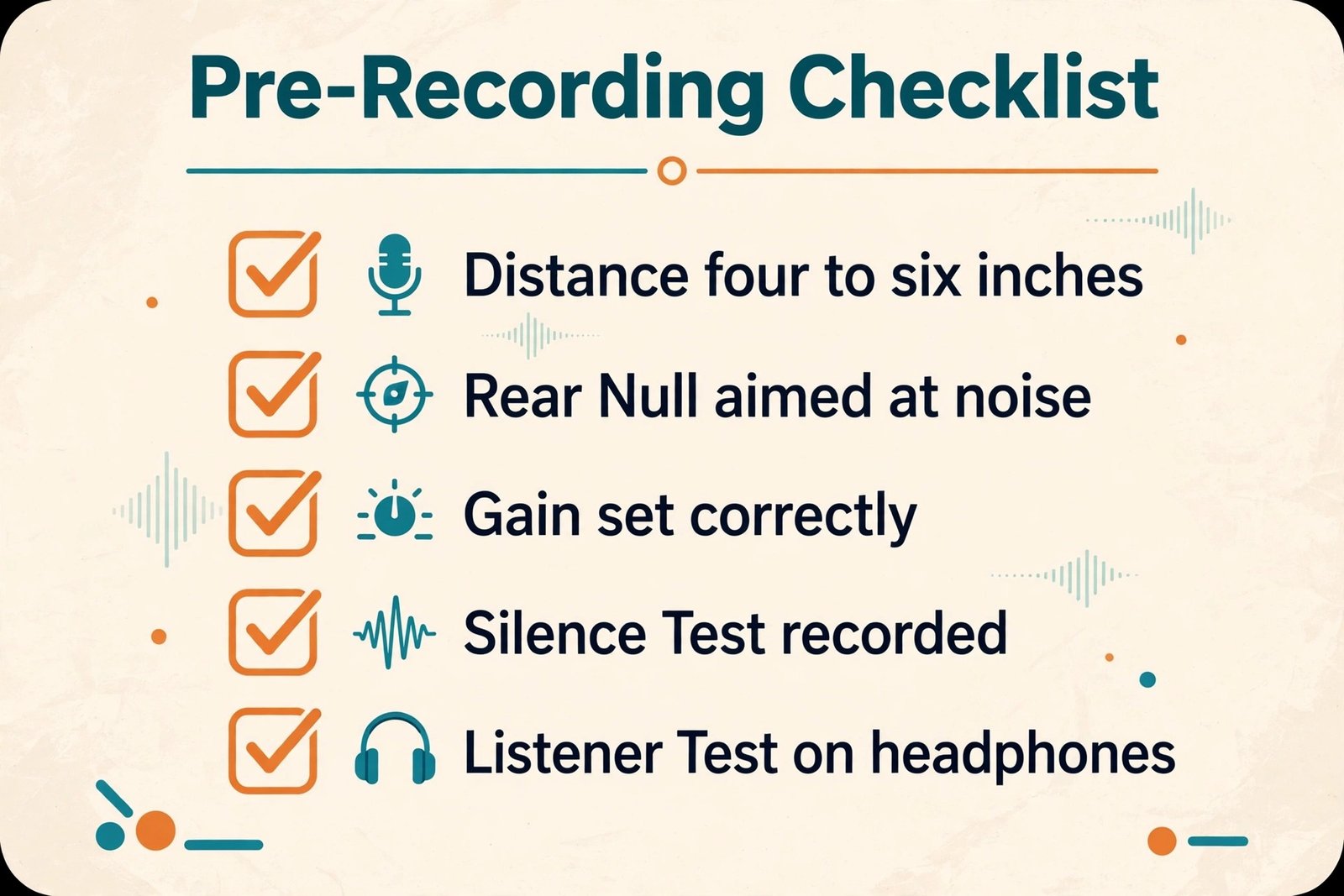
Start with position. Put the microphone on a boom arm, not on a desk stand, so it can sit four to six inches from your mouth, slightly off to the side, angled toward your mouth and away from the noisiest wall or window. The rear of a cardioid microphone should face the noise source, not your voice. If the noise is a computer fan, turn the setup so the rear faces the computer. Speak across the microphone, not directly into it, if plosives are a problem, and use the included pop filter.
Next, set gain correctly. Turn the gain up until your normal speaking voice peaks in the healthy range for your app, usually around minus 12 to minus 6 decibels on a meter, without shouting. If you set gain too low and raise the volume later, you raise the room noise as well. If you set gain too high, you clip on loud words and no software can restore the clipped peaks. Record a test with thirty seconds of silence in the room. That silence test tells you what the room really sounds like, and it is the test most buyers skip.
Mistakes That Make a Good Microphone Sound Bad in a Noisy Room
The first mistake is placing the microphone too far away. A dynamic microphone is designed for close use, and at two feet it loses its main advantage. Your voice falls, the room rises, and you turn up the gain, which raises both. Move it closer, even if it looks less tidy on camera, because listeners hear distance more than they see it.
The second mistake is overusing denoising. A little denoising helps a fan. A lot of denoising makes a voice sound underwater. If you need heavy denoising to make a recording usable, the recording position or the recording time is wrong. Fix the source first, then use light processing.
The third mistake is recording at the worst time and hoping the microphone will compensate. If the washing machine runs at the same time every day, or traffic peaks at rush hour, record around those times when you can. A schedule change is free, and it beats any microphone upgrade for intermittent noise. For calls you cannot reschedule, use a gate and mute when you are not speaking.
How to Test Before You Commit
A structured test takes twenty minutes and prevents most bad purchases. Record the same script four times, once with your current setup, once with the new microphone at four inches, once with the new microphone at twelve inches, and once with the new microphone at four inches plus a gate and light denoising. Use the same room, the same noise, and the same script, because changing more than one variable at a time makes the test useless. Listen on headphones, not on laptop speakers, because laptop speakers hide room noise that headphones reveal.
If the microphone is part of a larger setup, related reading on this site can help you place it in context. The guide to best AI podcast tools covers recording, editing and publishing tools that pair with a good microphone, and the guide to how to start a podcast with AI walks through the full workflow from idea to published episode. For remote work, the guide to best AI meeting assistants covers tools that transcribe calls once your audio is clean, and the guide to best AI dictation tools is useful if you plan to turn spoken notes into text.
Streamers can also check the guide to best AI tools for streamers for software that pairs with a dynamic microphone on a live setup.
Frequently Asked Questions
What is the best microphone for a noisy room for most people?
For most people in a typical home office, the Shure MV7+ over USB-C is the safest answer, because it combines dynamic rejection, onboard denoising, auto level control and a simple connection in one purchase. If budget is tight, the Samson Q2U gives you the same dynamic principle for far less, and it is the better buy than a more expensive condenser in the same room.
Is a dynamic microphone always better than a condenser microphone in a noisy room?
In most noisy rooms, yes, because a dynamic microphone is less sensitive and favours close sound over room sound. A condenser can still work if the room is treated, the microphone is close, and you use a gate and light denoising, but it will need more work for the same result. If you already own a condenser and you cannot replace it yet, sit closer, add soft material to the room, and use a gate.
How close should I sit to a microphone in a noisy room?
Sit about four to six inches from the grille for most dynamic microphones, slightly off axis if plosives are a problem. That distance raises your voice well above the room noise and reduces echo. If you sit twelve inches or more away, you lose most of the rejection advantage, and you will need more gain, which raises the room noise again.
Will noise cancelling software fix a noisy room on its own?
Software helps with constant noise such as a fan or air conditioning, and it can make a good recording cleaner. It does not reliably remove voices, barking, door slams, music or other intermittent sounds without damaging your voice. Use software after you have fixed position, distance and room reflections, not instead of those steps.
Do I need an audio interface for a noisy room?
You need an interface only if you choose an XLR only microphone such as the SM7B or the RE20. USB and hybrid microphones such as the MV7+, the PodMic USB, the MV6 and the Q2U include their own preamp and converter, so they work directly with a computer. A hybrid microphone is the best compromise if you want simple USB now and XLR later.
Should I buy acoustic panels before a new microphone?
Buy position and a boom arm first, then soft furnishings you already own, then a microphone of the right type, and only then consider panels. Panels help with echo, but they do not fix a microphone that is too far away, pointed at the noise, or too sensitive for the room. A good dynamic microphone close to your mouth will beat a condenser in a panelled room that still has a fan and a keyboard in it, if the condenser sits far away.
The Final Situation Verdict
The best microphone for a noisy room is not the microphone with the best sound in a quiet room. It is the dynamic microphone you will actually sit close to, on a boom arm, pointed away from the noise, with a gate and light denoising as a final polish. For most home offices, that means the Shure MV7+. For a tight budget, it means the Samson Q2U. For a small untreated bedroom, it means the Rode PodMic USB. For a dedicated studio with a real gain chain, it means the Shure SM7B. For calls on a small desk, it means the Shure MV6. For a voice that moves, it means the Electro-Voice RE20.
Start with your room, not with a ranking. Find your row in the decision table, buy the right type, place it close, fix the desk and the reflections, and test it with a real listener. That sequence will give you a cleaner recording than a more expensive microphone placed badly, and it will save you from the most common regret in this category, which is buying sensitivity you then spend months trying to remove. Your listeners do not need a perfect room. They need to hear you clearly, without the room competing for every word.