
A pet store online order system setup succeeds or fails on repeat orders, not on launch day sales. Food, litter, treats and supplements run out on a predictable cycle, and the customer who buys a bag of dog food once will need another one in three to six weeks. If reordering is hard, that customer drifts to a supermarket or a large online retailer. If reordering is easy, the same customer becomes monthly revenue you can plan stock around.
This guide covers the full build for a small pet store. You will choose a platform, build a catalogue that handles weight variants and life stages, set delivery options that protect your margin, add repeat orders and subscriptions, and handle payments, refunds and failed renewals. Every price below comes from vendor pricing pages and published 2026 comparisons, and where prices have moved recently the text says to confirm the live figure at checkout.
Why repeat orders decide whether a pet store survives online
A pet store is different from a gift shop or a clothing store. Most of what it sells is consumed, not kept. A dog eats roughly the same food every day. A cat uses litter every day. That consumption pattern is an advantage, but only if the store is built to capture it. A one time buyer found through search is expensive to win. A subscriber who orders every four weeks costs almost nothing to keep, provided the product arrives on time and the customer can change it without phoning the shop.
Repeat buying also changes how you buy stock. When you know that 120 customers take the same salmon kibble every month, you can order in larger quantities and avoid the two worst outcomes in pet retail, running out of a best seller and overstocking a slow flavour that expires on the shelf. A repeat order base turns guesswork into a forecast.
What a pet store online order system setup actually includes
A good pet store online order system setup has five working parts, and a store that launches with only three of them will feel unfinished. The first is the storefront, where customers browse, search and check out. The second is the catalogue, including variants, weights, ingredients, feeding guides and stock levels. The third is fulfilment, covering local delivery, collection, courier shipping, packing and cut off times. The fourth is repeat ordering, covering subscriptions, reminders and one tap reorders. The fifth is payments and back office work, covering card processing, refunds, failed payments, tax and reporting.
Judge each part by a customer task, not a feature list. Can a customer find the exact food their dog already eats, in the right bag size, in under a minute. Can they see whether it is in stock today. Can they choose delivery for tomorrow or collection this afternoon. Can they set the next bag to arrive automatically and change the flavour next month without help. Can they get a refund for a damaged bag without a long email chain. If any answer is no, that is the next thing to fix.
Start with the smallest version that answers all five tasks, then add extras. A store with 80 well described products, clear delivery rules and working subscriptions will outsell a store with 800 thin listings and no repeat option.
Choose the platform before you build the catalogue
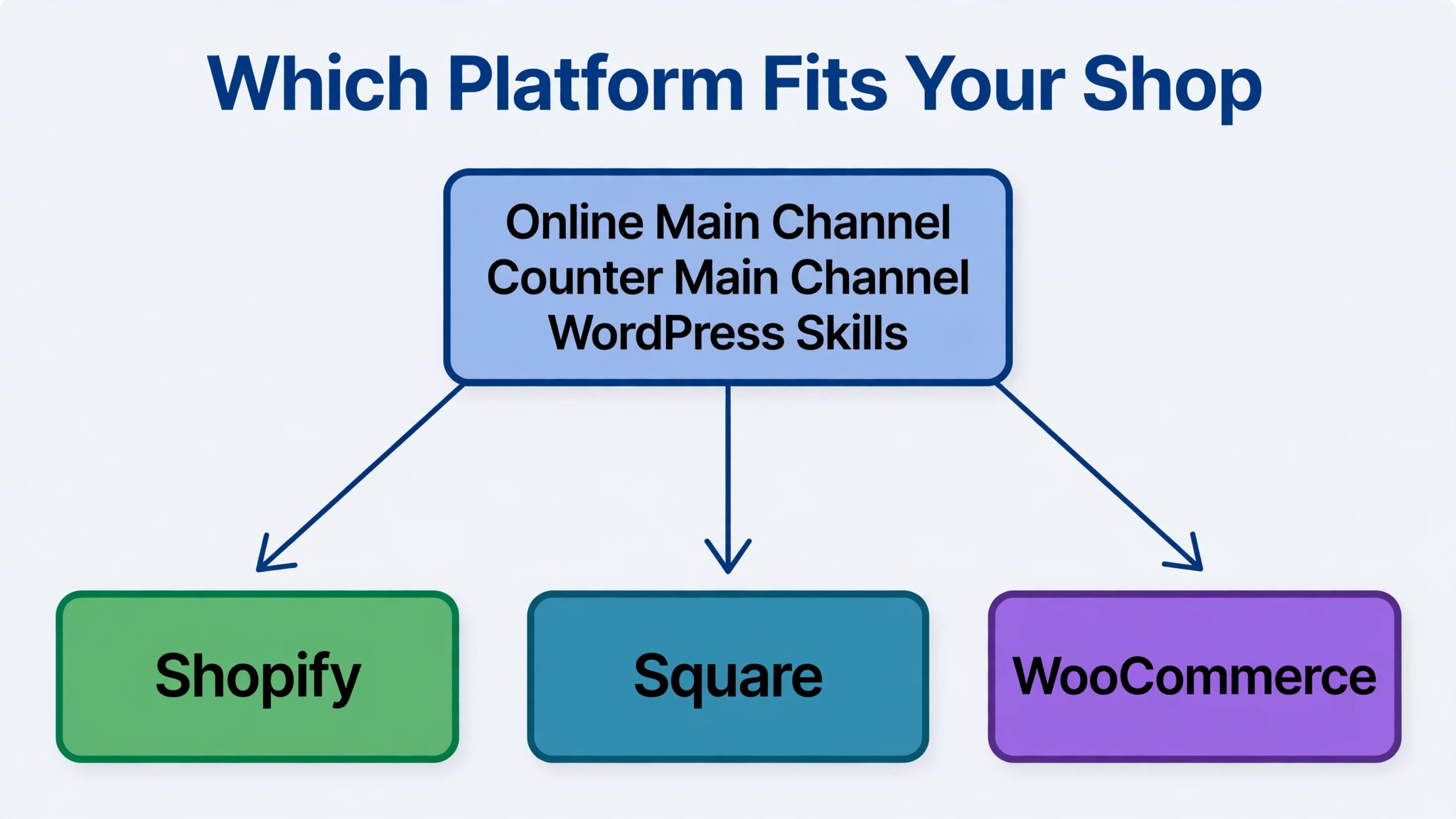
Platform choice is hard to reverse, because moving products, customers and subscription records later is real work. For a small pet store, three routes cover almost every case, Shopify, Square and WooCommerce, each suited to a different mix of counter sales, online sales and control.
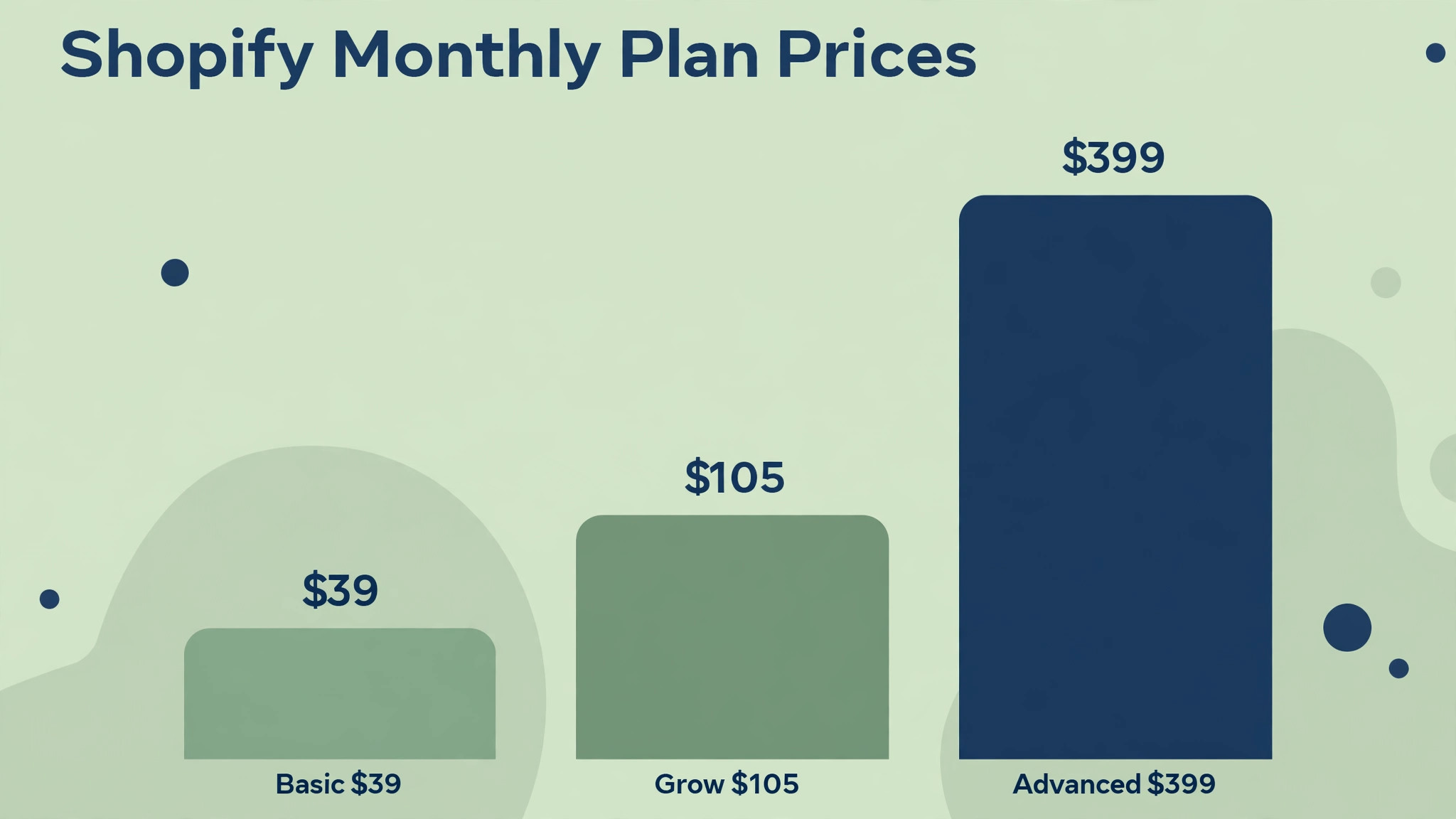
Shopify pricing in 2026, as reported across vendor pages and comparisons, starts with Basic at 39 dollars a month on monthly billing or 29 dollars a month when billed annually. Grow, the plan formerly called Shopify, costs 105 dollars a month on monthly billing. Advanced costs 399 dollars a month on monthly billing. Some October 2026 updates report higher annual figures for Grow and Advanced, so confirm the live price before you budget to the dollar. Shopify POS Lite comes with every plan, while POS Pro costs 89 dollars a month per location.
Card rates through Shopify Payments for United States stores are reported at 2.9 percent plus 30 cents online on Basic, 2.7 percent plus 30 cents on Grow and 2.5 percent plus 30 cents on Advanced.
Square takes a different shape. Its point of sale software is free, and you pay card fees when you take a payment. Published comparisons report online card rates of 2.9 percent plus 30 cents on paid Square Online plans, with a higher online rate on the free plan, and in person rates around 2.6 percent plus 15 cents. A shop doing mostly counter sales will often spend less on Square, while a shop where online is the main channel will often get more from Shopify even though the monthly plan costs more.
WooCommerce is free as a plugin, but free does not mean zero cost. You still pay for hosting, a domain, payment gateway fees and paid extensions for subscriptions or delivery slots. That route gives you ownership of customer data, but it also gives you updates, backups and security. Choose it if you already have WordPress skills in house or a developer you trust.
Ask four questions before you commit. Does it keep one stock count across channels. Does it support customer managed subscriptions with pause, skip and swap. Does it set delivery zones and cut off times without custom code. Does it export customers, orders and subscriptions cleanly if you ever leave. A yes to all four matters more than a pretty theme.
Build a catalogue that sells food, not just lists products
Pet catalogue data is messier than general retail data. The same recipe comes in 2 kilogram, 7 kilogram and 12 kilogram bags. Puppy, adult and senior versions share a brand name but not a formula. If a customer orders the wrong variant, you pay for a return and the pet misses a meal. Structure prevents most of that.
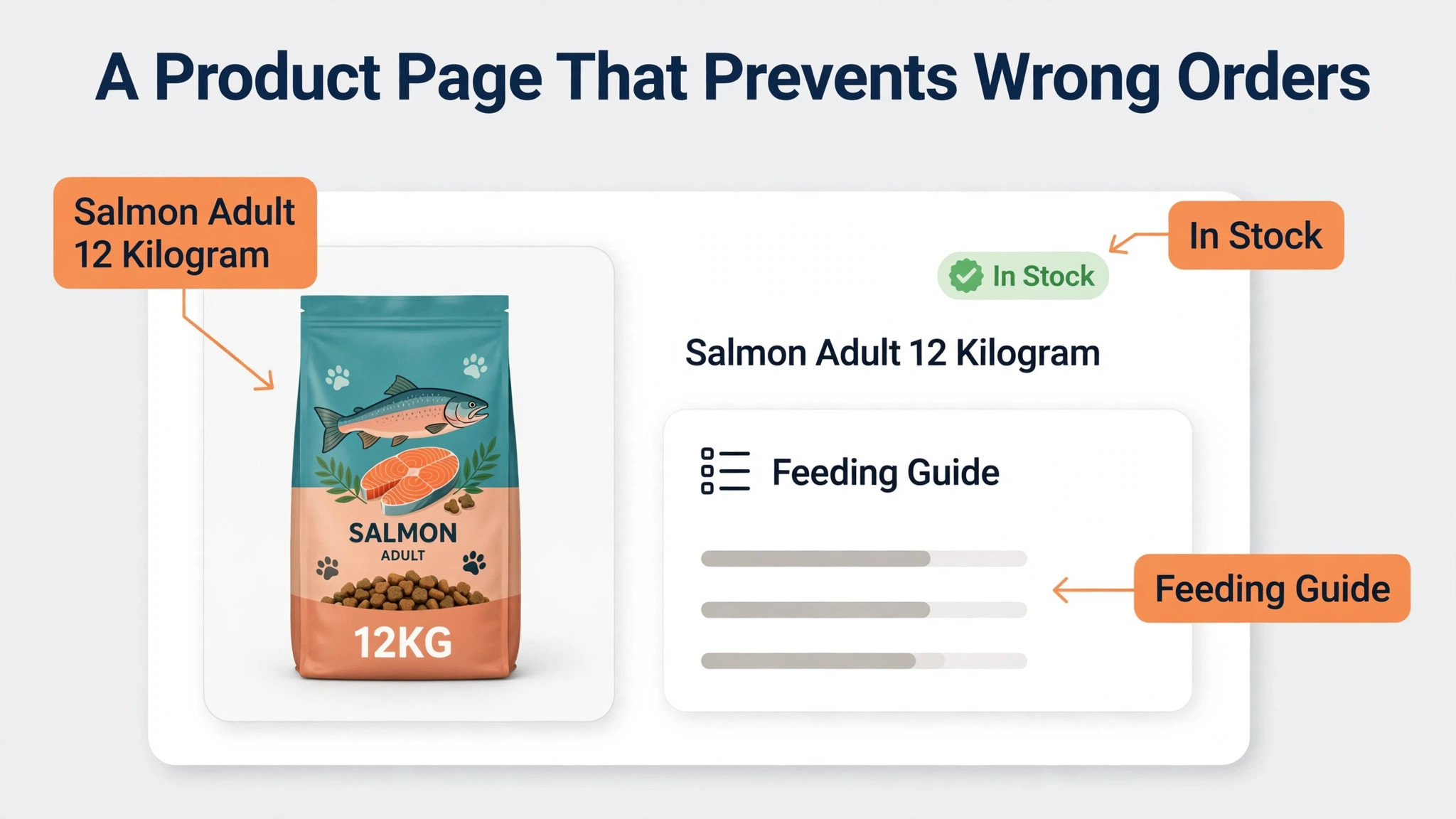
Build one product per recipe, with variants for size and life stage, rather than one listing per bag size. Each variant needs its own stock count, barcode, weight for shipping and price. Put the weight and life stage in the variant name itself, for example salmon adult 12 kilogram, so a customer scanning a small phone screen cannot mistake it. Add a short feeding guide with daily amounts by pet weight, and a transition note that a new food should be mixed with the old food over seven to ten days.
Ingredients, allergen notes and country of origin belong on the page, not buried in a photo of the bag. Customers with allergic dogs search for single protein foods and foods without chicken, wheat or dairy. If that information is only inside an image, search engines cannot read it and customers cannot filter for it. Add filters for species, life stage, breed size, dietary need and brand, and test them on a phone.
Photography deserves the same care. One clear front of pack photo, one back of pack photo showing the feeding guide, and one photo of the product in use will outsell five lifestyle shots that hide the bag size. For accessories, show scale and publish a size chart stating how to measure, because a harness return caused by a vague size chart is a preventable cost.
Stock discipline is part of the catalogue. Set a low stock alert for every food line, and show a clear low stock message when fewer than two bags remain. Check dates when stock arrives, sell oldest stock first, and never let a subscription renew into a product that is out of date.
Start with a tight range and expand on evidence. A useful launch catalogue is 60 to 120 products covering two or three food brands per species, the treats that pair with them, litter, basic health and hygiene, and a small accessory range. Track which products get searched but not bought, and which get added to baskets but abandoned.
Delivery options that protect margins and keep pets fed on time
Delivery is where pet stores quietly lose money. Food is heavy, litter is heavier, and a free delivery promise that ignores weight will eat the profit on every large bag. Set delivery rules before you launch, publish them plainly, and build them into checkout so customers see the real cost before they pay.
Offer three options where you can. Local delivery suits a shop with a van or driver and a tight area. Collection suits customers who pass the shop anyway. Courier shipping suits customers outside the local area. Not every shop needs all three on day one, but every shop needs at least one option that works for a 12 kilogram bag.
Local delivery needs zones, cut off times and a minimum order. Use two zones, near and wider, with a flat fee per zone and free delivery above a threshold you have costed, not guessed. If a local drop costs you 6 dollars in driver time and fuel, and your average margin on a food order is 18 dollars, free delivery above 60 dollars may hold up while free delivery on a single small bag will not. Publish the cut off time, for example orders placed before 2 pm leave the same day, and stick to it.
Collection needs its own discipline. Give customers a ready time, hold the order separately from shop stock so it cannot be sold twice, and send a ready message when it is packed.
Courier shipping needs weight bands and honest packaging. Price by total basket weight, not by item count, and test the checkout with a single 12 kilogram bag, two bags, and a mixed basket of food plus litter. Pack food in a box that survives a drop, seal litter bags inside a second bag, and add a note inside the box with feeding transition advice and the date the next bag will be needed.
Handle out of stock and substitution with a clear policy, chosen at checkout. Let customers choose between waiting, swapping to the same recipe in a different bag size, or a refund. Do not substitute a different recipe without asking, because a dog with a sensitive stomach cannot simply switch foods.
Add a delivery date estimate at checkout, and send a dispatch message with tracking where a courier is used. If a local delivery will be late, message the customer before they message you.

Repeat orders and subscriptions, the profit engine
A pet store online order system setup earns its keep when a customer can set a food order once and trust it to keep arriving. Build subscriptions around the products that genuinely repeat. Dry food, wet food, litter, treats bought in bulk, supplements and parasite treatments are natural subscription products. Toys, beds and carriers are not, and pushing a subscription on a bed will annoy customers and inflate cancellation numbers.
Offer intervals that match real consumption, not just a monthly default. A small dog on a 2 kilogram bag may need a delivery every three weeks, while a large dog on a 12 kilogram bag may need one every five weeks. Let customers choose every two, three, four, six or eight weeks, and change the interval from their account without contacting you. The most valuable subscription feature is control, the ability to skip a delivery when a bag is still half full, swap a flavour, change a bag size as a puppy grows, or pause for a holiday.
Discounts still help, but keep them modest. Five percent off subscription food is common and easy to explain. A better incentive for many shops is free local delivery on subscriptions above a threshold, or a free treat added to every third delivery. Those perks feel generous and cost less than a deep percentage cut.
Shopify store owners have a free starting point in the Shopify Subscriptions app, which published app store listings in October 2026 show as free with no transaction fee. Recharge Starter is listed at 99 dollars a month plus 1.49 percent plus 19 cents per transaction. Bold Subscriptions Launch is listed at 24.99 dollars a month plus 2 percent, rising through Grow at 49.99 dollars a month plus 1 percent and Scale at 74.99 dollars a month plus 0.9 percent. Check the live app store listing before you choose, because subscription app pricing has moved several times in 2026.
Start free or cheap, prove that customers actually subscribe, and only upgrade when failed payment recovery or bundle features would pay for themselves.
WooCommerce stores handle subscriptions through extensions that turn existing products into subscriptions without rebuilding the catalogue. Whatever the tool, the customer must see a subscribe option next to the one time price, must be able to manage it from their account, and must get a clear reminder before each renewal. A subscription that renews in silence feels like a trap. One that reminds, allows a skip and still delivers on time feels like a service.
Reorder reminders catch customers who will not subscribe yet. Send a reminder when a product should be running low, based on bag size and the date of the last order. One tap reorder from that message converts far better than a generic newsletter. Keep the message short, name the exact product and size, and give one clear action.
Pet profiles make reminders smarter. Ask for pet name, species, breed size, age band and dietary notes at account creation, and make every field optional. A customer who flags a chicken allergy should never be offered a chicken treat. Store only what you use, and never sell it.
Payment handling, refunds and failed renewals
Payments for a pet store online order system setup need to handle three moments, the first order, the subscription renewal and the refund. The first order needs a checkout that works on a phone, accepts cards and common wallets, and shows delivery cost and total before payment. Test checkout on a real phone in test mode, and count the taps from product page to paid order. If it takes more than a handful, simplify.
Subscription renewals need a payment gateway that supports automatic recurring billing. Shopify Payments, Stripe, PayPal Payments and WooPayments all support recurring billing in the contexts described in their documentation, but confirm that your chosen subscription app and gateway combination supports it before launch, because not every pairing does. Store payment methods securely through the gateway, never in your own database or a spreadsheet, and let the customer update an expired card from their account without help. An expired card is the most common reason a subscription stops.
Failed payments need a recovery sequence. Send a polite message on the day of failure saying the renewal could not be taken and delivery is on hold, a second message three days later with a direct link to update payment details, and a final message before cancellation offering a skip or pause instead. Offer a pause first, because a customer who pauses for a month is still a customer, while a cancelled subscription often never returns.
Refunds need a pet specific policy in plain language. Food that has been opened cannot always be resold, and a customer who reports a damaged bag, a wrong variant or a product that made their pet unwell needs a human response quickly. A workable policy is a refund or replacement for damaged, incorrect or short dated goods, with a photo requested but not demanded as a barrier, and a case by case approach for opened food. State the policy on the product page and at checkout, and honour it without argument on small amounts.
Tax, invoicing and reporting belong in the same setup week as payments. Make sure the platform applies the correct tax treatment for your location, and that you can report sales by product, by delivery method and by subscription versus one time orders. Those three reports answer the questions that drive buying decisions.
The setup checklist, week by week
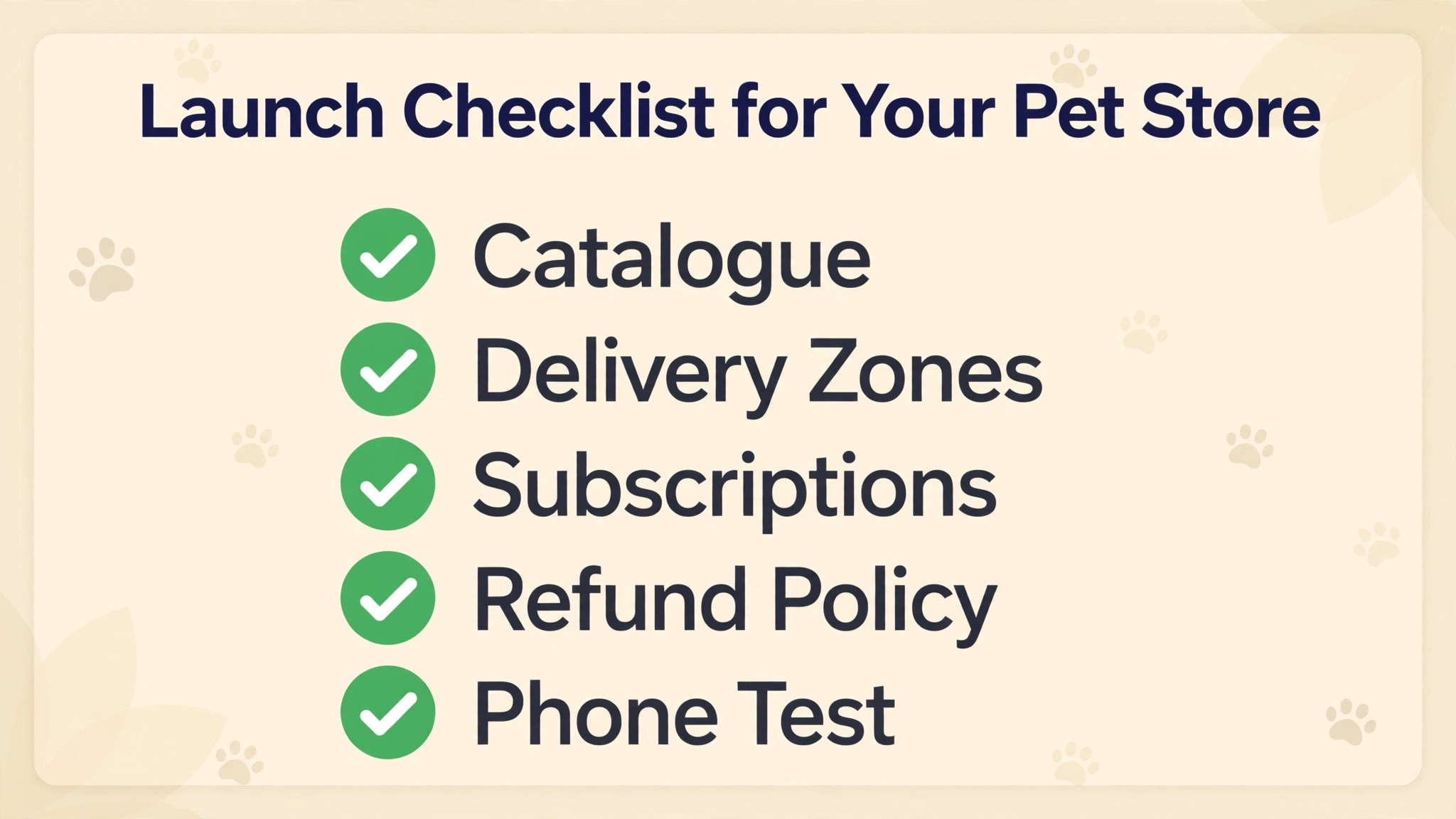
Use this checklist as the launch plan for a pet store online order system setup, and do not skip the testing steps at the end. A shop that launches untested will discover its problems through customer complaints.
- Choose the platform and payment gateway, and confirm the gateway supports recurring billing with your subscription tool.
- Build the launch catalogue, one product per recipe, with variants for size and life stage, stock counts, weights and feeding guides.
- Set delivery zones, fees, free delivery thresholds, cut off times and collection hours, and test three baskets, one large bag, two bags, and food plus litter.
- Add subscriptions to food, litter and supplement products, with intervals from two to eight weeks, a skip and pause option, and a reminder before renewal.
- Write the refund, substitution and out of stock policy, and put it on product pages, at checkout and in the first order email.
- Set up pet profiles with optional fields only, and test that a dietary note changes recommendations.
- Build the reorder reminder for non subscribers, timed by bag size and last order date, with a one tap reorder link.
- Test the full journey on a phone, including first order, subscription sign up, skip, swap, pause, card update and refund request.
- Prepare launch stock for the top 20 products at two weeks of expected demand, and set low stock alerts on every food line.
- Launch quietly to existing shop customers first, fix the first week of problems, and only then spend on advertising.
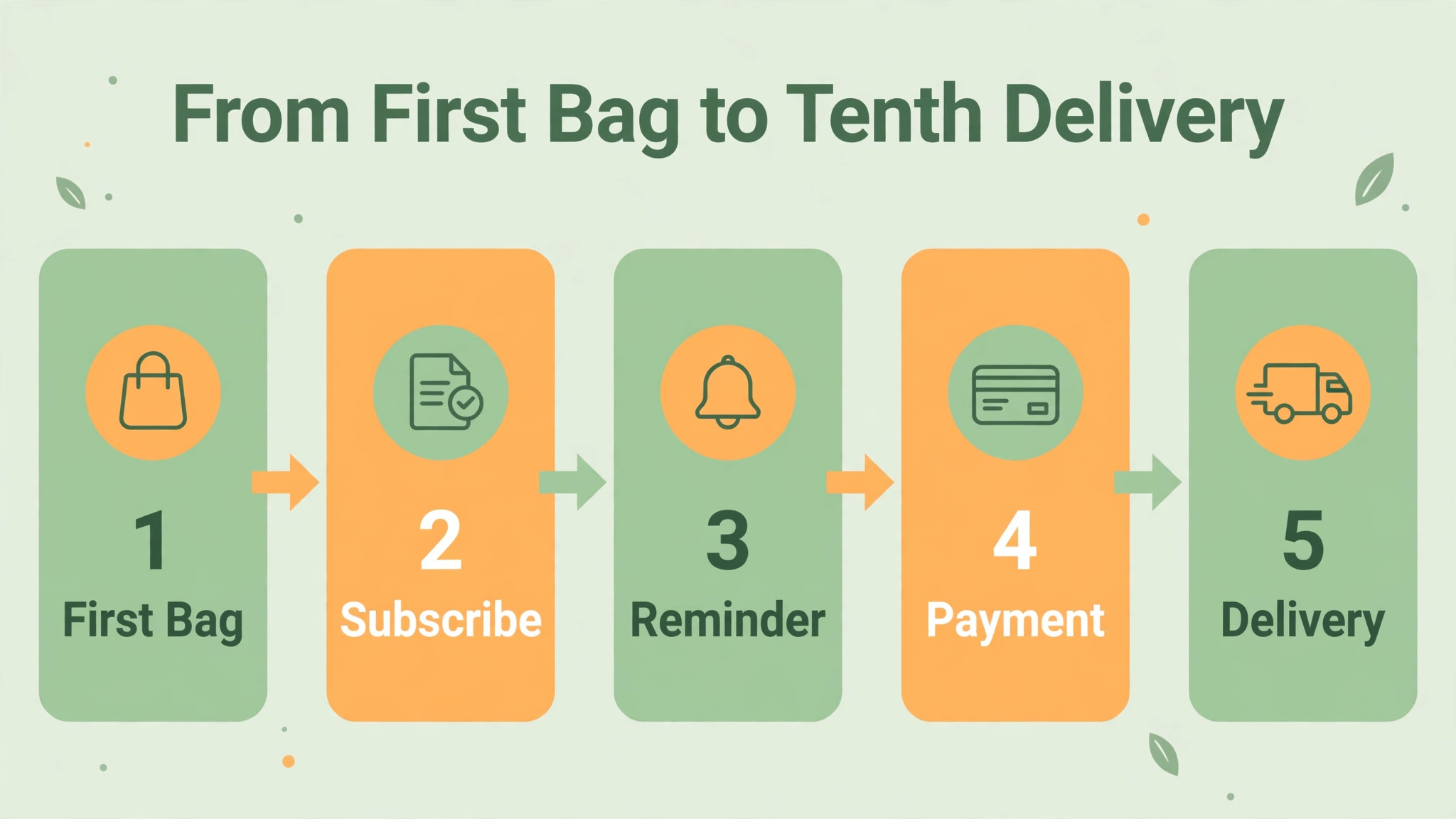
The repeat-order workflow, from first bag to tenth delivery
A repeat-order workflow is only useful if every step has an owner and a trigger. This workflow shows how a single food subscription should run, and where most shops let it break.
Step 1. The customer buys a first bag in store or online, and the shop records the pet profile, the exact variant and the date. No profile, no useful reminder later.
Step 2. Three days after delivery, the customer gets a short message asking how the transition went and whether the bag size suits the pet.
Step 3. At checkout or in the account, the customer is offered a subscription for the same variant, with an interval suggestion based on bag size and pet size, and a clear discount or delivery perk. The offer appears once, plainly, not as a pop up on every page.
Step 4. Three days before each renewal, the customer gets a reminder naming the product, size, price and delivery date, with links to skip, swap or pause. Silence before renewal causes the most cancellations.
Step 5. Payment is taken, stock is reserved, and the order is packed with a note showing the next delivery date and a reminder to tell the shop if the pet has grown, changed weight or developed a sensitivity.
Step 6. Delivery or collection happens on the promised day. If anything is late, the shop messages first.
Step 7. After the third delivery, the shop checks the pattern. Has the customer skipped twice, which usually means the interval is too short. Has the bag size stayed right as a puppy grew. A short check here prevents a quiet cancellation in month four.
Step 8. After the tenth delivery, the customer gets a specific thank you naming the pet and the product, with a small reward such as a free treat or free local delivery on the next order.
Measure this workflow each month with four numbers, the share of food buyers who subscribe, the share of renewals that succeed on first attempt, the share still active after three months, and the share of cancellations that chose pause instead.
Costs, a realistic first year budget
A pet store online order system setup has a first year cost that is easy to understate, because the platform fee is only the visible part. Build the budget in layers, and revisit it after three months of real orders.
The platform layer for a Shopify store on Basic is 39 dollars a month on monthly billing, or 348 dollars a year on annual billing at 29 dollars a month. A Square store may start with no monthly software fee and pay only card fees, while a WooCommerce store pays hosting and extensions instead. Add a domain, usually 10 to 20 dollars a year, and a paid theme only if the free theme cannot present variants and filters cleanly.
The subscription layer depends on volume. A free Shopify Subscriptions app costs nothing to start. A paid app such as Bold Launch at 24.99 dollars a month plus 2 percent, or Recharge Starter at 99 dollars a month plus 1.49 percent plus 19 cents per transaction, only makes sense once subscriber revenue covers it. A shop with 50 subscribers at 45 dollars a month has 2,250 dollars of monthly subscription revenue, and a 99 dollar app plus transaction fees is a noticeable share of that.
The payment layer is the largest variable cost. On a 45 dollar food order through Shopify Payments on Basic, the card fee at 2.9 percent plus 30 cents is about 1.61 dollars. On 200 such orders a month, that is about 321 dollars. Those fees are a reason to price delivery honestly and to avoid deep discounts that leave nothing after fees and delivery.
The fulfilment layer includes packaging, labels, driver time or courier charges, and returns. Track delivery cost per order separately from product margin. If local delivery costs more than you charge, raise the fee, raise the free delivery threshold, or narrow the zone. Do not absorb the loss silently, because volume makes a loss per order worse.
A realistic first year total for a small shop, excluding stock, often falls in the range of 1,500 to 5,000 dollars for platform, apps, domain, packaging tools and basic marketing, with card fees and delivery costs on top as a share of sales. Cut an app that is not earning its fee within three months.
Mistakes that quietly kill repeat orders
The first mistake is launching subscriptions without a skip button that actually works. Customers test it once, fail, and cancel rather than risk another unwanted bag. Test skip, pause, swap and card update yourself every month.
The second mistake is substituting a different recipe without asking. A dog that eats lamb because chicken upsets its stomach cannot eat a chicken substitute. Offer a wait, a size swap within the same recipe, or a refund.
The third mistake is free delivery with no threshold and no weight rule. Large bags and litter will erase margin. Price delivery by weight and zone, and review the threshold quarterly.
The fourth mistake is a catalogue that grows faster than its data. Every new product needs variants, stock, weight and a feeding note. A product added with no weight will break shipping calculations, and one added with no stock count will oversell.
The fifth mistake is treating online customers as strangers. A shop customer who has bought from you for three years should not get a generic welcome email online. Link in store and online records where the customer agrees, and recognise their pet by name.
Related reading on this site can help with the wider decisions around this build. The guide to pet grooming appointments covers appointment work that pairs naturally with a pet shop, the breakdown of the cost of running a Shopify store puts platform and app fees in full context, the guide to WhatsApp Business for small shop orders shows how messaging can support reorders, and the breakdown of the cost of running a food delivery side business is useful if local delivery becomes a service in its own right.
Frequently Asked Questions
How long does it take to set up online ordering for a small pet store
A focused shop can launch in two to four weeks, with one week for platform and catalogue, one week for delivery and subscriptions, and one week for testing and quiet launch. Start with a tight range and add products after launch rather than delaying launch for a perfect catalogue.
Should a pet store use Shopify, Square or WooCommerce
Use Shopify if online is the main channel and you want hosted checkout plus subscriptions through apps. Use Square if the counter is still the main channel. Use WooCommerce if you already run WordPress and want full control, and you accept hosting, updates and security as your job. The deciding test is one stock count across channels, customer managed subscriptions, and clean data export.
What products should be offered as subscriptions
Offer subscriptions on products that run out predictably, which means dry and wet food, litter, bulk treats, supplements and regular parasite treatments where local rules allow online sale. Do not offer subscriptions on beds, carriers, toys or one off accessories.
How much discount should a pet food subscription offer
Five percent off food is a sustainable starting point for most small shops, especially when paired with free local delivery above a threshold or a small treat on every third order. Deeper discounts leave little room after card fees and delivery costs. Test a modest discount first, and only increase it if sign ups are low after the offer has been seen clearly on the product page.
What happens when a subscription payment fails
The renewal is held, the customer gets a message on the day of failure with a link to update payment details, a second reminder follows after three days, and a final message offers a skip or pause before cancellation. The delivery is not sent until payment succeeds. Track recovery monthly, because a low rate usually points to a broken link or an unclear message.
Can a small pet store offer free delivery without losing money
Yes, but only with a threshold costed from real delivery expenses and margin, and with weight rules that stop a single heavy bag from erasing profit. Free delivery above a sensible basket value, for a defined local zone, can increase basket size and subscription sign ups. Free delivery on every order, in every zone, regardless of weight, will lose money as volume grows.
Keep the Next Bag Coming
A pet store online order system setup is finished not when the website looks good, but when a busy owner can reorder the right food, in the right size, for the right pet, without thinking about it. Build the catalogue with care, price delivery honestly, give subscribers real control, handle failed payments with patience, and review the four repeat numbers every month. Do those things consistently, and the shop stops chasing one time sales and starts building a base of customers whose pets are fed on time by a store they trust.