
For most small businesses that want Notion as a real workspace rather than a personal notebook, Business at 20 dollars per member per month on annual billing is the tier to budget for, even though Plus looks like the cheaper deal at 10 dollars. The reason is AI. Full Notion AI now ships inside Business, while Free and Plus get only a limited trial, so a team that buys Plus for AI will end up paying for Business anyway. That single fact shapes the cost of Notion for small business monthly more than any other line on the pricing page.
This guide prices Notion at real team sizes, explains the gates between tiers, and separates the costs that are unavoidable from the ones a business can avoid with a little discipline. Prices here reflect published figures at writing time, and Notion has changed its AI packaging before, so confirm the current price on the vendor page before you buy. The aim is a monthly figure that survives contact with the actual invoice.
Notion Prices on One Page
The table below lists the four tiers with their headline rates. Annual figures are monthly equivalents, meaning the yearly charge divided by 12. Monthly figures are the price of refusing the yearly commitment. Enterprise has no published rate, so it is left as a quote in every calculation that follows.
| Plan | Annual billing | Monthly billing | Page history |
|---|---|---|---|
| Free | 0 dollars | 0 dollars | 7 days |
| Plus | 10 dollars per member | 12 dollars per member | 30 days |
| Business | 20 dollars per member | 24 dollars per member | 90 days |
| Enterprise | Custom quote | Custom quote | Unlimited |
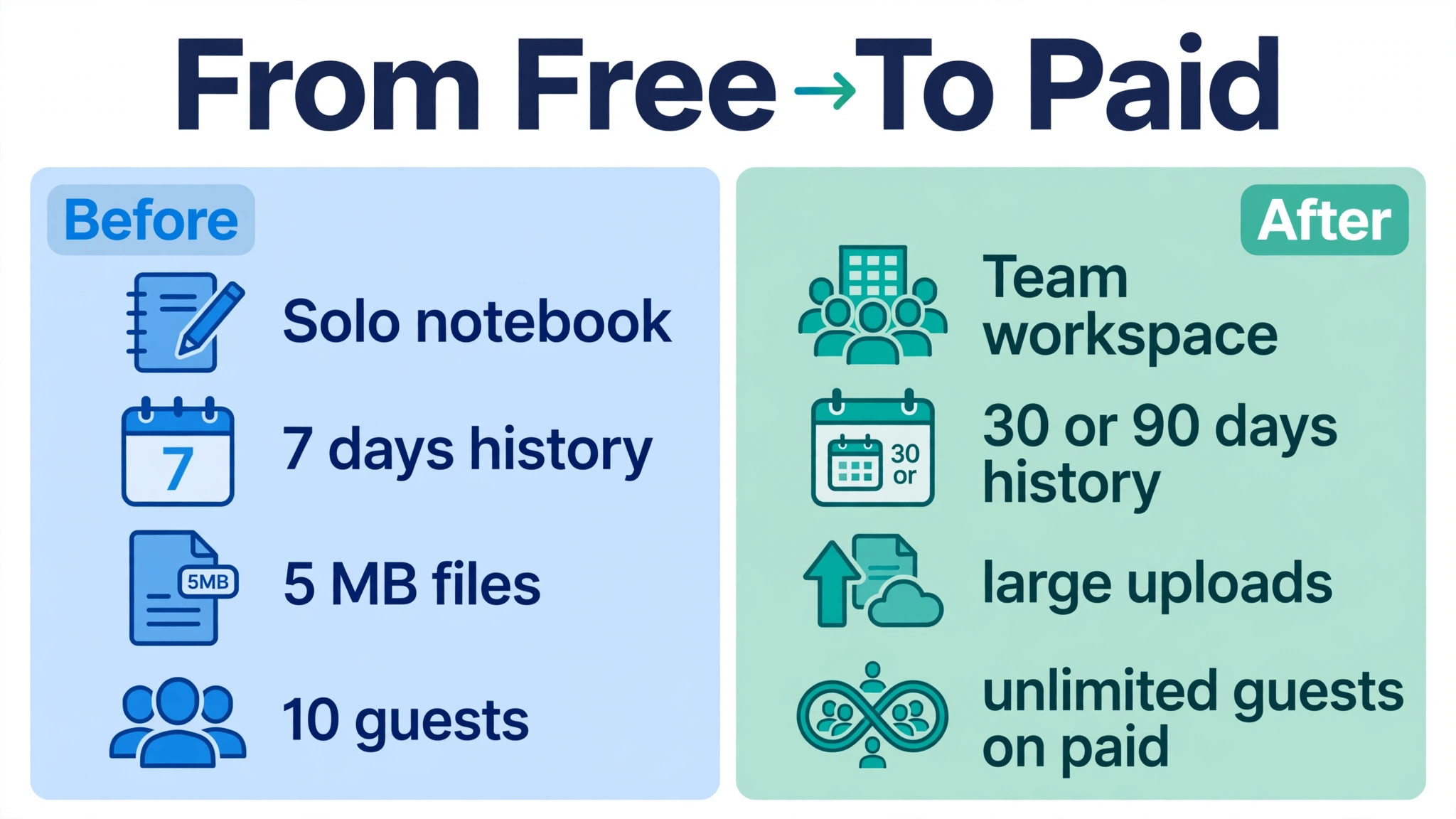
Two details in the table deserve more weight than the prices themselves. Page history jumps from 7 days on Free to 30 days on Plus, 90 days on Business and unlimited on Enterprise, and that history is the safety net when someone deletes or overwrites important work. File uploads tell a similar story, capped at 5 megabytes per file on Free and effectively unlimited on paid plans. A business that stores proposals, brand files or client documents inside Notion will feel the Free upload cap long before it feels any other limit.
Why the Cheapest Notion Price Is Not the Real Price
Notion Free costs nothing for one person, with unlimited pages and blocks, but a workspace with two or more members gets a block limit, and once that limit is reached the team can read and edit existing content but cannot add new content. That turns Free into a trial for any team, not a plan. A two person business that builds its operations inside Free will eventually hit the wall in the middle of real work, and the fix is a paid plan bought in a hurry rather than chosen calmly.
Plus at 10 dollars per member per month on annual billing looks like the natural next step, and for many teams it is a good plan. It removes the block limit, raises uploads, extends page history to 30 days and allows unlimited guests. What it does not do is unlock full AI. Free and Plus include only a limited trial of Notion AI, and new users can no longer buy the old standalone AI add-on that once sold for 8 dollars per member per month on annual billing. A team that chooses Plus expecting real AI will discover the gap only after it has moved its work inside.
The third reason the cheapest price misleads is the member count. Notion charges per member, meaning anyone who belongs to the workspace, while guests invited to specific pages are free. A business that adds freelancers, clients and part timers as members instead of guests will pay for seats it never needed. Member hygiene matters as much as tier choice, and it is covered in detail later in this guide.
Free
Free works well for a solo owner who wants a notebook, a task list and a simple wiki in one place. One person gets unlimited pages and blocks, a calendar, databases with subtasks and dependencies, basic forms and a basic public site, plus a limited trial of AI. For personal organisation or for testing whether Notion suits the way an owner thinks, Free is genuinely useful and costs nothing to keep.
The limits arrive as soon as a second member joins. The workspace gains a block limit, uploads stay capped at 5 megabytes per file, page history stays at 7 days and guests are capped at 10. A team that writes client proposals, stores PDFs or keeps a shared knowledge base will outgrow those limits in weeks rather than months. Seven days of page history is also a thin safety net for a business, since a mistake discovered two weeks later cannot be undone from history alone.
Leave Free when the team grows beyond one person, when files larger than 5 megabytes become routine, or when the block limit first appears. The honest next step is Plus for a team that only needs docs and databases, or Business for a team that also wants AI, private teamspaces and stronger admin control. Staying on Free past that point saves 10 dollars per member and costs far more in rework and lost content.
Plus
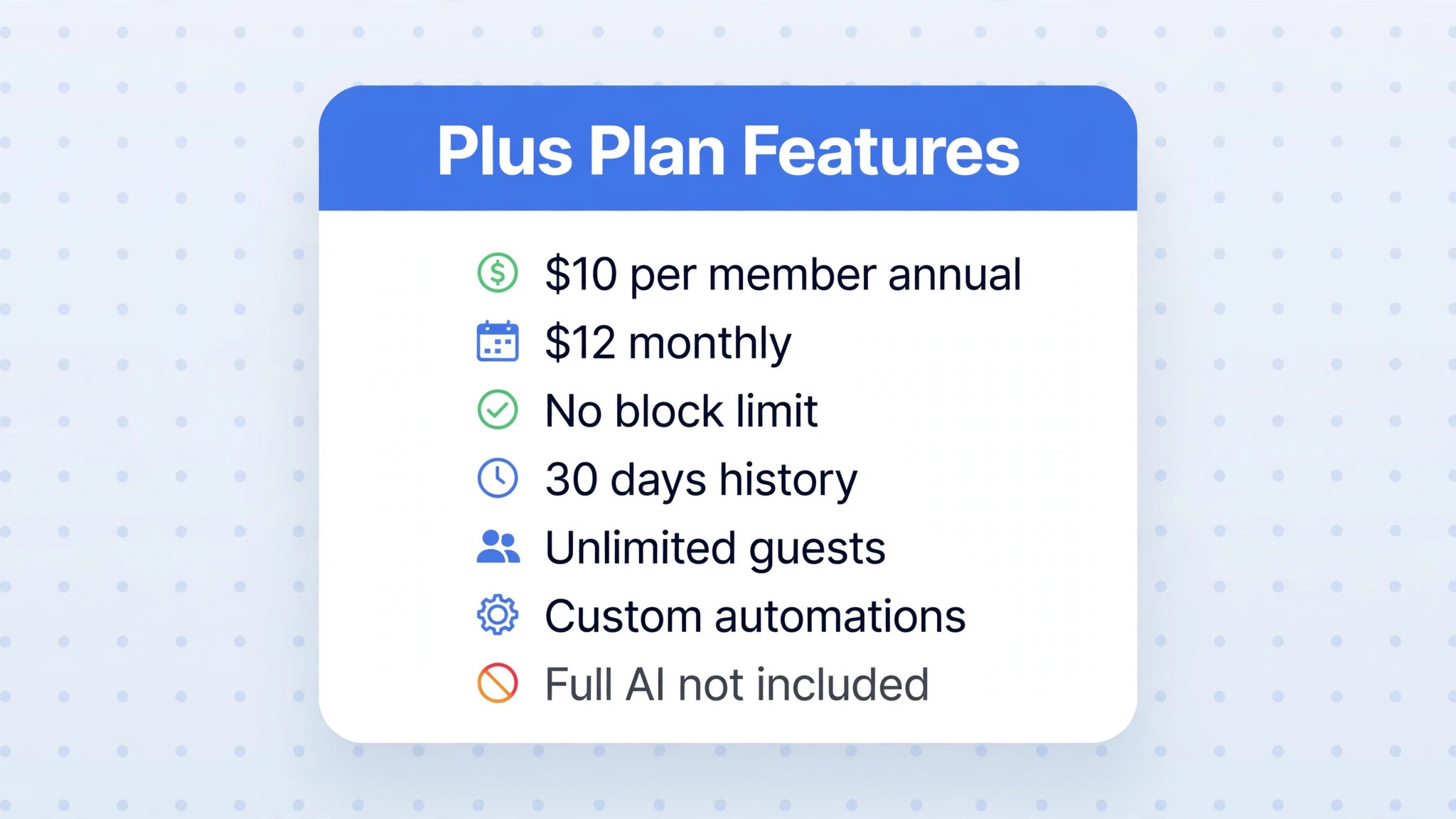
Plus is the tier most small teams start on, at 10 dollars per member per month on annual billing or 12 dollars on monthly billing. It keeps everything in Free and removes the block limit, allows unlimited uploads at around 5 gigabytes per file, extends page history to 30 days, allows unlimited guests and adds custom automations. For a team that uses Notion as a wiki, a project tracker and a content calendar, Plus covers the daily job well and the cost of Notion for small business monthly stays at its lowest paid level on this tier.
The gates on Plus are worth naming plainly. Full Notion AI is not included, so AI Agent, Custom Agents, AI Meeting Notes and Enterprise Search are all out of reach except for the limited trial. Private teamspaces are not included, so a business that wants separate private areas for leadership, finance or HR inside one workspace cannot build them on Plus. SAML single sign on is also absent, which matters once a business starts caring about login security and offboarding staff cleanly.
Choose Plus when the work is documents, databases and light automation, when AI is a nice extra rather than a core workflow, and when the team is small enough that one shared workspace without private teamspaces is fine. A content team, a small agency or a consultancy that lives in docs will be happy here. A team that plans to run meetings through AI notes, search across the whole workspace with AI, or build custom agents should skip Plus and price Business instead, because upgrading later means migrating habits as well as seats.
Business
Business doubles the Plus price to 20 dollars per member per month on annual billing or 24 dollars on monthly billing, and the doubling is justified only if the team uses what it unlocks. Full Notion AI is included, covering Notion Agent, AI Meeting Notes, Enterprise Search, research mode, image generation and AI blocks, with each Business seat receiving a monthly credit allowance for agent use. Private teamspaces, SAML single sign on, bulk PDF export and advanced permissions arrive in the same step, which together turn Notion from a shared notebook into a managed workspace.
The AI inclusion is the headline, but the admin features are what make Business durable for a growing team. Private teamspaces let leadership keep sensitive pages separate without running a second workspace, and SAML single sign on ties access to the business login system so a departing employee loses access in one place. Page history extends to 90 days, which gives a business a full quarter to recover from an editing mistake. None of these features show up in a demo of pretty pages, but all of them matter when the workspace holds real company knowledge.
Business is the right tier for a team that wants AI as a daily tool rather than a trial, that runs meetings it wants summarised automatically, or that needs private areas and stronger access control. It is the wrong tier for a team that only writes docs and tracks projects, because that team pays double for AI and admin features it will never open. The test is simple. If fewer than half the team would use AI weekly, Plus plus a separate AI tool may cost less overall, but if AI use is widespread, Business is cheaper than buying AI anywhere else.

Enterprise
Enterprise is priced by custom quote and is built for organisations with security, compliance and scale requirements that go beyond a typical small business. It adds everything in Business plus SCIM provisioning, an audit log, advanced security controls, unlimited page history and zero data retention with the underlying AI providers. Those features matter for regulated industries, for businesses handling sensitive client data under strict contracts, and for larger organisations that need to prove who accessed what and when.
A small business should treat Enterprise as a requirement driven purchase, not an aspiration. If no client contract, regulator or internal policy demands SCIM, audit logs or zero data retention, Enterprise adds cost without adding daily value. The quote process itself is a signal. A vendor that prices by quote expects a sales conversation about headcount, security needs and contract length, and a small team that enters that conversation without a clear requirement will usually be quoted a price built for a larger buyer.
The one small business case for Enterprise is a team that already runs on Business and wins work that demands the extra controls in writing. In that case the Enterprise premium belongs in the cost of serving those clients, and it should be negotiated as part of those contracts. For every other small business, Business is the ceiling, and money saved by staying off Enterprise is better spent on the work itself.
Members, Guests and the Seat Trap
Notion charges per member, and the difference between a member and a guest is the single most useful billing fact in this guide. Members belong to the workspace and can access teamspaces, while guests are invited to specific pages only and are free on every plan. A client who needs to view a project page, a freelancer who needs to update one document, or an accountant who needs to read one database can usually be a guest. Making those people members is the most common way small teams overpay for Notion.
Adding members mid cycle creates a prorated charge, while removing members does not create a credit. The empty seat stays paid until renewal, when the seat count resets to match the members actually in the workspace. That rule punishes casual seat adding, so a business should add members deliberately and review the member list monthly. Refunds exist for downgrades within three days on monthly billing or 30 days on annual billing, but those windows are short and should not be treated as a safety net for sloppy seat management.
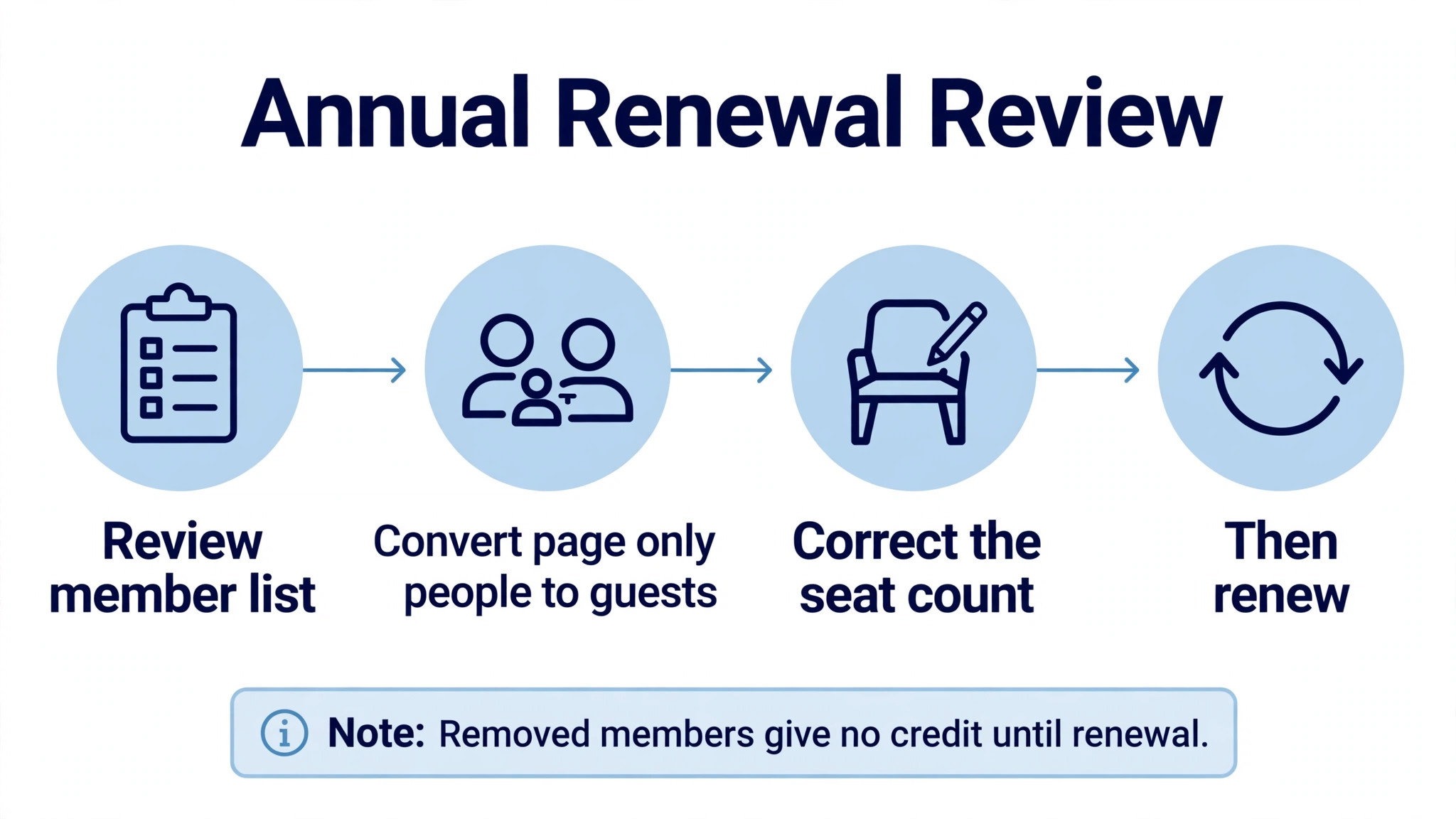
The practical habit is a monthly member review that takes five minutes. List every member, ask whether each person needs teamspace access or only page access, and convert page only people to guests. A 10 person workspace that converts three unnecessary members to guests saves 30 dollars a month on Plus or 60 dollars a month on Business, which is 360 dollars or 720 dollars a year. That saving requires no downgrade, no lost feature and no negotiation, only a little discipline.
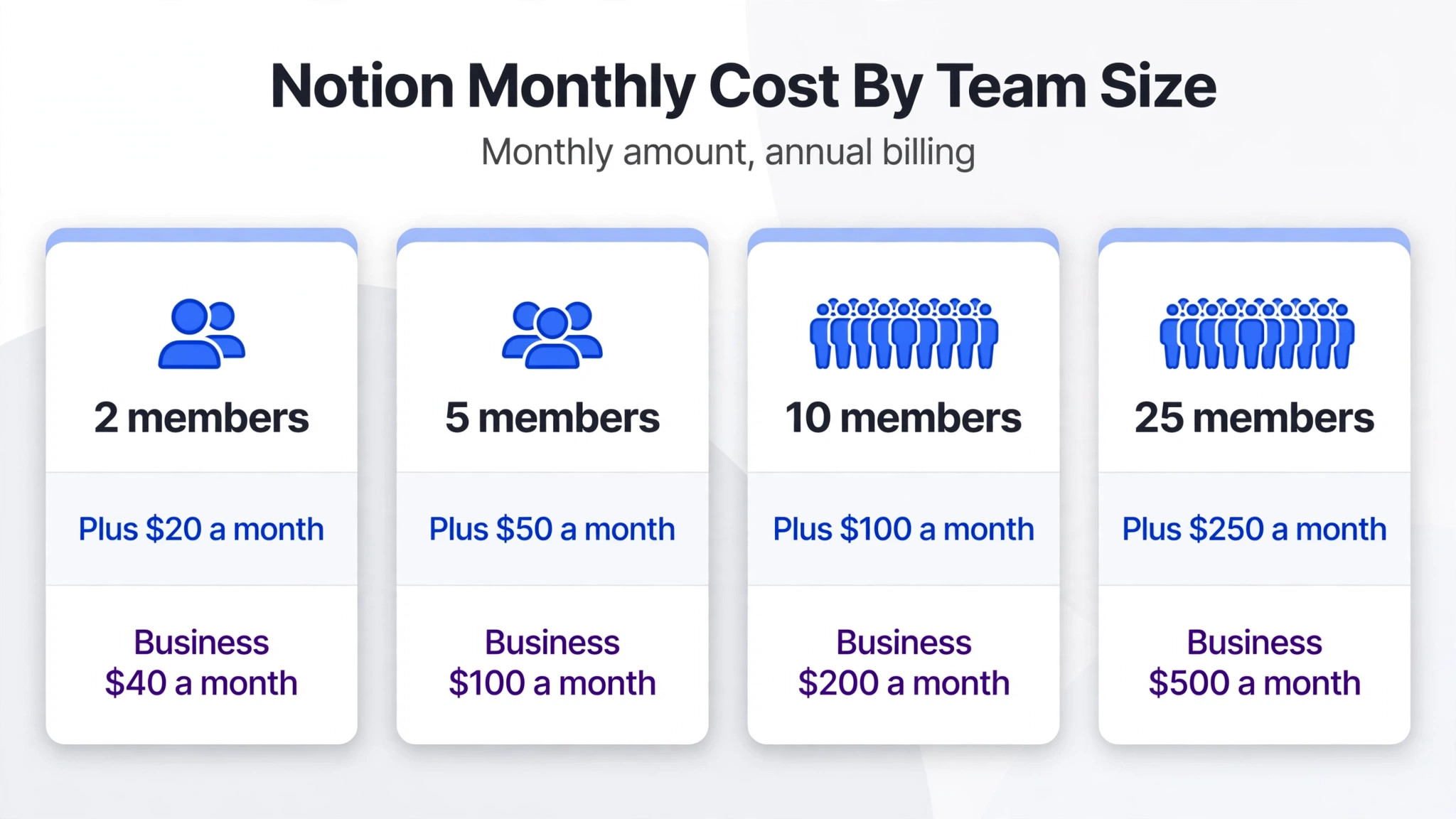
The Cost of Notion for Small Business Monthly at 2, 5, 10 and 25 Seats
The table below prices Plus and Business on annual billing, which is how most established teams pay. Monthly billing figures follow in the paragraph after the table. Enterprise is excluded because it is quoted per organisation, and a guessed figure would mislead more than it helps.
| Team size | Plus annual | Business annual | Plus monthly | Business monthly |
|---|---|---|---|---|
| 2 members | 20 dollars | 40 dollars | 24 dollars | 48 dollars |
| 5 members | 50 dollars | 100 dollars | 60 dollars | 120 dollars |
| 10 members | 100 dollars | 200 dollars | 120 dollars | 240 dollars |
| 25 members | 250 dollars | 500 dollars | 300 dollars | 600 dollars |
Yearly totals make the choice clearer. A 10 member team pays 1200 dollars a year on Plus and 2400 dollars a year on Business, a difference of 1200 dollars that must be earned back by AI use, private teamspaces or admin control.
Monthly billing costs a 10 member Business team 480 dollars more a year than annual billing, and a 25 member Business team 1200 dollars more a year. That premium buys the right to shrink or leave, which is valuable during a trial or a period of uncertain headcount. Once the team size is stable and Notion is embedded in daily work, annual billing is the cheaper habit, and the saving is large enough to matter in a small business budget.
The AI Question
AI is where Notion pricing changed most, and older guides still describe a product that no longer exists for new buyers. The standalone AI add-on, once 8 dollars per member per month on annual billing or 10 dollars on monthly billing, was withdrawn from new sign ups in May 2025, and legacy subscribers who kept it are grandfathered on the old terms. A new team cannot buy that add-on at any price, so any article that prices Plus plus AI as 18 dollars per member is describing a deal that a new buyer cannot get.
For new buyers, full AI lives inside Business at 20 dollars per member per month on annual billing. That bundle covers Notion Agent, AI Meeting Notes, Enterprise Search, research mode and AI blocks, with a monthly credit allowance per Business seat for agent work. Extra agent use beyond the included allowance is metered through Notion credits, reported at 10 dollars per 1000 credits on a monthly basis, and heavy custom agent use can therefore add a variable line to the bill. Most small teams will stay inside the included allowance, but a team that builds agents to process large databases should watch credit use in the first month.
The AI question changes the cost of Notion for small business monthly more than any tier feature, because it forces a choice between two honest prices. A team that wants real AI pays Business at 20 dollars per member, while a team that does not want AI pays Plus at 10 dollars and accepts a trial only. There is no middle price for new buyers, so the business should test AI need before choosing a tier. Run the trial, count how many staff use AI weekly, and let that count decide the tier.
Costs Beyond the Subscription
The subscription is the visible cost, but setup and migration are the costs that catch small businesses off guard. Moving docs, wikis, project trackers and client material into Notion takes staff time, and a workspace built without a clear structure becomes hard to search within months. A team that invests a week in structure, templates and naming rules will get far more value from the same subscription than a team that dumps old files into Notion and hopes search will save them. That week is a real cost, even though it never appears on an invoice.
Training is the second hidden cost. Notion is flexible, and flexibility means new users can build pages in ten different ways, which quickly creates a messy workspace. A short onboarding guide, a template library and a named workspace owner prevent that drift, and they cost a few hours to create. Without them, the business pays in slower onboarding for every new hire and in time wasted hunting for the right page. The subscription stays the same, but the value per dollar falls.
A third cost is the tool stack around Notion. Teams often keep a separate meeting tool, a separate form tool or a separate automation tool because Notion does not cover that job well, and those subscriptions sit on top of the Notion bill. Before judging Notion expensive, a business should add up the tools it replaces. If Notion replaces a wiki, a project tracker and a docs tool, the combined saving may justify Business. If it only replaces a notebook, Plus is the honest price and Business is an indulgence.
Paying Annually Against Paying Monthly
Annual billing saves 2 dollars per member per month on Plus and 4 dollars per member per month on Business compared with monthly billing. For a 10 member team that is 240 dollars a year on Plus or 480 dollars a year on Business, and for a 25 member team it is 600 dollars or 1200 dollars a year. Those savings are worth having once the team is settled, and they are the reason most established Notion workspaces pay annually. The discount is only a saving, however, if the seats stay filled.
Monthly billing suits three situations. The business is still testing whether Notion fits its work, the headcount is seasonal or project based, or cash flow is tight and a yearly lump sum would hurt. In those cases the premium buys flexibility, and flexibility is worth more than the discount. A sensible pattern is to pay monthly for the first quarter, confirm the tier and the member count, and then switch to annual billing when the numbers stop moving. Notion allows that switch, and the business loses nothing by waiting one quarter to commit.
One more billing detail matters. Because removing a member does not create a credit until renewal, annual billing punishes a team that adds people casually and then shrinks. Review the member list before renewal, convert page only people to guests, and only then renew at the corrected count. That review is the difference between an annual bill that reflects the real team and one that reflects last year’s hiring plan.
Errors That Push the Bill Up
The most expensive error is buying Business for AI that the team never uses. Business doubles the Plus price, and if only two people in a 10 member team use AI weekly, the business pays an extra 100 dollars a month for eight seats that gain nothing. Test AI use during the trial, count weekly users honestly, and buy Business only when the count justifies it. An error in the cost of Notion for small business monthly usually starts here, with a tier chosen for a feature rather than for measured use.
The second error is member inflation. Every freelancer, client and part timer added as a member adds 10 dollars or 20 dollars a month, and those seats accumulate quietly. A workspace that started with five members can drift to twelve without anyone noticing, because adding a member feels free in the moment. The fix is the monthly member review described earlier, and it is the cheapest saving available to any Notion customer.
The third error is ignoring page history and export needs until they matter. A team on Free that loses work older than seven days, or a team on Plus that cannot recover a page from two months ago, learns the value of history at the worst possible moment. If the business holds client work, contracts or compliance material in Notion, 90 days of history on Business is not a luxury, it is insurance. Price the tier that protects the work, not just the tier that holds it.
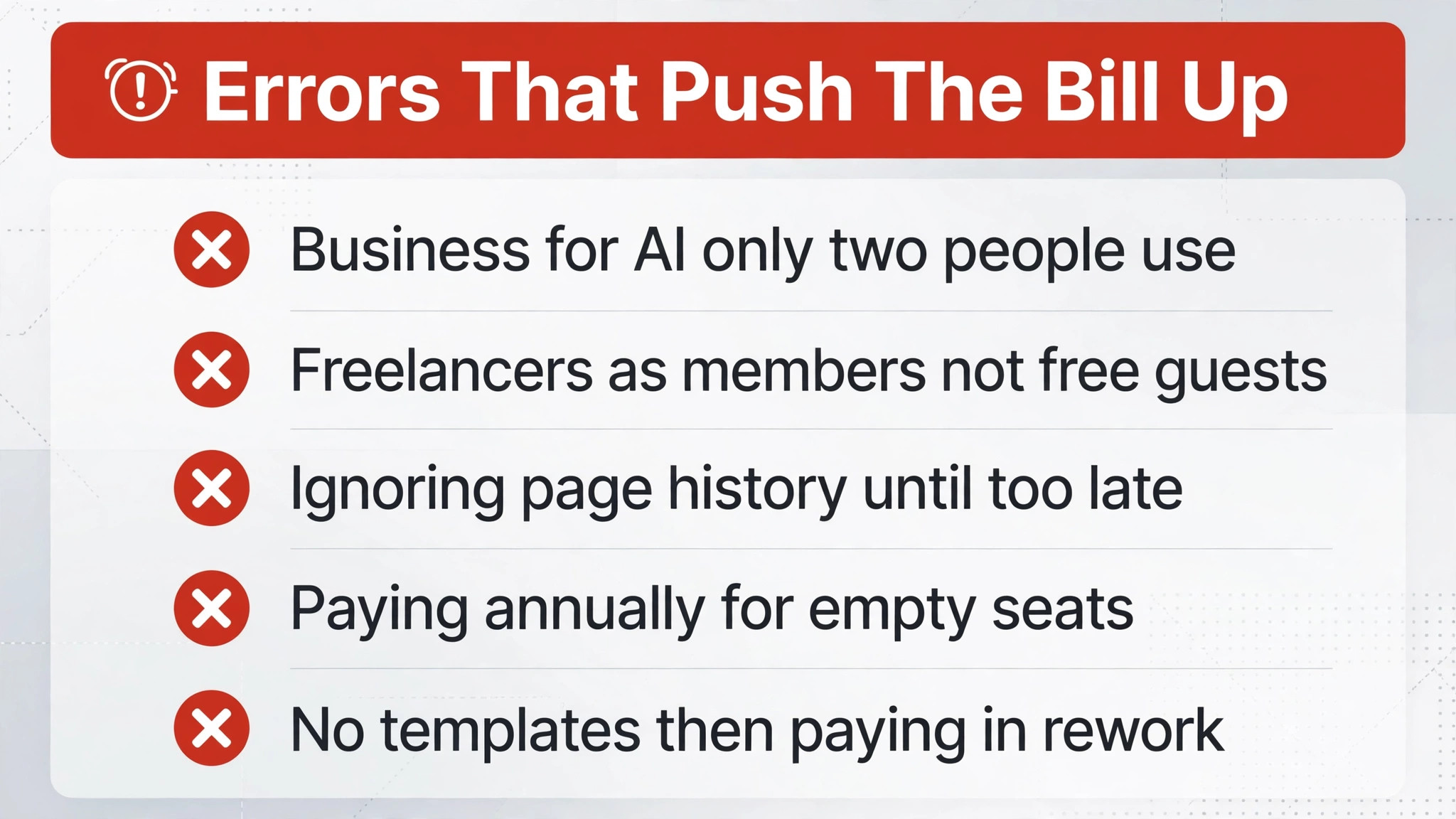
– Buying Business for AI that only two people use each week – Adding freelancers and clients as members instead of free guests – Ignoring page history until a deleted page cannot be recovered – Paying annually for seats that will be empty within months – Building a workspace without templates, then paying in rework later
How to Choose Without Overpaying
Start with a two week trial on real work. Move one live project, one team wiki section and one recurring meeting workflow into Notion, invite the people who will actually use it, and track three numbers. How many members were truly needed, how many guests covered the rest, and how many staff used AI in a normal week. Those three numbers answer the tier question better than any feature list, because they describe the business rather than the product.
Then price the team three ways. Price it on Plus, price it on Business, and price it with unnecessary members converted to guests. If Business only wins when AI use is high, and AI use is currently low, choose Plus and revisit the question in a quarter. If guest conversion alone saves more than the tier difference, fix the seats first and then choose the tier. The cheapest honest bill is usually found by fixing seats before upgrading tiers.
Finally, assign a workspace owner. One person should own templates, member reviews and the renewal check, and that ownership should be written down rather than assumed. Software costs rise when no one owns them, and Notion is no exception. A workspace with an owner stays tidy, stays correctly sized and stays on the right tier, while a workspace without one drifts upward in cost and downward in usefulness at the same time.
The Final Call by Team Type
A solo owner should stay on Free until a second member joins, then move to Plus if the work is docs and databases only. A small content team, agency or consultancy that lives in documents and project trackers will be well served by Plus at 10 dollars per member per month on annual billing, provided AI is not a daily need. That team gets unlimited uploads, 30 days of history and unlimited guests for the lowest paid price, and it should resist Business until AI use proves itself.
A team that runs meetings through AI notes, searches a growing knowledge base with AI, or builds custom agents should budget for Business from the start. At 20 dollars per member per month on annual billing, Business is double the Plus price, but it is still cheaper than buying a separate AI meeting tool, a separate search tool and a separate agent tool for the same staff. For that team, the cost of Notion for small business monthly is best judged against the stack it replaces, not against Plus alone.
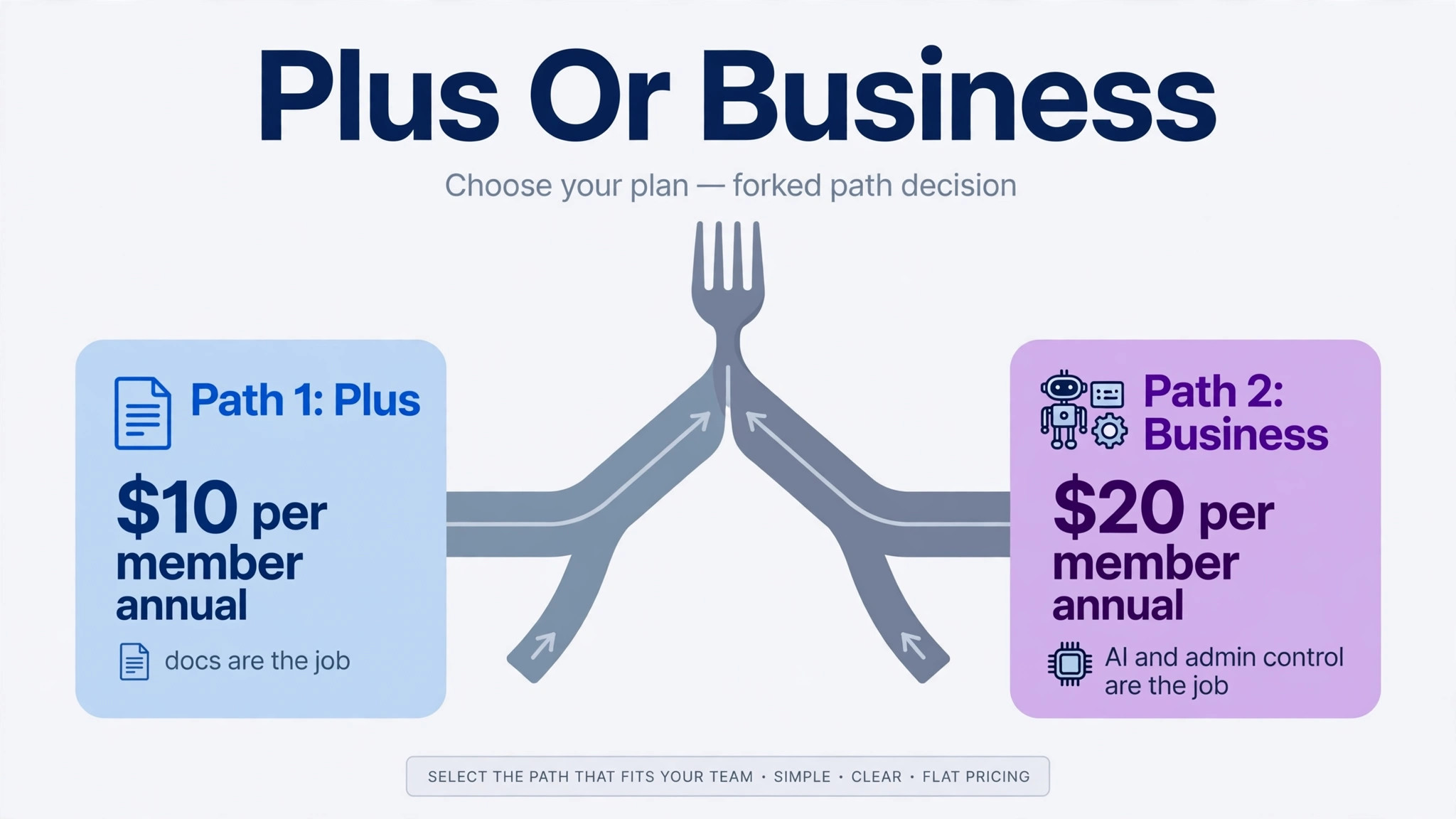
Enterprise belongs to businesses with compliance, audit or security requirements in writing, and a small business without those requirements should not pay for it. The final call is therefore simple for most readers. Choose Plus when docs are the job, choose Business when AI and admin control are the job, keep guests free, review members monthly, and let measured use rather than marketing decide any upgrade.
More Reading on Stratilyze
The guides below sit next to a Notion decision, covering project tools for distributed teams and the switch from Airtable to Notion for database led work.
– Project management tool for remote teams – Project management software for interior designers – Switch Airtable to Notion for a database team
Frequently Asked Questions
Is Notion free for a small business team?
Notion Free costs nothing for one person with unlimited pages and blocks, but a workspace with two or more members gains a block limit, and once that limit is reached the team cannot add new content. Uploads are capped at 5 megabytes per file, page history at seven days and guests at 10. A team of two or more doing real client work should treat Free as a trial and budget for Plus or Business, because building operations inside a plan that blocks new content is a risk, not a saving.
Why does the cost of Notion for small business monthly double from Plus to Business?
Business costs 20 dollars per member per month on annual billing against 10 dollars for Plus, and the difference buys full Notion AI, private teamspaces, SAML single sign on, bulk PDF export and 90 days of page history instead of 30 days. The AI bundle is the main reason for the jump, since new buyers cannot purchase AI separately. A team that uses AI weekly across most seats will find Business good value, while a team that only writes docs will find it an expensive way to buy features it never opens.
Can new buyers still purchase the Notion AI add-on separately?
No, for new sign ups the standalone AI add-on was withdrawn in May 2025, and full AI now ships inside Business and Enterprise. Legacy subscribers who kept the old add-on are grandfathered, but a new team that wants real AI must buy Business at 20 dollars per member per month on annual billing. Free and Plus include only a limited trial of AI, so a team should test that trial honestly before assuming Plus will cover its AI needs.
Are guests really free on Notion?
Yes, guests invited to specific pages are free on every plan, while members who belong to the workspace are charged. Guests cannot access teamspaces, only the pages shared with them, which makes them ideal for clients, freelancers and reviewers who need one document or one project page. Converting page only people from members to guests is the fastest saving available, worth 10 dollars a month per person on Plus or 20 dollars on Business.
What happens if a team removes a member mid cycle?
Removing a member does not create a credit. The empty seat stays paid until renewal, when the seat count resets to match the members actually in the workspace. Adding a member mid cycle creates a prorated charge instead. That asymmetry means a business should add members deliberately, review the member list monthly, and correct the count before renewal rather than expecting a refund for seats removed during the year.
Is Business worth it for a team that does not use AI?
Usually not, and this is where the cost of Notion for small business monthly is most often overstated. Without AI use, Business still adds private teamspaces, SAML single sign on and 90 days of page history, but most small teams do not need those features urgently enough to justify doubling the bill. Plus at 10 dollars per member per month on annual billing covers docs, databases, unlimited uploads and unlimited guests. Buy Business when AI use, private areas or login security become real weekly needs, and revisit the decision each quarter as the team grows.