

Most small business blogs die the same way. The owner publishes ten posts in a burst of enthusiasm, traffic stays flat for three months, the owner concludes blogging does not work, and the site sits untouched for two years while competitors publish steadily. The problem is rarely the writing quality. The problem is that the ten posts answered questions nobody keeps asking, so each post had a short life and then stopped earning visits. An evergreen content strategy small business owners can actually maintain fixes this by choosing questions customers ask every month of every year, answering them completely once, and refreshing the answers on a schedule instead of chasing a new topic every week.
An evergreen content strategy small business owners can maintain in four hours a month
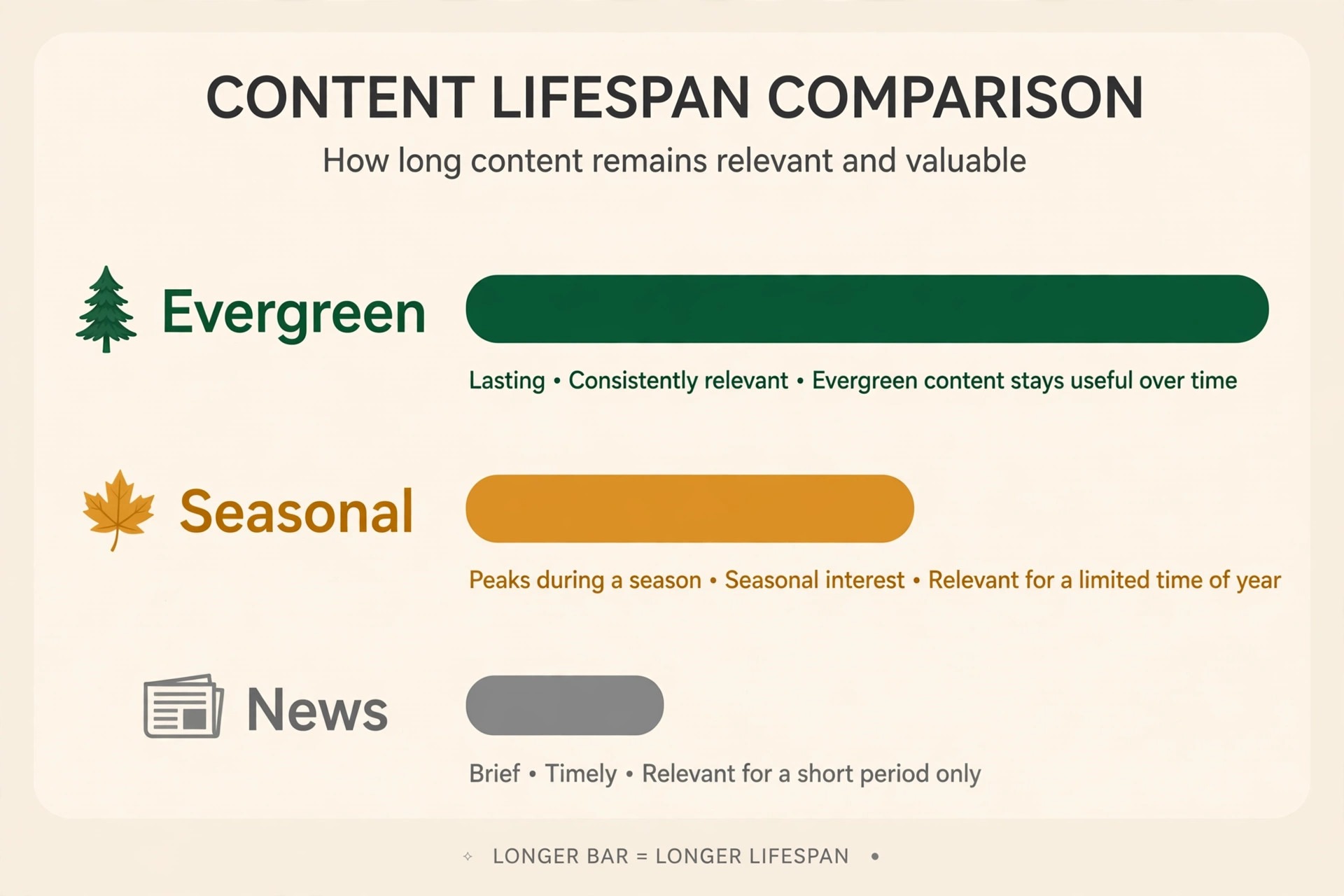
Evergreen content answers a question with steady demand and a slow changing answer. A guide to choosing the right size of water heater, a comparison of two payroll methods, or a checklist for preparing a shop for a health inspection will matter in three years almost as much as it matters today. A post about a platform update, a seasonal sale, or a trending tool will matter for three weeks and then fade. Both kinds of content have a place, but a small business with limited hours should build its foundation from the first kind, because one evergreen post can earn visits for years while a news post earns visits for days and then needs replacing.
The four hour month is realistic if the system is small. One hour goes to checking which existing posts slipped in traffic or contain outdated facts. One hour goes to refreshing one post properly, updating facts, links, examples, and the call to action. One hour goes to writing or outlining one new evergreen post from the question list. One hour goes to publishing, internal linking, and sharing the refreshed post once.
That rhythm produces twelve refreshed posts and twelve new posts a year, which is enough to build a library of forty to sixty strong pages within three years. A business that publishes four thin posts a month and never refreshes anything will have more pages and less traffic, because search engines reward pages that stay accurate and complete, not sites that accumulate dated drafts.

The difference between evergreen, seasonal, and news content
Evergreen content is often confused with content that simply avoids dates, but avoiding a year in the title does not make a post evergreen. The test is whether the core question stays the same. A post explaining how to register a food business answers a question that changes slowly, because registration steps change when rules change, not every month. A post reviewing the best booking app of the year answers a question that changes constantly, because apps change prices and features every quarter. Both posts can be useful, but only the first belongs in the evergreen core, and the second belongs in a review schedule with a planned update date written into the calendar at publication time.
Seasonal content sits between the two. A guide to preparing a garden centre for spring will spike every spring and sleep the rest of the year, which is fine if the business expects that pattern and refreshes the guide each winter before the spike. The mistake is treating seasonal content as evergreen and leaving it untouched for three years, so the spring spike arrives on a page with old prices, closed suppliers, and broken links.
News content, such as a reaction to a regulation change or a new product launch, earns a fast spike and then fades, and its value is in being first and accurate, not in lasting. A sensible library holds roughly seventy percent evergreen pages, twenty percent seasonal pages refreshed on schedule, and ten percent news or opinion pages that are allowed to age without guilt.
Finding questions customers keep asking
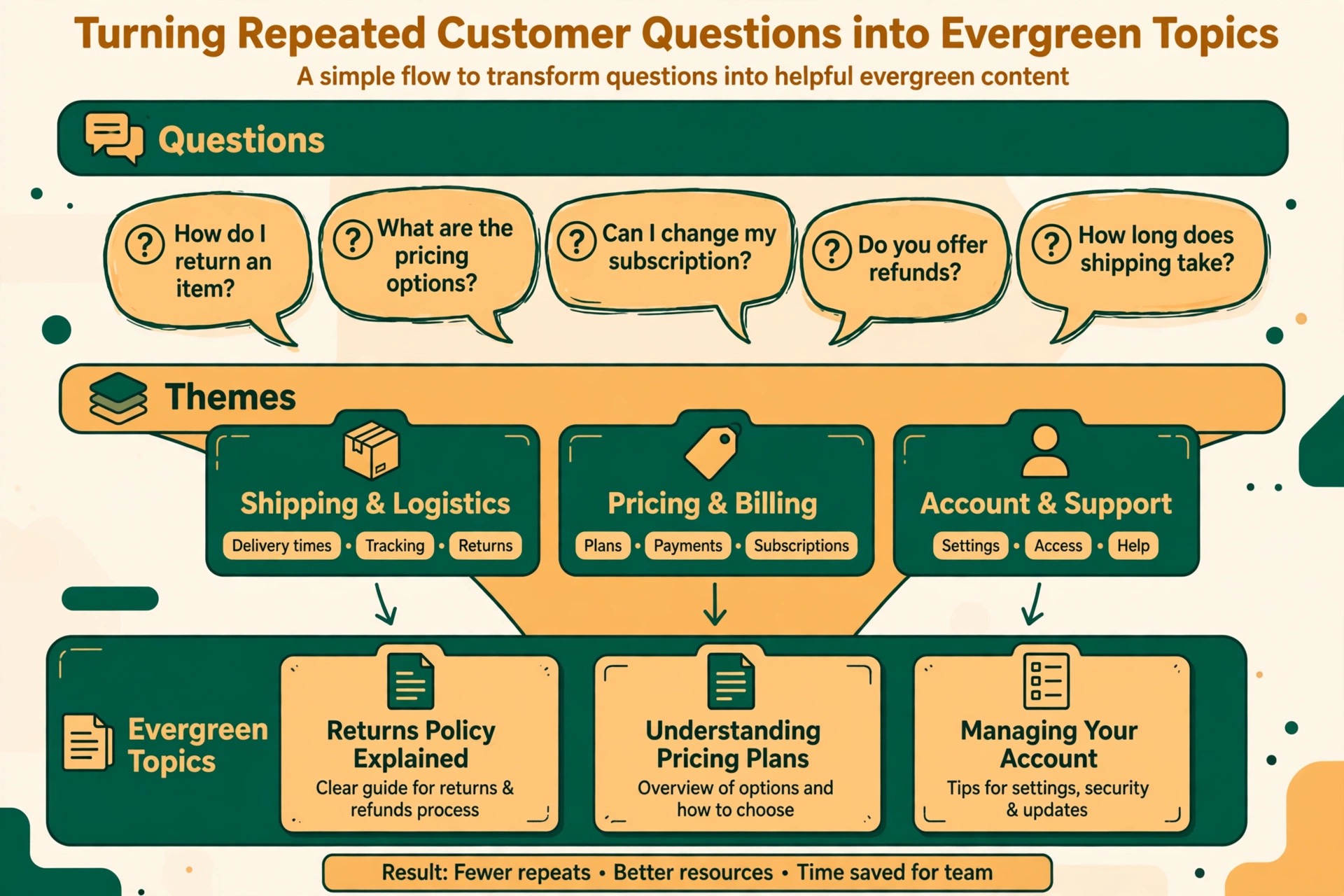
The best evergreen topics come from real customer conversations, not from keyword tools alone. Start with the questions your team answers every week, such as how much a service costs, how long a job takes, what a customer should prepare before an appointment, and how two options compare. Write down every repeated question for a month, and you will have a topic list that no keyword tool can match, because it reflects what buyers in your market actually worry about. Add the questions customers ask after buying, such as how to maintain a product or how to get the most from a service, because post purchase questions reveal the anxieties that stop the next buyer from deciding.
Keyword research still matters, but it should validate the list, not replace it. Check whether each question has steady search interest across the year rather than a single spike, and check what the top ranking pages cover that your draft should cover better. A question with modest but steady demand and weak competing pages is worth more to a small business than a high volume question dominated by large publishers, because the small business can actually rank for the first and will never rank for the second.
Also check the question behind the question. A search for a service price is often really a search for whether the service is worth the price, so the post should answer both the number and the value, with a clear breakdown of what the price includes.
The topic test every evergreen idea must pass
Run every candidate topic through four checks before writing. First, will this question still be asked in three years in roughly the same words. If the answer depends on a specific product version, a current event, or a trend, the topic fails the test or needs reframing around the underlying problem. Second, can a small business answer this question better than the pages already ranking, through local detail, real examples, original photos, or a clearer structure. If the top pages already answer it completely, pick a narrower angle, such as the same question for a specific customer type or a specific situation.
Third, does the topic connect to a service the business actually sells, so a reader can take a sensible next step. A post that attracts readers who will never buy wastes the hours spent writing it, however good the traffic looks. Fourth, can the post be refreshed without a full rewrite, because a post whose facts change every quarter is a maintenance burden disguised as an evergreen asset. Topics that pass all four checks go on the writing list. Topics that fail one check get reframed or dropped, and dropping a weak topic is a success, not a loss, because every weak post is hours that could have built a strong one.
Structuring a page so it lasts for years
An evergreen page should be built so sections can be updated independently. Write a short answer at the top that gives the reader the core answer in two or three sentences, then follow with complete sections that each answer one sub question. A reader who only needs one section should be able to find it from the headings and read it alone, and an editor refreshing the page should be able to update one section without rewriting the whole post.
Keep the page address stable and free of years, seasons, and trend words, because changing an address breaks links and resets the authority the page has built. If the title needs a year for a review post, keep the address timeless and update the title on the same address.
Avoid tying the body text to dates wherever possible. Write about rules, processes, and comparisons in a way that stays true until the facts change, and put genuinely time sensitive details, such as current prices or current versions, in one clearly marked section that the refresh checklist targets first. Use original examples from your own work where you can, because generic examples age faster than real ones and give the reader no reason to trust your page over a competitor page.
End every evergreen page with a next step that matches the reader intent, such as booking a consultation, downloading a checklist, or reading the comparison that follows naturally from the topic, rather than a generic contact form link that ignores what the reader just learned.
The content calendar template
A calendar template turns good intentions into a publishing rhythm a busy owner can keep. The template below covers one month, and it repeats with new topics each month. It assumes four hours a month, one new post, and one refresh, which is the minimum rhythm that compounds. Businesses with more time can double the rhythm, but they should double it by adding a second refresh before adding a second new post, because refreshing a page that already ranks usually earns more visits per hour than writing a new page from zero.
| Week | Task | Time | Output |
|---|---|---|---|
| Week 1 | Review traffic and pick one post to refresh | 1 hour | One refresh brief with outdated facts listed |
| Week 2 | Refresh the chosen post and republish it | 1 hour | Updated post with new facts and links |
| Week 3 | Draft one new evergreen post from the question list | 1 hour | Complete draft ready for editing |
| Week 4 | Edit, publish, link, and share the new post | 1 hour | Live post with internal links added |
The question list itself needs its own rhythm. Once a quarter, spend thirty minutes adding new repeated customer questions to the list and removing topics that have been covered or that no longer match the services offered. A question list that never gets pruned fills with stale ideas, and a calendar built on stale ideas produces posts nobody needs. Keep the list short, around twenty questions at a time, ordered by a mix of search demand and business value, so the next topic is always obvious and no week is lost deciding what to write.
The refresh checklist, step by step
A refresh should improve the content itself, not just change the date. Start by rechecking search intent, because the question behind a keyword can shift over time as products change or new solutions appear. Read the top ranking pages again and note any sub question they now answer that your page misses. Then update every fact, statistic, price, screenshot, and example that has changed, and remove claims you can no longer verify. A page with one outdated price loses trust for its other ninety nine correct sentences, because readers assume the rest is equally stale once they spot one error.
Next, fix the structure. Tighten headings so they match the questions readers actually ask, add a short answer at the top if the page lacks one, and break up any paragraph that grew long through past edits. Then repair links, both internal and external, replacing broken links and adding links to newer related posts published since the original went live. Update the images and their descriptions, because a screenshot from three years ago signals neglect even when the text is current.
Update the call to action to match the current offer, and add a genuine last updated note that reflects real changes. Finally, share the refreshed post once through the channel that already reaches your audience, and ask search engines to recrawl it through Search Console if you use it. An evergreen content strategy small business owners run well treats this checklist as a job sheet, not a vague intention, and keeps a copy with each post record.
– Reconfirm search intent and read the current top ranking pages before editing. – Update facts, prices, statistics, screenshots, examples, and product names. – Remove claims, links, and offers that can no longer be verified. – Tighten headings, add a short answer at the top, and split long paragraphs. – Fix broken links and add internal links to newer related posts. – Refresh images and descriptions so the page does not look dated. – Update the call to action to the current offer and add a genuine last updated note. – Share the refreshed post once and request recrawling where the tools allow.

How often to refresh each type of page
High traffic pages deserve a review every three to six months, because they earn the most visits and any decay costs the most. Mid traffic pages can be reviewed twice a year, and low traffic pages once a year, unless a fact change forces an earlier update. A page about a regulated process should be reviewed whenever the regulation changes, regardless of the calendar, because an outdated compliance page can mislead a customer into a costly mistake. Set a review date for every page at publication time, and store it in the same sheet as the calendar, so no page drifts for years simply because nobody owned its next check.
Deciding between a light update, a full overhaul, and a consolidation is part of the schedule. A light update fixes facts, links, and examples, and suits a page that still ranks and still matches intent. A full overhaul rewrites structure and adds missing sections, and suits a page that has slipped badly or that now misses the main sub questions. Consolidation merges two or three thin pages on the same question into one strong page, with redirects from the weaker addresses, and suits a library that grew by accident with overlapping posts.
Deletion is the last option, reserved for pages that no longer match the business, attract no visits, and cannot be reframed. A library that is pruned deliberately stays stronger than a library that only grows, because every weak page dilutes the attention the strong pages deserve.

Writing new evergreen posts without burning out
The fastest way to burn out on content is to treat every post as a blank page challenge. Use a repeatable brief instead. Every brief names the question, the reader, the short answer, the five to eight sub questions the post must answer, the proof or example each section needs, and the next step the reader should take. Writing from a brief is faster because the decisions are made before drafting starts, and the resulting post is more complete because the sub questions were chosen deliberately.
Keep a bank of briefs, so a writing hour never starts with choosing a topic, and write the brief for the next post during the current post publishing week, while the topic is fresh in mind.
Batching also helps. Research three briefs in one sitting, draft one post per sitting, and edit on a different day from drafting, because editing while drafting slows both jobs. Use the same structure across posts only in the loosest sense, varying openings, examples, and section order so posts do not read as fill in templates. A reader who opens two posts and finds the same skeleton with different nouns will trust neither.
Vary the proof as well, using a worked example in one post, a comparison table in the next, and a checklist in the one after, so each post earns its length with material that fits its question. For a wider view of planning, read Content Marketing Strategy and a practical guide to Planning a Month of Social Media Content.
Measuring an evergreen library honestly
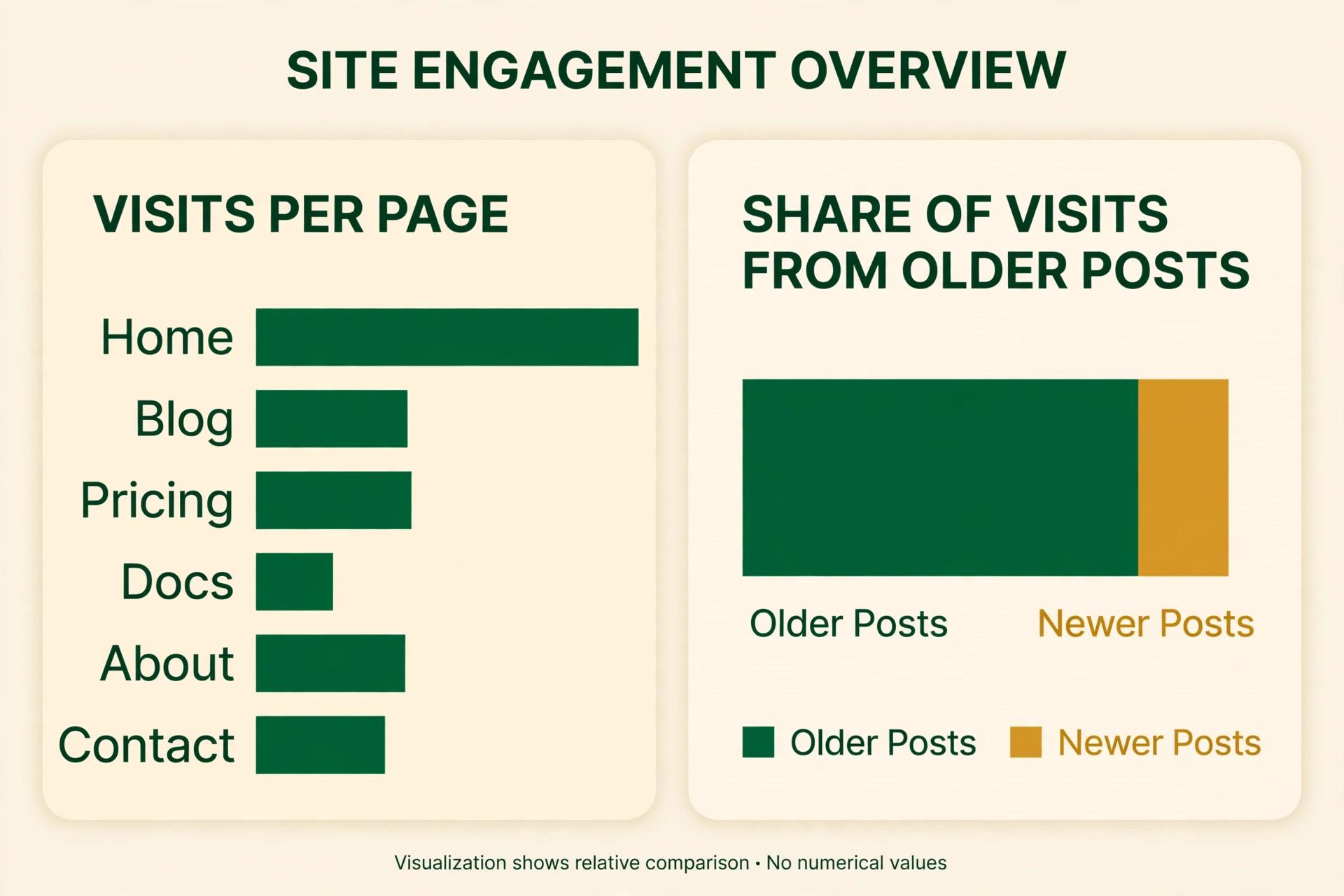
Traffic alone flatters an evergreen library, because a rising total can hide a falling core. Track visits per page, and flag any page that loses a quarter of its visits over two consecutive quarters. Track the share of visits that come from posts older than six months, because a healthy evergreen library should earn most of its visits from older pages. Industry data often cited for this pattern notes that a large share of blog traffic, around three quarters in one well known HubSpot figure, comes from older posts, and while your share will differ, the direction matters. If nearly all visits come from new posts, the library is not compounding, it is running on a treadmill.
Also track conversions per page, not just visits. A page that earns a thousand visits and no enquiries is less valuable than a page that earns a hundred visits and five enquiries, and the second page deserves the refresh budget first. Track the number of pages earning at least one visit a month, because a library where half the pages earn nothing is a library with dead weight that should be consolidated or reframed.
Review these numbers quarterly, in the same sitting as the calendar review, so measurement leads to decisions instead of reports nobody reads. An evergreen content strategy small business owners keep for years is measured by enquiries and steady visits per page, not by the total number of posts published.
Mistakes that turn evergreen plans into graveyards
The first mistake is writing for search engines instead of for the question. A post stuffed with keyword variations but thin on answers may rank briefly, then fade as readers bounce and better pages overtake it. Write the complete answer first, in words a customer would use, and let the keywords fall where they naturally belong. The second mistake is publishing without a review date. A post with no owner and no next check will age silently, and by the time traffic falls, the facts may be so outdated that a light refresh cannot save it. Write the review date into the post record on publication day, every time, without exception.
The third mistake is refreshing only the date. Readers and search engines both notice when a last updated note changes but the content does not, and the tactic burns trust that takes months to rebuild. The fourth mistake is chasing volume over coverage. Twenty thin posts on twenty related questions lose to five complete posts that answer each question fully, because readers and search engines prefer the page that ends the search.
The fifth mistake is ignoring internal links. An evergreen page that no other page links to is hard for readers to find and slow to build authority, so every new post should link to the two or three older posts it relates to most, and every refresh should add links to newer posts. A library linked together compounds. A library of isolated pages does not.

Building the first ten evergreen posts
The first ten posts set the pattern for the whole library, so choose them as a set rather than one at a time. Cover the five questions every buyer asks before choosing a business of your kind, such as what the service costs, how long it takes, how to choose between the main options, what to prepare beforehand, and what happens after the job.
Then add three posts that answer the most common post purchase questions, because those posts reassure buyers who are close to deciding and reduce support messages later. Finish with two comparison posts that place your approach honestly against the main alternatives, since comparison readers are usually near a decision and value a straight answer over a sales pitch.
Write the ten posts in order of business value, not in order of search volume, because the post that answers the question asked by your best customers matters more than the post that might attract a large but irrelevant audience. An evergreen content strategy small business owners start well is one where the first ten posts map to real revenue, so early results encourage the owner to keep going. Publish one post per week if time allows, or one per fortnight if it does not, and link each new post to the earlier posts it relates to, so the set grows into a connected guide rather than ten isolated pages.
An evergreen content strategy small business owners can measure from the start should record the publication date, the review date, and the main question for each post in one sheet, because that sheet becomes the maintenance system for the whole library.
After the tenth post, pause and review before writing the eleventh. Check which posts already earn visits, which ones readers finish, and which ones lead to enquiries, using the simplest analytics available. The pattern in those ten posts will tell you more about your audience than any planning document, and the next ten topics should follow that pattern. An evergreen content strategy small business owners refine this way improves with every batch, because each review sharpens the topic test for the next round. Resist the urge to double output after a good first batch, since the refresh habit matters more than the publishing speed, and a library of ten strong, maintained posts will outperform thirty neglected ones within a year.
Frequently Asked Questions
How long does evergreen content take to rank?
Most evergreen posts take three to six months to reach their steady traffic level, because search engines need time to test a new page against existing results and because authority builds through links and reader behaviour. A post that targets a narrow question with weak competition can rank faster, while a post in a crowded topic can take longer. Judge a post after six months of accurate, complete content, not after six weeks, and use the waiting period to refresh older posts and build internal links rather than rewriting the new post repeatedly.
How many evergreen posts does a small business need?
A library of forty to sixty strong evergreen pages covers most small businesses well, because that range usually answers the core questions across services, comparisons, costs, preparation, and aftercare. A business with many distinct services may need more, while a single service business may need fewer. The number matters less than coverage, so map the library against the real customer journey, from first question to post purchase care, and fill the gaps before adding second posts on questions already answered.
Should evergreen posts mention the current year?
Avoid years in the address and in the title unless the post is genuinely a review that must be updated yearly. A year in the title forces a yearly title change and signals to readers that the post may expire, which weakens the evergreen promise. If a post covers a product that changes yearly, keep the address timeless, update the title on the same address when a real update happens, and record the update in the calendar so the yearly revision is planned rather than panicked.
What is the difference between refreshing and rewriting a post?
A refresh updates facts, links, examples, images, headings, and the call to action while keeping the structure and the core answer intact. A rewrite changes the structure, the angle, or the main answer, and suits a post whose intent has shifted or whose ranking has collapsed. Most maintenance work is refreshing, and a post that needs rewriting every year was probably not evergreen in the first place. If a post needs a third rewrite, consider whether the topic should be reframed around a more stable question.
Can an evergreen content strategy small business owners run work with only four hours a month?
Yes, four hours a month works when the system is small and consistent, because twelve refreshed posts and twelve new posts a year build a strong library within three years. The rhythm fails only when hours are spent on news topics, on posts without a review date, or on volume without coverage. Protect the four hours as a fixed appointment, use a brief for every post, and measure visits and enquiries per page quarterly so the limited hours go to the pages that earn the most.
When should an old post be deleted instead of refreshed?
Delete a post only when it no longer matches the services offered, earns almost no visits, and cannot be reframed around a question customers still ask. Before deleting, check whether its visits could be saved by merging it into a stronger related post, because a redirect preserves whatever authority the old page built. Deleting a page that still earns visits or links throws away work for no benefit, so deletion should be rare, deliberate, and recorded, not a bulk cleanup driven by a desire for a tidy post count.
The Evergreen Verdict for a Small Business
Start with the question list, not with a keyword tool. Write down the questions customers already ask every week, test each one for lasting demand and business fit, and publish one complete post and one proper refresh each month. Keep every address timeless, every post on a review schedule, and every refresh honest, improving facts and structure rather than just changing a date. After a year, the library will hold twelve new pages and twelve strengthened pages, and after three years it will hold a body of work that earns visits while you are busy serving customers.
That compounding return is the whole reason evergreen content suits a small business, because it turns limited hours into an asset that keeps working long after the writing hour ends.