
Move first, and only if the numbers and the brand system both point the same way. That is the verdict on whether to switch Canva to Adobe Express team by team, because the subscription saving is real but the rebuild work is real too. Adobe Express usually costs far less per seat than Canva Business, and it fits teams that already live in Adobe tools or need stronger stock and font depth. Canva still wins for teams that depend on its huge template library, its document and whiteboard range, and a gentler learning curve for non-designers. If your team publishes mostly social posts, ads, and short videos, and your brand rules are already written down, the move pays.
If your team lives in Canva Docs, whiteboards, and dozens of niche templates, stay put until you have tested replacements.
This guide gives you the decision work first, then a four week plan. You will get a brand kit mapping table, template migration steps in priority order, pricing maths for teams of 5, 10, and 25, and a cutover checklist. Prices quoted here reflect publicly listed United States figures checked in October 2026, and they vary by region and change often, so check the official pricing page and checkout before you pay for either tool.
The Verdict First. Who Should Move and Who Should Stay
Teams that switch Canva to Adobe Express team wide usually do it for one of three reasons, and you should be honest about which one is yours. The first is cost. Canva Business is listed at 25 dollars per person per month on monthly billing, or 250 dollars per person per year, while Adobe Express for Teams is widely listed at a first year rate near 4.99 dollars per person per month and a regular rate near 7.99 dollars, with a two seat minimum. For a team of 10, that gap is roughly 1,500 dollars a year even after you allow for price changes. The second reason is the Adobe link.
If designers on your team already use Photoshop or Illustrator, Express lets finished assets move between tools with less rework, and Creative Cloud All Apps plans already include Express Premium, which can make the extra cost zero for those seats. The third reason is commercial safety for AI images. Adobe Firefly is trained on licensed stock and public domain material, which gives careful marketing teams a clearer story for client work than a general purpose generator.
Stay on Canva if your daily work depends on things Express does not match. Canva offers a far larger template library, plus documents, presentations, whiteboards, websites, and print products in one account. Teams that run docs, brainstorm boards, and client decks in Canva will feel that loss more than the subscription saving. Canva is also easier for a new hire to use with no training. Express menus, file handling, and account structure take longer to learn, and that cost lands in the first two weeks when the team is already rebuilding templates.
A useful test is to list your ten most used Canva designs from the last month and rebuild three of them in Express during a trial. If they look right, export cleanly, and take no more than twice as long as the originals, the migration is viable. If one depends on a Canva only feature, such as a Magic Studio effect or a document format, price that gap honestly. Either find an Express workaround before you commit, or keep that workflow in Canva and move only the social and ad work.
What Actually Changes When You Move
The editor is the first change your team will feel. Canva is built around a single canvas with a huge template catalogue and a long list of built in apps. Adobe Express is built around quick creation, strong photo and video tools, and a deep link to Adobe Stock and Adobe Fonts. Both handle social posts, flyers, short videos, and simple presentations well. The difference shows up at the edges. Canva covers more everyday formats in one place, including documents and whiteboards. Express covers stock, fonts, and Adobe file compatibility in more depth, with more than 200 million Adobe Stock assets and more than 30,000 fonts listed for Premium users.
If your team constantly hunts for the right photo or the exact brand font, Express feels richer. If your team constantly hunts for the right template, Canva feels richer.
Brand control changes shape rather than disappearing. Canva Business supports up to 100 brand kits with approvals, shared folders, and template locking, so an admin can stop a sales rep from changing a logo colour or stretching a headline. Express Premium includes brand kits too, and Express for Teams adds shared brand libraries and an Admin Console for managing licences. The controls are not identical, so do not assume a one to one copy. Retest template locking, approval flows, and folder permissions in Express with your actual roles, not just on a feature page.
Fonts deserve a separate check, because they break migrations quietly. Canva lets teams upload custom fonts on paid plans, and many teams have built templates around two or three brand fonts that are not in any public library. Express gives access to the Adobe Fonts library, which is large, but your exact brand font may still need to be uploaded or replaced. Check each font licence before you upload it, since some allow use in one tool but not another. If a font cannot move, pick the closest Adobe Fonts match early, get brand approval, and document it in the mapping table.
Video and scheduling also shift. Both tools edit short video and schedule social posts, but the limits differ by plan. Express Premium is listed with scheduling for up to three accounts per social network, including TikTok, while the free plan is listed with one account per network. Canva Business includes a content planner and scheduling as well, so most teams will not lose scheduling outright. What changes is the workflow around it. Bulk resize and background removal exist in both tools, but the buttons and export settings differ. Recheck resize and download settings in week one, because a post that exported at the right size in Canva can come out cropped in Express.
The Real Cost of the Move
Price the plan that includes the features you need, not the cheapest headline rate. Canva Pro is a single person licence, so a team must buy Canva Business, listed at 25 dollars per person per month on monthly billing or 250 dollars per person per year. Adobe Express Premium is listed at 9.99 dollars per month for one person, and Express for Teams is widely listed at a first year rate near 4.99 dollars per person per month, rising to a regular rate near 7.99 dollars, with a two seat minimum and an annual commitment.
Some listings show a Teams rate of 9.99 dollars per person per month instead, so treat the Teams price as a range of roughly 5 to 10 dollars per person per month and confirm the exact figure at checkout before you budget.
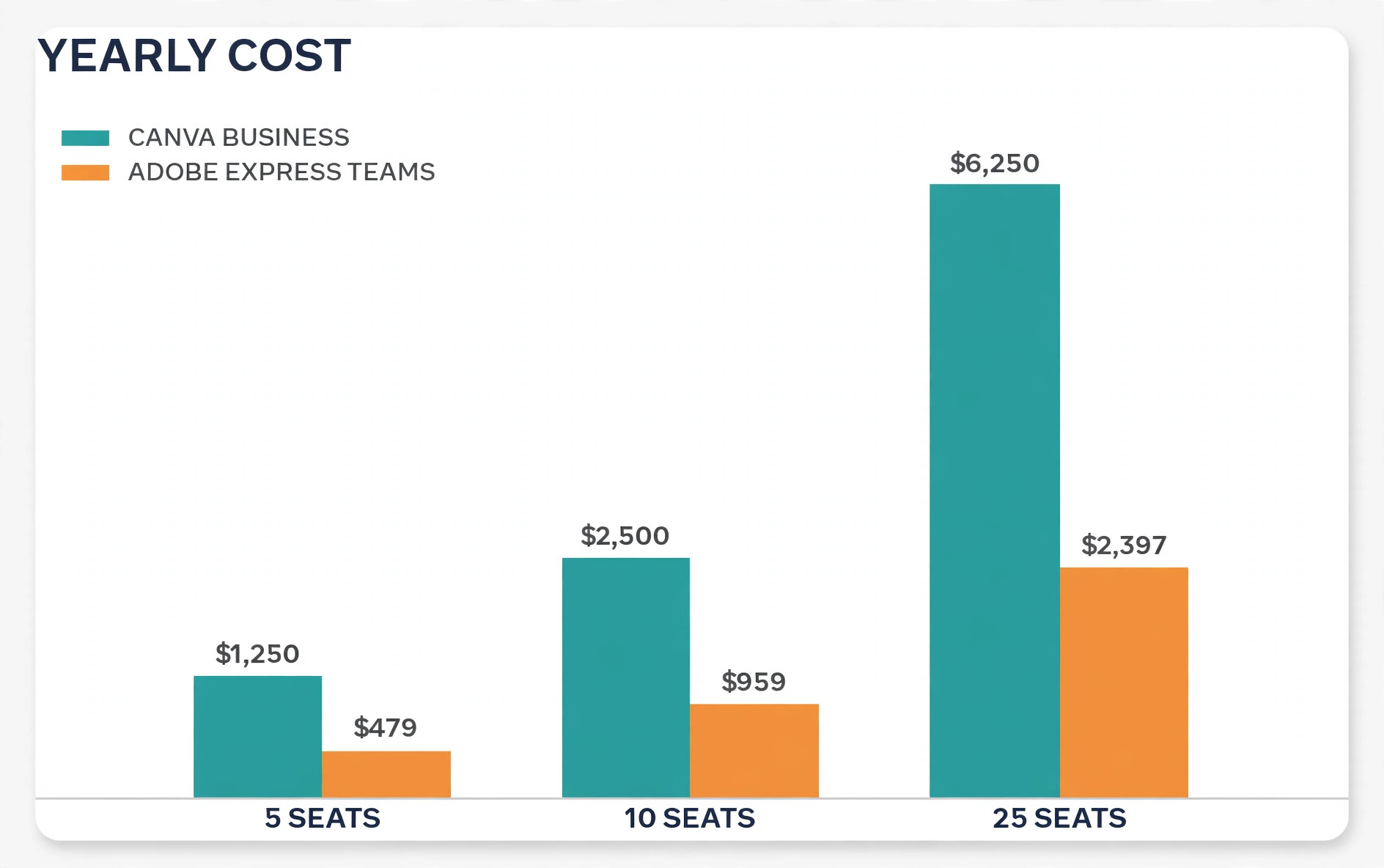
The table below uses the regular Express Teams rate of 7.99 dollars and the Canva Business annual rate, because annual billing is how most teams buy. Confirm both figures on the official Adobe Express site and the official Canva pricing page before you pay.
| Team size | Canva Business per year | Adobe Express Teams per year at 7.99 dollars | Saving per year |
|---|---|---|---|
| 5 seats | 1250 dollars | About 479 dollars | About 771 dollars |
| 10 seats | 2500 dollars | About 959 dollars | About 1541 dollars |
| 25 seats | 6250 dollars | About 2397 dollars | About 3853 dollars |
Three costs sit outside that table. The first is the annual commitment. Express for Teams is sold with a 12 month minimum on the listings checked, and reports describe an early termination fee of up to half the remaining contract value if you cancel after the early window. Run the trial before you sign a team contract. The second cost is rebuild time. Rebuilding 20 templates at two hours each is 40 hours, and that wipes out the first year saving for a small team at any normal hourly rate. Count it in the business case. The third cost is AI credit pressure.
Heavy AI use can push a team toward Firefly Pro at 19.99 dollars per month, or toward Canva AI Pass at 100 dollars per person per month as an add on. Measure AI use in the trial month before you assume the base plan covers it.
Teams that switch Canva to Adobe Express team wide should also check for double payment. If anyone already holds a Creative Cloud All Apps plan, listed near 59.99 dollars per month, Express Premium is included for that person, so buying a separate Express seat wastes money. List every current Adobe licence before you buy, and check tax, seat minimums, and what happens when a seat is removed mid cycle.
Brand Kit Mapping. From Canva to Adobe Express
A brand kit is not a folder of logos. It is the set of rules that stops ten people from producing ten versions of your brand. The mapping table below forces every Canva element to a named Express home before anyone rebuilds a template. Work through it with your brand owner, and sign it off before week two starts.
| Brand element in Canva | What to export or record | Where it lives in Adobe Express | Check before sign off |
|---|---|---|---|
| Primary logo and reversed logo | Transparent PNG and SVG originals, plus the master vector file | Brand kit logos and shared brand library | Logo stays sharp at small sizes and on dark backgrounds |
| Secondary logos and partner logos | Same files, with usage rules for spacing and minimum size | Brand kit logos, grouped by use | Partner rules still respected after the move |
| Brand colours | Hex values, plus print values if you use them | Brand kit colour palette | Every hex value matches the old kit exactly |
| Primary and secondary fonts | Font files and licence terms, or the closest Adobe Fonts match | Brand kit fonts, or Adobe Fonts selection | Licence allows use in Express and the match is approved |
| Photography style and stock rules | Three approved example images and a short style note | Shared asset library and stock favourites | New stock searches return on brand results |
| Templates and locked elements | List of templates, with locked items marked | Express templates with editing rules written down | Non-designers can edit text without breaking layout |
| Social sizes and export settings | Size list per channel and the export format per use | Template sizes and saved export presets | Test exports match the old sizes pixel for pixel |
| Voice and caption rules | Short tone guide and banned phrases | Team guide document linked from the brand library | New hires can find the guide without asking |
Start with colours and fonts, because they touch every template. Export the hex values from Canva and type them into Express by hand, then compare the palettes on screen and in a test export. Next, move logos. Keep the master vector file outside both tools, in a shared drive your brand owner controls. If a logo exists only inside a Canva design, stop and recreate it from the original source before the migration goes further.
When you switch Canva to Adobe Express team wide, fonts need a decision log, not just a transfer. For each font, record whether it moved exactly, was replaced by an Adobe Fonts match, or was dropped with approval. Share that log with the team, so briefs stop naming fonts the new tool cannot build. Finally, write the editing rules for each template in plain words, and name the person who approves exceptions.

How to Switch Canva to Adobe Express Team in Four Weeks
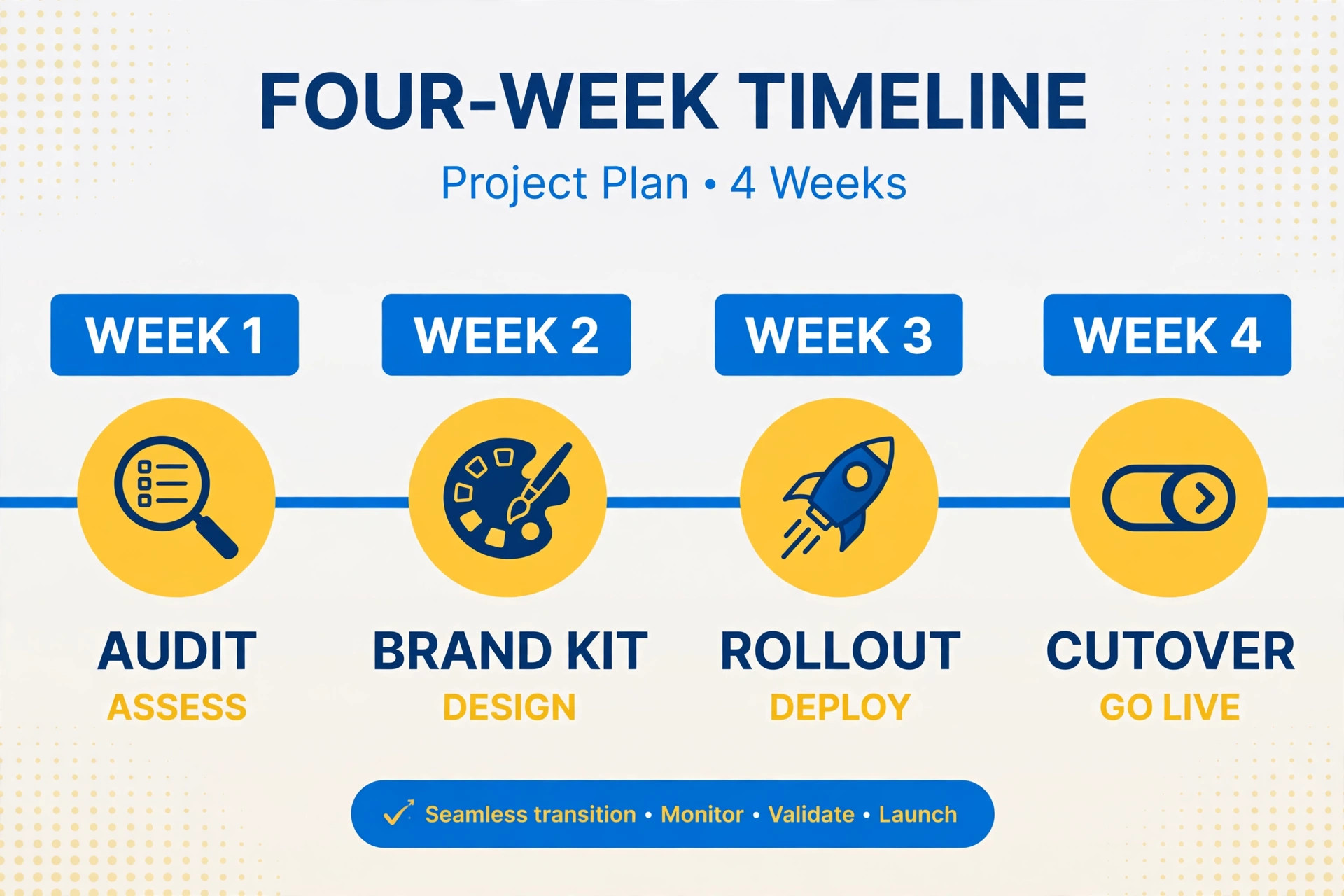
A four week move works for teams of up to 25 people. Larger teams should double week two and week three. Keep Canva fully paid and readable throughout, and do not cancel it until Express has produced two full weeks of live work without a brand incident.
Week one is audit and trial. Inventory every Canva design from the last 90 days, mark the ten most used templates, and record which features each one depends on. Set up Express Premium trials for three pilot users, one designer, one marketer, and one non-designer, and ask each to rebuild one real template and publish one real post. At the end of week one, decide the scope. Full move, partial move, or stop. A stop after week one costs a few hours and saves a bad year.
Week two is brand kit and core templates. Build the Express brand kit from the signed mapping table, then rebuild the top five templates only. Test each rebuild with a real post, a real export, and a real approval. Fix fonts, colours, and spacing now, while only five templates exist. Freeze the brand kit at the end of week two. No new colours, fonts, or logo versions until cutover is done.
Week three is team rollout and the remaining templates. Invite the full team, assign roles, and rebuild the next 15 templates in priority order. Publish new work in Express while old scheduled work still goes out from Canva, so the audience never sees a gap. Run two short training sessions, one on everyday creation and one on exports and scheduling, using real team templates, not generic examples.
Week four is cutover and cleanup. Move all new work to Express, keep Canva open in read only practice for 30 days, and review every post from week four against the brand checklist. Fix the three most common errors, update the team guide, and only then cancel or downgrade Canva. Archive the old designs as PDF and PNG exports, plus original files where possible.
Template Migration Steps That Protect Live Work
No direct editable import exists between Canva and Adobe Express, so plan for rebuilds, not transfers. Express can import editable files from other apps, including PowerPoint, PDF, Photoshop, and Illustrator files, and its help pages describe bulk PDF import of up to 30 files at once, each under 100 MB and under 99 pages. That helps for presentation work exported from Canva. It does not turn a Canva design into a fully editable Express template. Treat imported files as starting points, and complex Canva designs as rebuilds from the brand kit.
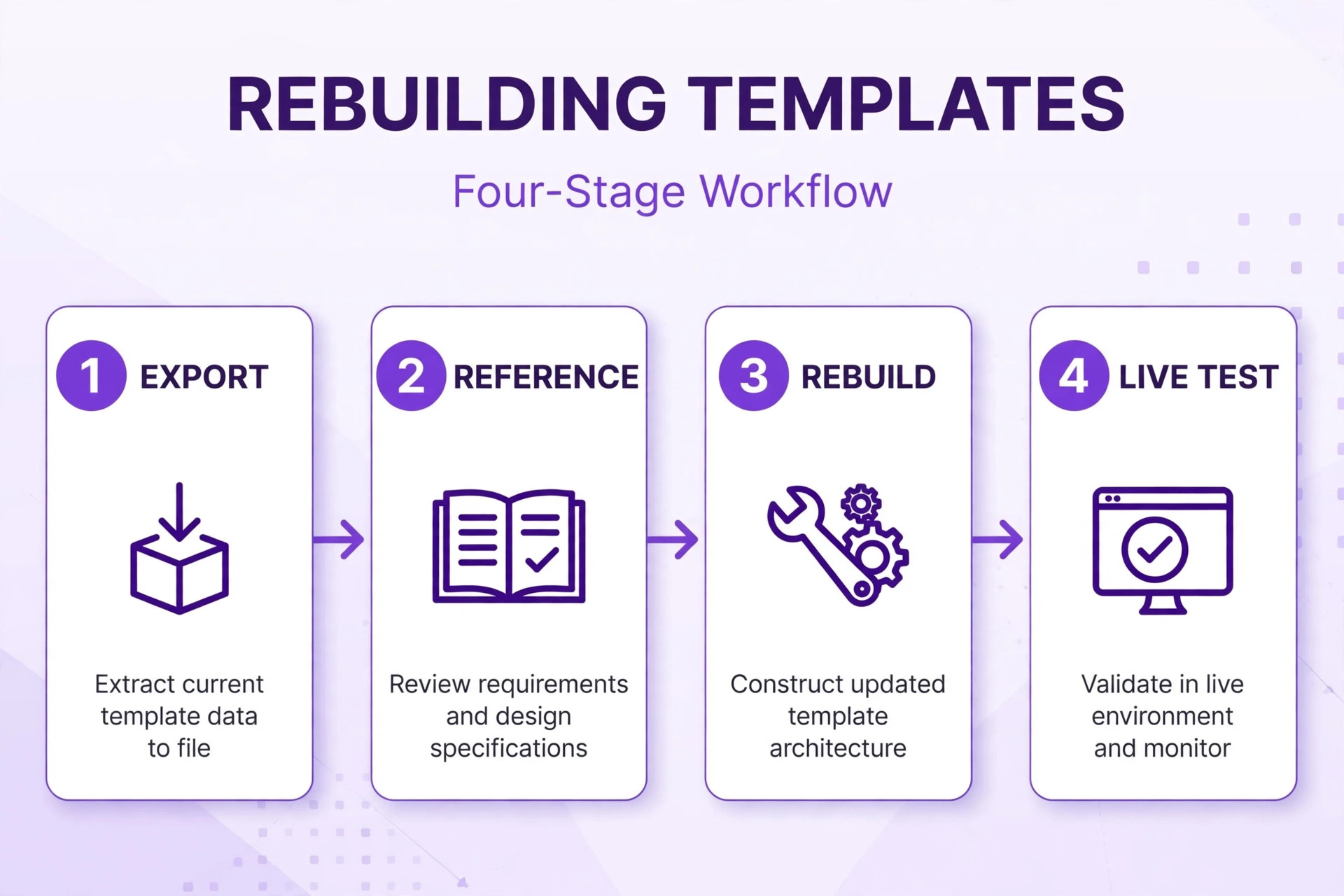
Follow these steps in order for each template. First, export the Canva original as PDF and PNG, so you have a visual reference and a fallback. Second, list the building blocks, meaning background, headline, body text, logo, photo, call to action, and footer, and note which blocks are fixed and which change per post. Third, rebuild the fixed blocks in Express from the brand kit, and leave the changing blocks as clearly marked editable areas. Fourth, test with three real inputs, a long headline, a short headline, and a differently shaped photo, because templates that only work with the original text break in real use.
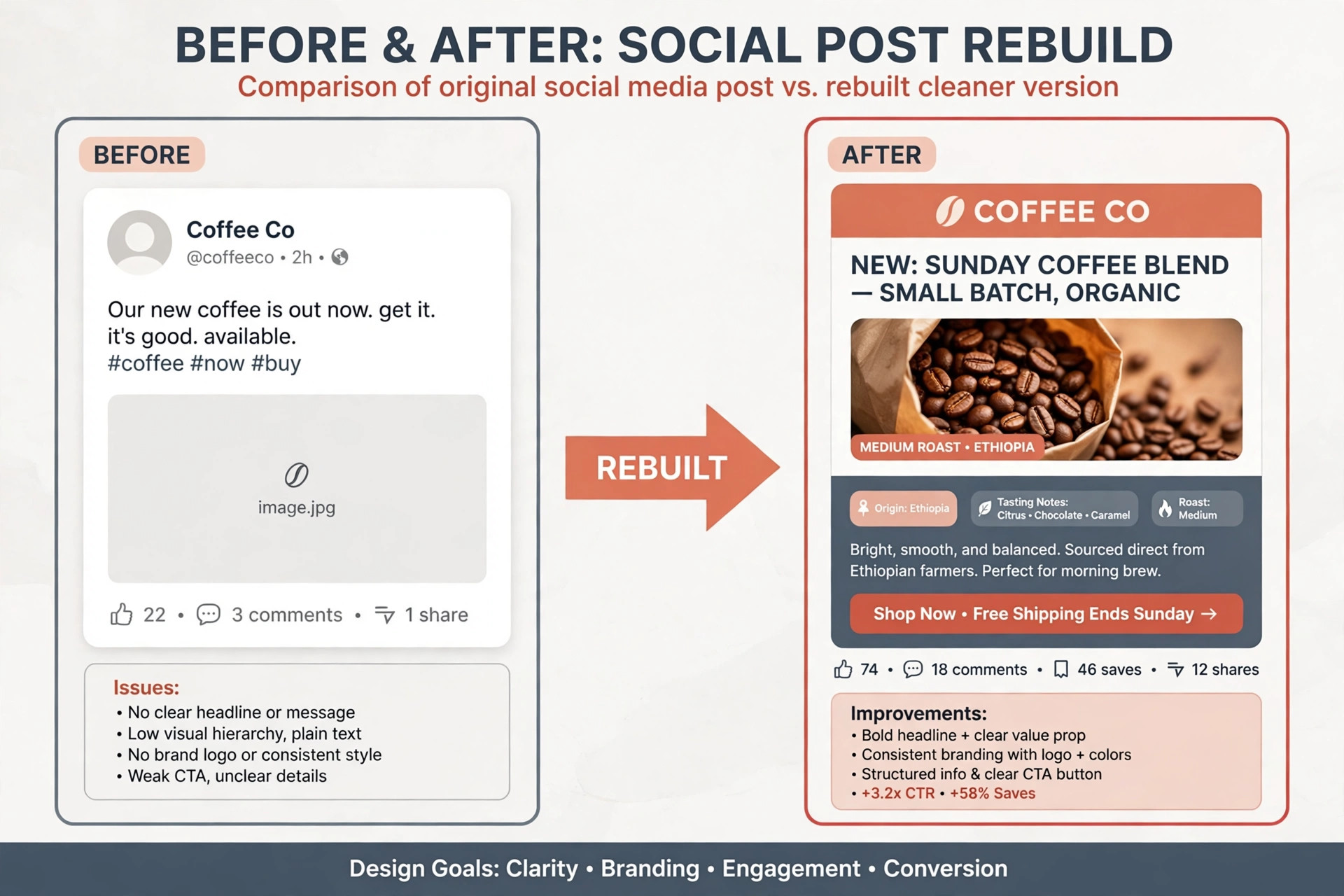
Fifth, write a one paragraph usage note covering photo rules, text limits, and the export setting, and store it with the template.
When you switch Canva to Adobe Express team wide, prioritise templates by publishing frequency, not by how pretty they are. A weekly social template used 50 times a year matters more than an annual report cover used once. Rebuild daily social templates first, then weekly campaign templates, then event and sales templates. Archive the long tail instead of rebuilding it. If a template has not been used in 90 days, export it as a reference and leave it out. Teams routinely cut their template count by a third this way.
Watch three technical traps during rebuilds. The first is text reflow. A headline that fit in Canva may wrap differently in Express, so test long headlines early. The second is image cropping. A photo cropped to a Canva frame may crop differently in Express, so recheck faces and products after import. The third is animation timing. A Canva animation preset has no exact Express twin, so rebuild video templates by timing and feel, and reapprove every video template before it goes live.
Roles, Permissions and Approvals in Adobe Express
Set roles before you invite the full team, because a workspace where everyone can edit everything becomes off brand within a week. Name one brand owner who approves brand kit changes, one or two template owners who build and fix templates, and the rest of the team as creators. Keep the brand owner role small. If five people can change brand colours, the brand kit is a suggestion, not a standard. Use the Express for Teams Admin Console to control who can invite users, share libraries, and change shared assets.
Approvals need a written path. Decide who approves a social post, a paid ad, and a client facing document, and write the path into the team guide. A simple path works for most teams. The creator drafts, a peer checks text and image rights, and the channel owner approves anything paid or client facing. Test the path in week three with a real ad. Also decide what happens when someone leaves. Transfer ownership of their templates and library items on the day they leave, not at the next audit.
Asset rights deserve the same discipline. Stock photos, music, and AI images carry different licence terms, and old licences do not always move with a tool switch. Reconfirm the licence for any stock asset you reuse in Express, and keep the generation record with every AI image.
Training a Team That Already Knows Canva
Do not train Express as if the team has never designed anything. Train the differences, because Canva habits cause most early errors. The first difference is file handling. Express files, libraries, and Adobe account storage work differently from Canva folders, so show the team where finished work, templates, and brand assets live on day one. The second difference is resizing and export. Show the resize flow and download settings for each channel, and make each person export one post per channel during training. The third difference is AI.
Firefly prompts and credit limits behave differently from Canva Magic Studio, so give the team three approved prompt patterns for product shots, backgrounds, and social art, and warn them about the credit meter.
When you switch Canva to Adobe Express team wide, pair each non-designer with a template owner for the first two weeks. The non-designer publishes, the template owner reviews, and the pair logs the three most common fixes. Those fixes become the second training session. Also keep a one page cheat sheet in the team guide, covering brand colours, fonts, export sizes, file naming, and who to ask for help. New hires should be able to publish their first on brand post from the cheat sheet plus one template, without a meeting.
Measure training by output, not attendance. At the end of week three, each team member should have published at least two real posts in Express with no brand errors, and should be able to find a template, swap a photo, edit text, and export for one channel without help. Anyone below that bar needs a focused hour, not another group session.
How to Choose the Right Adobe Express Plan
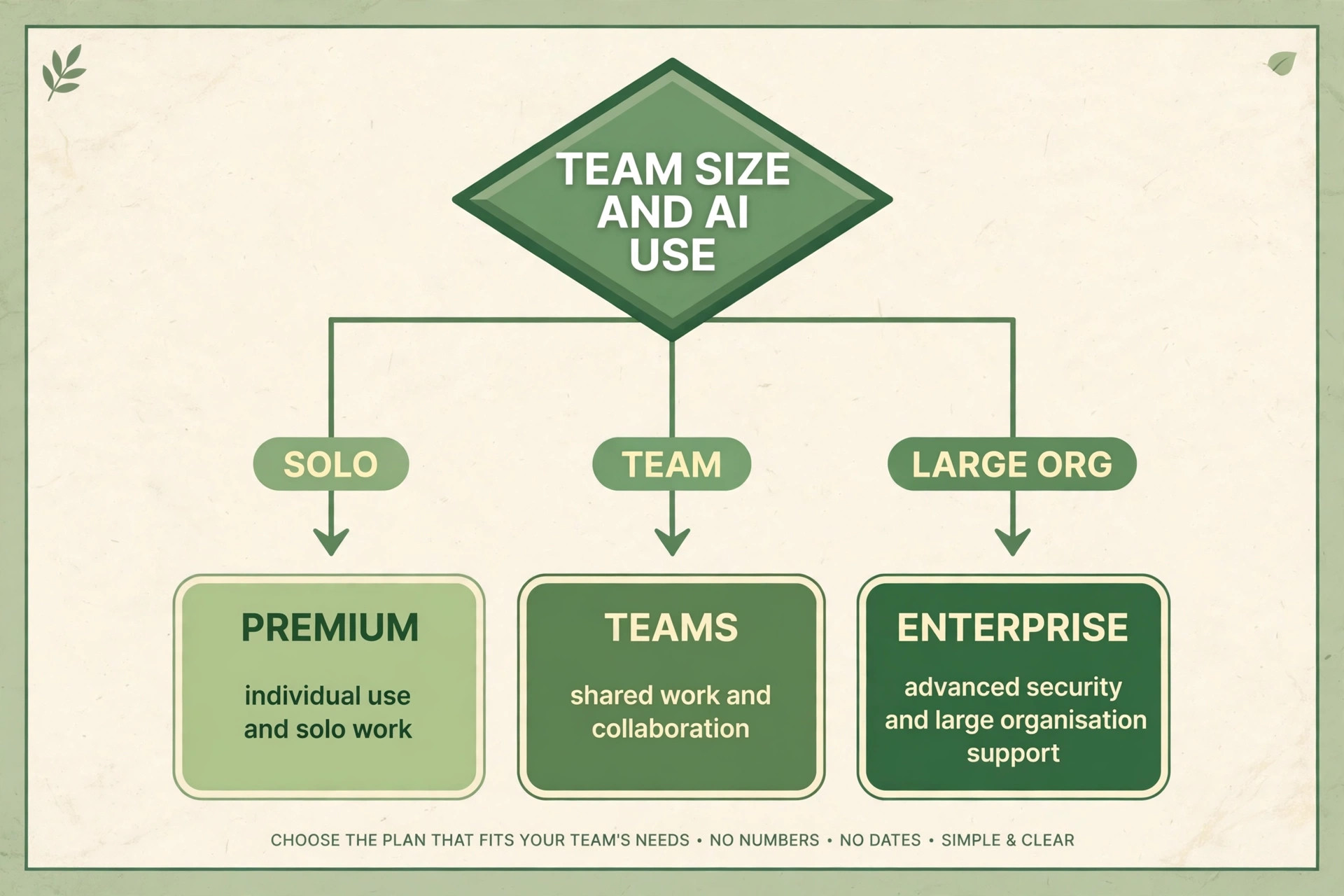
Choose by seat count, brand control needs, and AI use, in that order. A solo creator should start with Premium at 9.99 dollars per month, because it includes brand kits, premium templates, Adobe Stock access, and 100 GB of storage on the listings checked. A team of two or more that needs shared brand libraries and admin control should price Express for Teams, using the range of roughly 5 to 10 dollars per person per month and confirming the exact rate and annual commitment at checkout. A team that already pays for Creative Cloud All Apps should check existing licences first, because included Express Premium can remove seats from the bill.
Enterprise only makes sense when your organisation needs single sign on, advanced security controls, or large scale admin features, and the price is quoted, not listed. Do not buy Enterprise for brand control alone, because Teams already covers shared libraries and admin management for most teams. Also do not buy Firefly Pro for the whole team by default. Buy it for the two or three people who generate AI images and video daily, and keep the rest on the base plan until usage data proves otherwise.
A practical rule is to buy the smallest plan that covers your must have features for 30 days, measure real use, and then upgrade only the seats that hit a limit. Upgrading mid cycle is easy. Downgrading a team contract after an annual commitment is not. If finance needs a fixed annual number, budget at the regular Teams rate of 7.99 dollars, not the first year rate of 4.99 dollars, so year two does not arrive as a surprise. Keep the renewal date in the team guide, because an auto renewal at a higher rate is a common and avoidable cost.
Mistakes That Break a Brand Migration
The first mistake is cancelling Canva on day one. Keep it readable for at least 30 days after cutover, because the team will need old designs for reference. The second mistake is rebuilding every template. Rebuild the templates the team actually uses, archive the rest, and let the template count shrink.
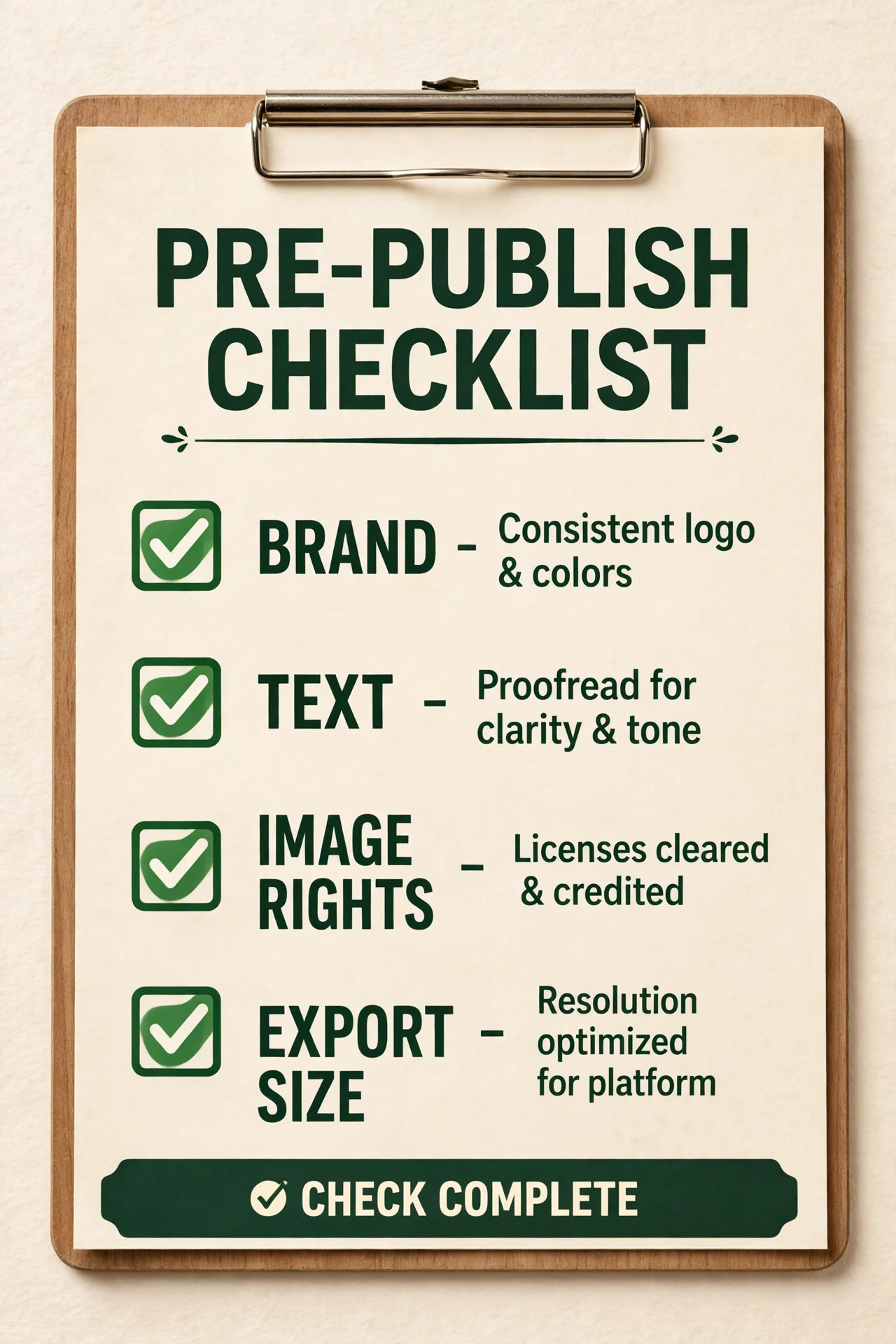
The third mistake is moving colours and fonts by eye. Type hex values from the source, test exports, and get brand sign off on any font substitute before publishing. Colour and font drift are hard to fix after 100 posts have gone out, and easy to prevent in week two. The fourth mistake is skipping the rights check. Stock, font, and partner logo rules do not automatically transfer between tools.
The fifth mistake is training everyone the same way. Designers need file compatibility and advanced editing. Marketers need templates, scheduling, and exports. Non-designers need one safe path to publish without breaking layout. The sixth mistake is letting the brand kit stay open to edits after launch. Freeze it at cutover, route changes through the brand owner, and review the kit quarterly.
Teams that switch Canva to Adobe Express team wide sometimes make a seventh mistake, which is judging the move by the subscription saving alone. Judge it by three measures after 60 days. Brand errors per 100 posts, time to publish a standard post, and team satisfaction. If brand errors rise, the migration failed even if the bill fell. If publish time doubles, the saving is being paid for in staff hours. Measure all three, and be willing to reverse a partial move if the numbers point that way.
For related reading, teams planning the wider content workflow should look at how to plan a month of social media content with AI for the monthly system the new templates will feed, best AI tools for Instagram for channel specific creation help, and best AI social media management tools if scheduling and approvals beyond Express are part of the plan.
Frequently Asked Questions
Can we move Canva designs into Adobe Express without rebuilding them?
Not as fully editable designs. You can export Canva work as PDF, PowerPoint, PNG, or video and import supported files into Express, but complex designs need checking and often need rebuilding from the brand kit. Plan for a rebuild of your most used templates, with exports kept as visual references.
Can we switch Canva to Adobe Express team wide and keep Canva for some work?
Yes, and a partial move is often the smartest outcome. Move social posts, ads, and short videos to Express, and keep documents, whiteboards, or niche templates in Canva until Express covers those jobs. A partial move still saves money on the seats you move.
How long does a team migration really take?
Four weeks is realistic for a team of up to 25 people with 20 to 30 active templates, if week one is a real audit and week two is limited to the top five templates. Larger teams, or teams with more than 50 active templates, should allow six to eight weeks. The fastest way to miss the date is to rebuild every old template instead of archiving the ones nobody uses.
Do brand kits transfer exactly, including fonts?
Colours and logos transfer if you export the right files and type hex values from the source, but fonts need a decision per font. A brand font may move exactly, may need an Adobe Fonts substitute with brand approval, or may be blocked by its licence. Record each decision in the mapping table before publishing.
What happens to our Canva designs if we cancel?
Export everything you may need before you cancel, as PDF and PNG references plus original files where possible, and keep the archive in a shared drive the brand owner controls. Keep Canva readable for at least 30 days after cutover. Cancelling on day one is the most common and most avoidable migration regret.
Is Adobe Express cheaper than Canva Business for every team size?
On listed United States prices checked in October 2026, Express for Teams is cheaper per seat at every team size in the table above, but the saving shrinks if your team needs Firefly Pro seats or signs a team contract before testing. Price your real seat count, your real AI use, and your existing Adobe licences at checkout, and budget at the regular Teams rate rather than the first year rate.
Treat the Brand Kit as the Project, Not the Subscription
The move is worth making when three things are true at the same time. Your team publishes mostly social, ad, and short video work that Express handles well. Your brand system is written down, mapped, and signed off before rebuilds start. And your trial rebuilds prove that real posts look right, export right, and publish on time. If those three hold, the saving is genuine and the four week plan will carry you through without a gap in output.
If any of the three fails, pause. A failed trial, an unmapped font, or a missing template type is information, and acting on it in week one costs hours while ignoring it costs a year. Teams that switch Canva to Adobe Express team wide and succeed share one habit. They treat the brand kit as the project, not the subscription, and they keep the old tool open until the new one has earned the job with two clean weeks of live work.