
A finished podcast episode often takes far longer to edit than it took to record. A 45 minute conversation can turn into three hours of scrubbing through a waveform, hunting for the moment a guest repeated a point, and trying to remember where the best quote landed. For a solo host or a small team, that editing load is the real reason episodes slip and a show that started with energy quietly goes quiet. Learning to use Descript for podcast editing changes that job, because it turns the recording into an editable transcript instead of a timeline you must listen through again and again.
Descript lets you cut, move, and clean up an episode by editing words on a page. Delete a sentence from the transcript and the matching audio goes with it. Move a paragraph and the conversation moves too. This guide walks through the full record to publish workflow, from recording setup and transcript checks to sound cleanup, show notes, clips, and export. It also covers pricing, limits, and the mistakes that turn a fast tool into a slow one, so you can judge whether this workflow fits your show before you commit to a plan.
Why Podcast Editing Eats So Much Time
Traditional audio editing forces you to work in a medium you cannot skim. You cannot read a waveform the way you read a page, so finding a weak section means listening through it again. A guest who wanders off topic for four minutes, a host who restates a question three times, and a long pause before an answer all hide inside the timeline until you hear them. That listening time adds up fast, especially on interview shows where voices overlap and the best material sits in the middle of a long answer.
The second time sink is the small fix. A mispronounced name, a wrong date, or a sentence that trails off usually means re-recording a line, matching its tone, and patching it into the timeline. In a waveform editor, that patch takes care and a good ear. In a transcript editor, the same fix often takes a few keystrokes, provided you check the result by listening rather than trusting the text alone. The difference is searching by sound against searching by words. The third sink is everything after the edit, meaning show notes, chapters, a transcript, and clips.
What Descript Actually Does, and What It Does Not Do
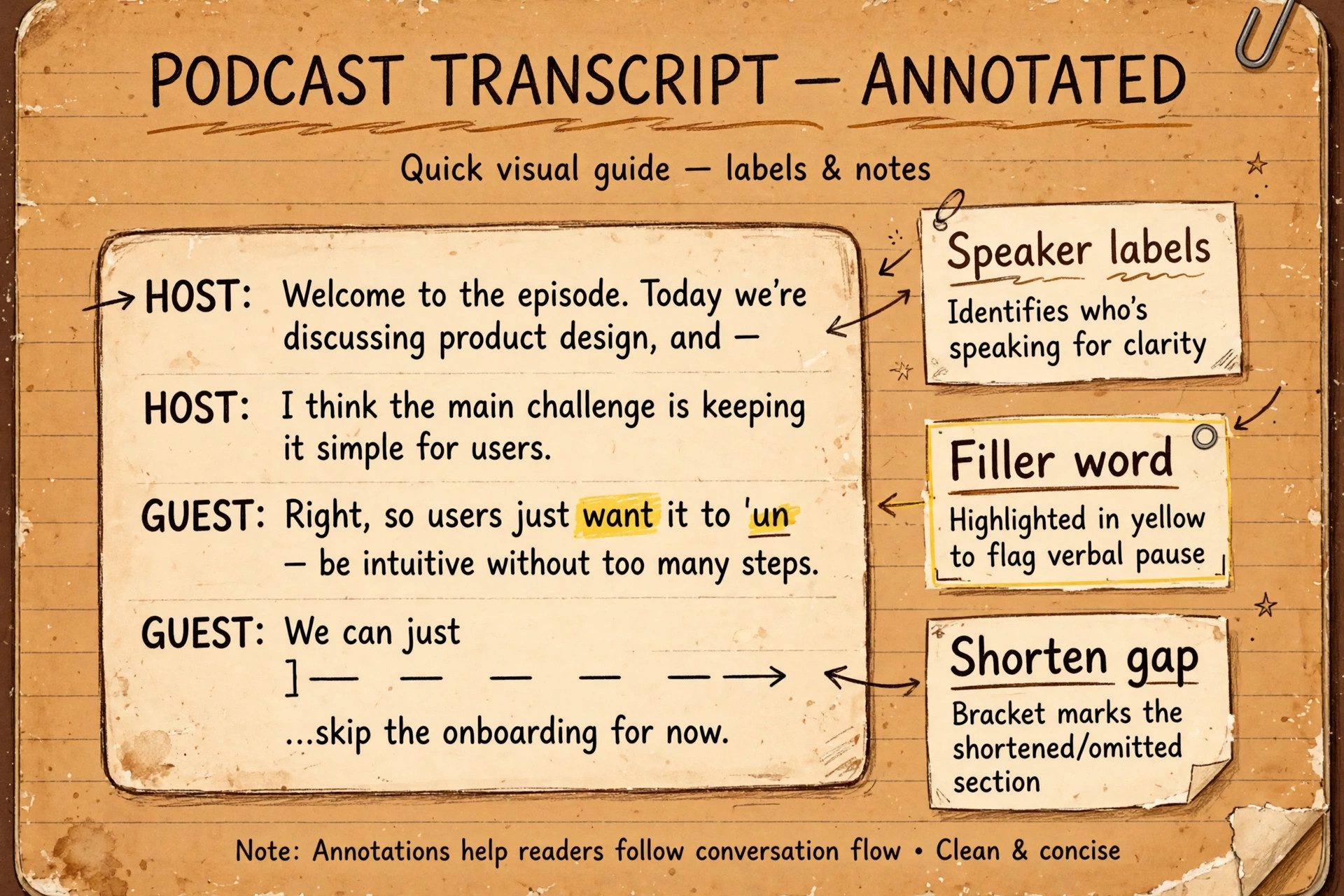
Descript records audio and video, transcribes speech into text, and lets you edit the media by editing that text. It detects speakers, removes filler words, shortens long gaps, improves room sound with Studio Sound, and can generate a voice in your own style for small corrections through Overdub. From the finished edit you can export audio or video, build clips, draft show notes and chapters with its AI assistant Underlord, and add captions for video versions. When you use Descript for podcast editing, the transcript becomes the main editing surface, and the timeline becomes the place you check fine detail, not the place you do every cut.
What Descript does not do is replace good recording habits or good judgement. A noisy room, a guest on a laptop microphone in a kitchen, and two people talking over each other will still need care. Studio Sound can reduce echo and background noise, but it cannot recover words that were never captured clearly, and pushing its intensity too high can make a voice sound thin or processed. Filler word removal can tighten a conversation, but removing every pause can also make a thoughtful guest sound rushed. Overdub can fix a single wrong word, but it is a poor way to write whole new paragraphs in a voice that is not really speaking them.
Treat Descript as a faster way to make editorial decisions, not as a way to skip them. It also sits between a simple recorder and a full workstation, handling multitrack editing, music, fades, and exports well enough for most independent shows.
Set Up Your Project So Editing Stays Fast
Speed in Descript starts before you press record. Create one project per episode, name it with the episode number, guest name, and recording date in a consistent order, and keep that order for every episode. A naming habit sounds dull, but it is what lets you find episode 14 in six months without opening five projects that all say final version. Inside the project, confirm speaker labels as soon as transcription finishes. Descript detects speakers, but it does not always know which voice belongs to the host and which belongs to the guest, especially on a first episode. Correct those labels early, because every later search, clip, and chapter note depends on them.
Set up a simple template for repeat work. Keep your intro music, outro music, and any recurring segments in a template project you can duplicate, with fades and levels already set. That way you are not rebuilding the opening of every episode from scratch, and your loudness and music balance stay consistent from week to week. If you publish both audio and video versions, decide the aspect ratio and caption style once, and reuse them. If you record outside Descript, export each speaker on a separate track where possible, and keep the originals untouched in a separate folder.
Record in Descript or Bring In Audio You Already Have
You have two solid starting points, and the right one depends on how your show is recorded. Recording inside Descript with Rooms gives you remote guests on separate tracks, a transcript ready soon after you stop, and no file transfer step. That is the fastest path for a regular interview show, because the episode is already inside the editor the moment the call ends. Test the setup before a real guest arrives. Record a two minute test with a friend, check levels, check that each track is separate, and listen back on headphones. A five minute test prevents the most common beginner failure, which is discovering after a great interview that one track was muted or far too quiet.
Bringing in outside audio is just as workable, and it is the right choice if you already record in a tool you trust, if your guests prefer a familiar link, or if you record in person on a portable recorder. Upload the files, let Descript transcribe them, and confirm the speaker labels. Start the upload while you do other work, rather than watching a progress bar. If you use Descript for podcast editing every week, build a short pre record routine and stick to it. Ask guests to use headphones, to sit close to the microphone, and to close noisy tabs.
Ask the host to state the episode title and guest name at the top of the recording, even if that line will be cut later. Record 30 seconds of room tone, meaning the quiet sound of the room with nobody speaking, because that tone helps smooth small cuts later.
How to Use Descript for Podcast Editing From Record to Publish
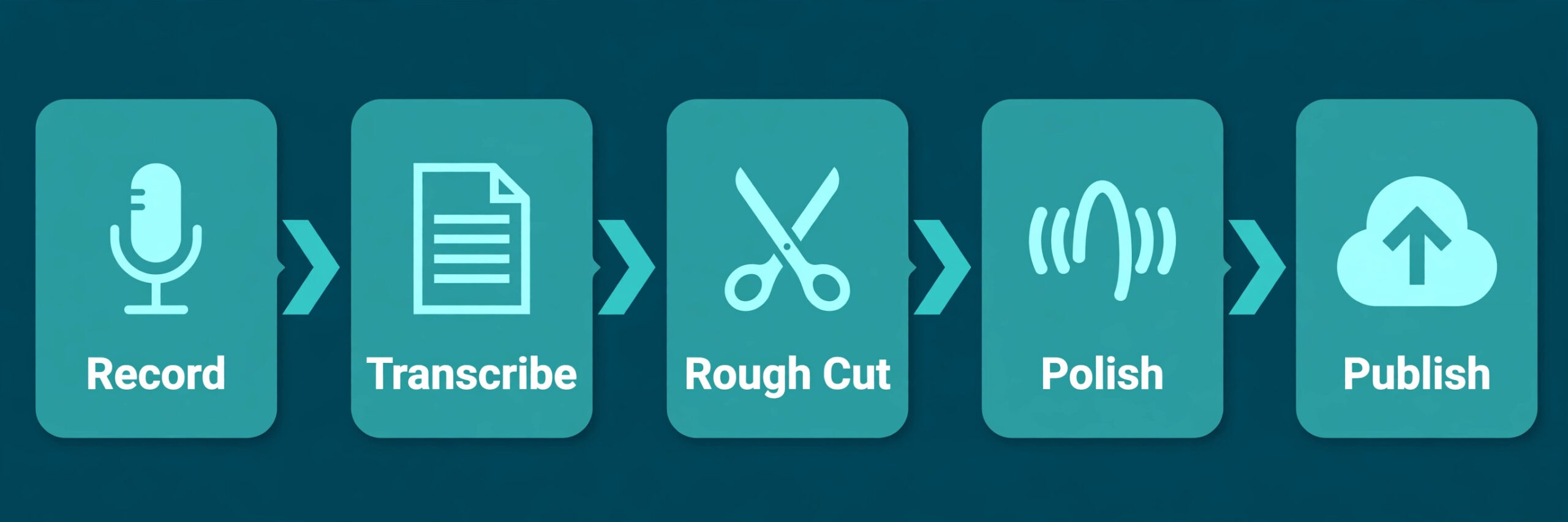
Work in passes, not in one perfect sweep. A rough cut pass removes the clearly unwanted material. A structure pass orders what remains. A polish pass fixes sound, pacing, and small errors. A publish pass builds the assets a listener actually sees, meaning the show notes, chapters, transcript, and clips. Trying to polish sound before you have cut the structure wastes time, because you will polish sections you later delete.
Start with a full transcript read, not with playback from the top. Read the transcript quickly, mark sections to cut, and mark the strongest quotes for clips and show notes. Correct any transcription errors that change meaning, especially names, numbers, and product titles, because those errors will travel into captions and show notes if you leave them. Next, delete false starts, repeated answers, and off topic detours in the transcript. Listen to each cut once, because a sentence that reads as redundant can carry a useful tone in audio. Then tighten pacing. Use filler word removal as a review tool first, not as a one click delete.
Scan the list Descript finds, keep fillers that sound natural in a thoughtful answer, and remove the ones that stall the conversation. Shorten long gaps, but leave a short natural pause where a guest is thinking. After pacing, apply Studio Sound and check it on headphones and on a phone. Finish with music, levels, and a final listen away from the editor, checking that host and guest levels stay balanced across the whole episode.
The Record to Publish Checklist
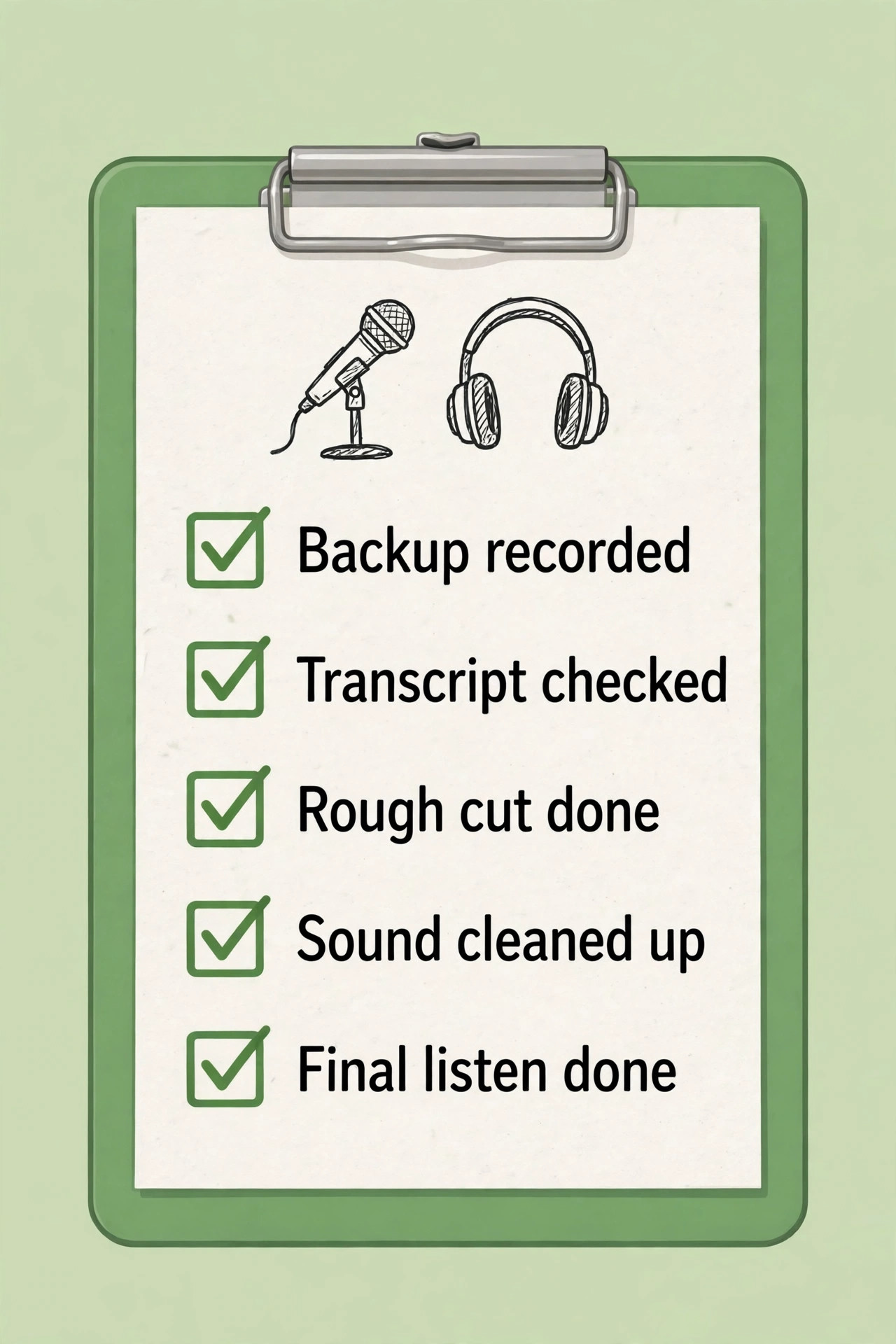
A checklist sounds basic until you publish an episode with the wrong guest name in the show notes or a clip that cuts off mid sentence. Use this list for every episode, in order, and keep it where the editor can see it without switching apps. This checklist is the core of how you use Descript for podcast editing without missing a publish step when you are tired at the end of an edit.
- Record a backup and confirm every speaker track before the interview starts.
- Confirm speaker labels and correct names, numbers, and titles in the transcript.
- Rough cut in transcript order, removing false starts, repeats, and off topic sections.
- Structure pass, moving strong material earlier and checking the episode still flows.
- Review filler words and gaps, keeping natural pauses and removing stalls.
- Apply Studio Sound at a moderate level and listen on headphones and a phone.
- Fix small errors, checking every Overdub or typed correction by listening.
- Add intro music, outro music, and fades, and balance host and guest levels.
- Draft chapters, show notes, and a transcript, and check guest names and links.
- Create clips from marked quotes, and check captions and cut points.
- Export a draft, listen away from the editor, and fix anything that jars.
- Export the final file, back up the project, and upload to your podcast host.
- Publish show notes and clips, and file the original recordings with the episode number.
If a step does not apply, mark it as skipped rather than leaving it blank. Teams should assign one owner for the checklist, even if several people edit.
Editing Decisions You Should Make Before You Cut
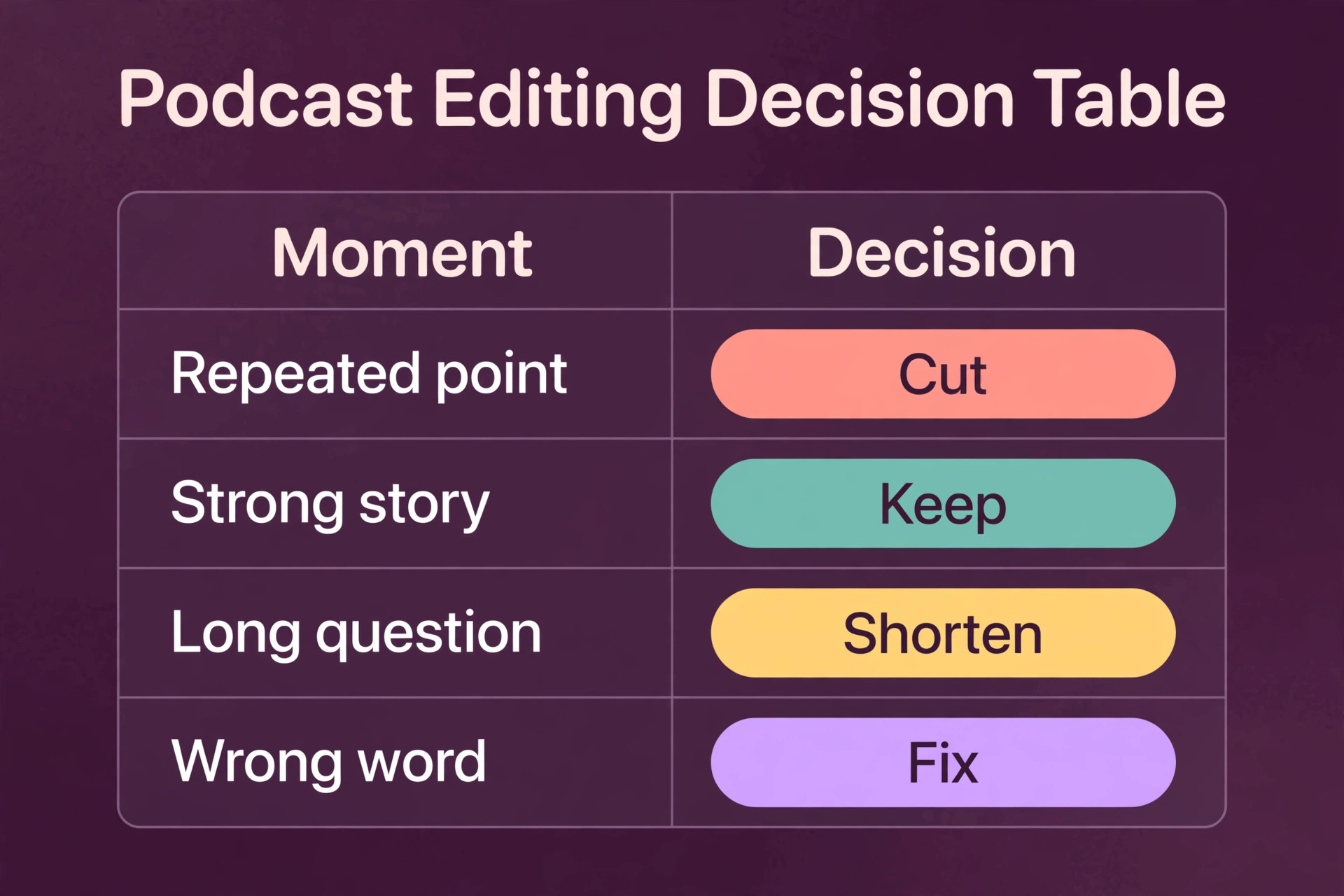
Most slow edits are not caused by the tool. They are caused by undecided taste. Before you cut, decide how tight the show should feel, how much personality to keep, and what counts as a mistake worth fixing. An interview show that keeps laughter and pauses will feel different from a news show that cuts every breath. The error is switching styles inside one episode. When you use Descript for podcast editing, most of your time will go to a small set of repeated choices, and the table below gives a starting rule for each one. Adapt it to your show, then keep it consistent, because consistency lets listeners relax into a show instead of noticing the edits.
| Situation | Decision | Why it usually works |
|---|---|---|
| Guest repeats the same point twice | Keep the clearer version only | The second version rarely adds information, and it slows the story |
| Host asks a long, winding question | Shorten the question in transcript | Listeners need the answer, not the full route to it |
| Guest pauses to think mid answer | Keep a short pause | A pause signals thought, and removing it can sound rushed |
| Long silence before a key answer | Shorten the gap, do not remove it fully | A beat before a strong line adds weight, a long wait loses attention |
| Filler words in a fast story | Remove most of them | Fast speech with fillers feels cluttered and hard to follow |
| Filler words in a personal story | Keep some of them | A personal story needs natural rhythm to feel honest |
| Small factual slip, one word wrong | Fix with a careful correction and listen | A tiny fix protects credibility without a re-record |
| Intro runs long before the topic | Move the topic up, keep intro short | Listeners decide in the first minute whether to stay |
Use the table as a guide, not as a rulebook. If a cut makes a guest sound like someone else, undo it.
Clean Up Sound Without Making Voices Sound Artificial
Studio Sound is the feature most new Descript users either underuse or overuse. Start at a moderate intensity, listen to a full minute of speech, and only then decide whether to raise it. Room echo, fan noise, and a thin laptop microphone often improve a lot at a moderate setting, and the extra gain from a maximum setting is often smaller than the extra artificial edge it adds. If only one speaker sounds noisy, apply the effect to that track alone rather than to the whole episode, because a clean host voice does not need the same treatment as a guest in a noisy room.
Level balance matters as much as noise removal. A guest who starts loud and drifts quiet will sound like two different recordings if you leave levels alone. Check levels at the start, middle, and end of the episode, and make gentle adjustments rather than one large change. For music, keep the bed low enough that every word stays clear on a phone speaker. Also check for sounds the transcript will not show you, such as mouth clicks and keyboard taps, which can survive a transcript edit because they sit between words.
Fix Mistakes With Overdub, Carefully
Overdub lets you type a correction and hear it in a cloned version of your own voice, which is useful for a mispronounced name, a wrong number, or a date you got wrong on the day. Train the voice with clean recordings, use it for short fixes, and always listen to the result in context, because a single word that sounds fine alone can sound flat or oddly stressed inside a sentence. If the fix sounds even slightly off, re-record the line yourself. A real re-record takes two minutes and will always sound more human.
Be careful with disclosure and consent. Only clone your own voice or a voice you have clear permission to clone, and do not use a cloned voice to put words into a guest mouth that the guest never said. That rule is not just about ethics. It is about trust. A listener who discovers a host invented a guest line will not trust the next episode, and a guest who hears themselves saying something they never said has every reason to refuse a return visit. Overdub also has practical limits. It works best for short, neutral corrections. If you find yourself generating whole answers, stop and ask whether the episode needs a real re-record instead.
Add Music, Chapters, Show Notes and Clips
Once the audio is clean, the publish assets decide whether a good episode gets found and shared. Chapters help listeners jump to the section they care about, and they help a busy listener finish an episode in two sittings rather than abandoning it. Write chapter titles that describe the content, not just the guest name or a vague label, and check the timestamps against the final export, because a chapter that points to the wrong minute frustrates listeners more than no chapters at all. Show notes should carry the episode promise in the first two sentences, the main takeaways, guest links, and any resources mentioned, with names spelled exactly as the guest spells them.
Clips are where many shows waste the edit they just saved. A clip works when it contains one complete idea, a clear setup, and a payoff within 60 seconds, and it fails when it starts mid sentence or ends before the point lands. Mark clip candidates during the transcript read, not after the edit, because you will remember why a moment mattered while you are reading it, and you will forget it by publish day. Add captions to every video clip, check them for transcription errors, and keep the caption style consistent with your show. A captioned clip can be watched with sound off, which is how much social scrolling actually happens.
Underlord can draft show notes and chapters, but treat those drafts as a first draft. Check every claim, link, and name, and add at least one specific detail only your episode contains.
Publish and Distribute Without Rework
Export settings are a small decision with a lasting effect, so set them once and reuse them. For audio only shows, export a high quality MP3 at a consistent bitrate your host recommends, and keep a lossless master or WAV export in your archive for future re-edits. For video shows, export at the resolution your plan and platform support, and check the file on the platform before you announce it, because a file that plays well in Descript can still have caption or aspect problems after upload. Name the final file with the episode number and title, and store it with the show notes and transcript in one episode folder.
Upload the final file to your podcast host, paste in the checked show notes, add chapters if your host supports them, and confirm the episode appears correctly in at least one podcast app before you share the link. That five minute check catches the most embarrassing publish errors, such as a truncated description, a missing guest link, or an episode that plays the draft instead of the final cut. Schedule social clips separately, and stagger them across the week rather than posting them all on publish day. Keep a simple publish log with the episode number, publish date, and any corrections made after publishing.
What Descript Costs and Which Plan Fits Your Output
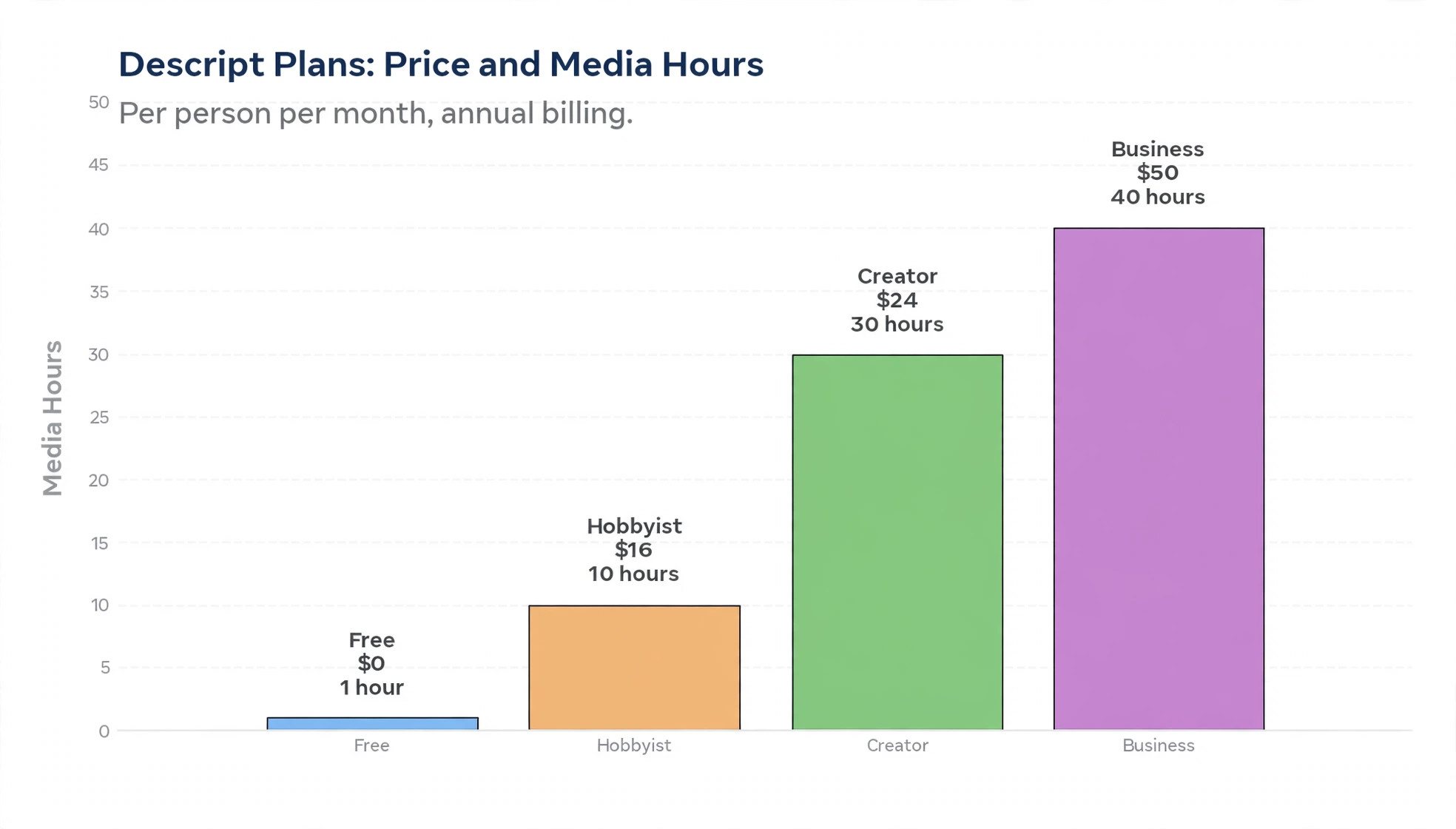
Pricing is where many creators overpay, because they buy for the show they hope to have rather than the show they actually publish. Descript prices by media hours and AI credits per person per month, and the headline price is per person, not per team, so check the official Descript pricing page at checkout before you pay. Figures below reflect public listings checked in October 2026, and vendors adjust plans, so treat them as a planning guide, not as a quote. On current plans, uploading or recording media uses your media allowance, while transcription itself is not separately metered as older plans metered it.
Unused minutes and credits do not roll over, and top ups are available if you run short.
| Plan | Price per person a month | Media hours a month | AI credits a month | Export |
|---|---|---|---|---|
| Free | 0 dollars | 1 hour | 100 one time | 720p watermarked |
| Hobbyist | 16 dollars annual, 24 dollars monthly | 10 hours | 400 | 1080p watermark free |
| Creator | 24 dollars annual, 35 dollars monthly | 30 hours | 800 | 4K watermark free |
| Business | 50 dollars annual, 65 dollars monthly | 40 hours | 1500 | 4K watermark free |
| Enterprise | Custom | Custom | Custom | 4K watermark free |
The cheapest way to use Descript for podcast editing is to start on the free plan for one test episode, then move to Hobbyist if you publish monthly and your raw recordings fit inside 10 media hours. A monthly show with one 60 minute episode and a few retakes will usually fit, but a show that records two hours of raw material for a one hour episode will burn media hours faster than the finished length suggests, because raw footage counts, not just the final cut. Weekly shows should price Creator, because 30 media hours gives room for retakes, guest backups, and clips without watching the meter every week.
Business fits teams that need more seats, brand controls, and priority support, not solo hosts who just want more hours. Work out your real monthly media use before choosing. Add up raw minutes for a typical month, including retakes, then add a buffer of about a third for a busy month.
How to Choose Your Descript Setup
Choose by output, not by feature list. A solo host publishing one episode a month needs a different setup from a team publishing three episodes a week with video, and both can be right. Start with three questions. How many raw media hours do you record each month. How many people edit, review, or approve each episode. Do you publish video, audio only, or both. Those three answers point to a plan, a recording method, and an export routine without a long feature comparison.
If you are a solo audio host, record in Descript or upload clean multitrack audio, edit by transcript, and export audio only. You do not need video captions, avatars, or dubbing to make a strong show, and adding them will slow your first months. If you run an interview show with remote guests, prioritise separate tracks, backup recordings, and a clear speaker label routine, because those habits matter more than any AI feature. If you publish video as well, decide early whether captions and vertical clips are part of every episode or only for selected episodes. Give one person the final listen and the publish checklist, even on a small team.
Trial the setup on two real episodes before you pay annually.
Mistakes That Slow Down a Descript Edit
The first mistake is editing sound before structure. Applying Studio Sound, fixing levels, and polishing music on a section you later cut wastes the most careful work in the project. Cut structure first, polish second, and keep a note of any section you are unsure about rather than polishing it just in case. The second mistake is accepting every AI suggestion without listening. Filler removal, gap shortening, and clip suggestions are starting points, and accepting them all can make a conversation sound clipped and a clip start in the wrong place. Review each batch, keep what serves the story, and undo the rest.
The third mistake is trusting the transcript for names and numbers. Transcription is strong on clear English speech, but it still mishears names, places, and technical terms, and those errors travel into captions and show notes if you do not check them. Keep a guest fact sheet with correct spellings, and check it against the transcript before you publish. The fourth mistake is recording without a backup. A single track, a single file, and no guest backup is a risk that feels fine until the one episode you cannot re-record is lost. The fifth mistake is publishing the first export. A draft listen away from the editor catches pacing and level problems a screen focused edit misses.
The sixth mistake is letting media hours run out mid month, so track raw minutes and upgrade before a deadline week. The seventh mistake is overusing Overdub. A short fix is a gift, a generated paragraph is a warning sign.
For related reading, this site guide to best AI podcast tools compares Descript with other podcast options, how to start a podcast with AI covers launching a show from scratch, and Descript alternatives helps if you want a second option before you commit. If your workflow also needs transcription help, best AI transcription tools is useful, and Descript vs CapCut covers the video editing comparison for creators who publish video versions too.
Frequently Asked Questions
Can a beginner use Descript for podcast editing without audio experience?
Yes, and that is the main reason many new hosts choose it. You can use Descript for podcast editing as a beginner because the main work is reading and editing a transcript, which feels closer to editing a document than to learning a waveform editor. You can publish a clean first episode after a test recording and one practice edit.
How long does it take to edit a podcast episode in Descript?
A realistic range for a weekly show is about one to one and a half times the finished episode length once you know the workflow, plus time for show notes and clips. A 45 minute episode often takes 60 to 90 minutes of editing, with longer times for difficult audio, many speakers, or heavy restructuring.
Does Descript record remote guests on separate tracks?
Yes, Descript Rooms records remote guests so each voice can be edited and cleaned separately, which matters when one guest is quiet, noisy, or talks over the host. Test the setup with a short call before a real episode, and keep a guest backup for important recordings.
Is Studio Sound enough to fix a noisy recording?
Studio Sound often improves room echo, fan noise, and thin microphone sound a lot, but it cannot fully rescue a recording where speech was too quiet, heavily distorted, or drowned out by background sound. Record as cleanly as you can, use a moderate setting, and listen on headphones and a phone before publishing. If a section still sounds poor after cleanup, consider cutting it rather than pushing the effect too high.
Can Descript publish directly to podcast hosts?
Descript is strongest as a record, edit, and export tool, and most podcasters export the finished audio file and upload it to their podcast host, where the host handles distribution to apps. Keep your host as the place of record for episode titles, show notes, and distribution.
What happens if I run out of media hours or AI credits?
Unused media minutes and AI credits do not roll over to the next month on current plans, and you can buy top ups if you run short. Track raw recording and upload minutes across the month, especially for video, and upgrade before a deadline week if you are close to the limit. A weekly show with retakes and clips usually needs the headroom of a higher plan.
A Repeatable Workflow, Not Just a Faster Edit
A good Descript workflow is not really about speed for one episode. It is about a routine you can repeat on a tired week, with a difficult guest, and under a deadline, without the episode slipping. Record clean tracks with a backup, confirm speakers, cut structure before polish, review AI suggestions by listening, build show notes and clips from marked moments, and finish with a draft listen away from the editor. That routine turns editing from a dreaded weekend job into a set of small passes, each with a clear finish point.
Start with one episode, not with a perfect system. Record a test, run it through the checklist, publish it, and note which step took longest. Fix that step next time, whether it means a better microphone setup, a stricter rough cut, or a simpler clip routine. After three episodes, you will know your real media use and editing time, and whether Descript fits your show. For a practical starting point, try the Descript podcast template on a test recording before you commit to a paid plan.