
The verdict is plain. When you use Grammarly for cover letter writing as a disciplined editor rather than a first-draft machine, it lifts a good letter by catching small errors, tightening wordy sentences and flagging a tone that lands harder or softer than you meant. When you let it rewrite every sentence and accept every suggestion, it flattens the letter into polite, generic prose that could belong to any applicant. The difference is not the plan you pay for. It is the workflow you follow, and this guide gives you that workflow from blank page to send button.
A cover letter has one job, and it is not to repeat your resume. It has to answer three questions in under a page. Why this role, why this company, and why you are worth a conversation. Everything else is decoration, and decoration is what gets a letter skimmed and set aside. Grammarly helps most when your argument is already clear, because then its grammar, clarity and tone checks polish a message that deserves attention. It helps least when the argument is vague, because no amount of clean grammar can rescue a letter that never says anything specific.
What Hiring Managers Actually Scan First
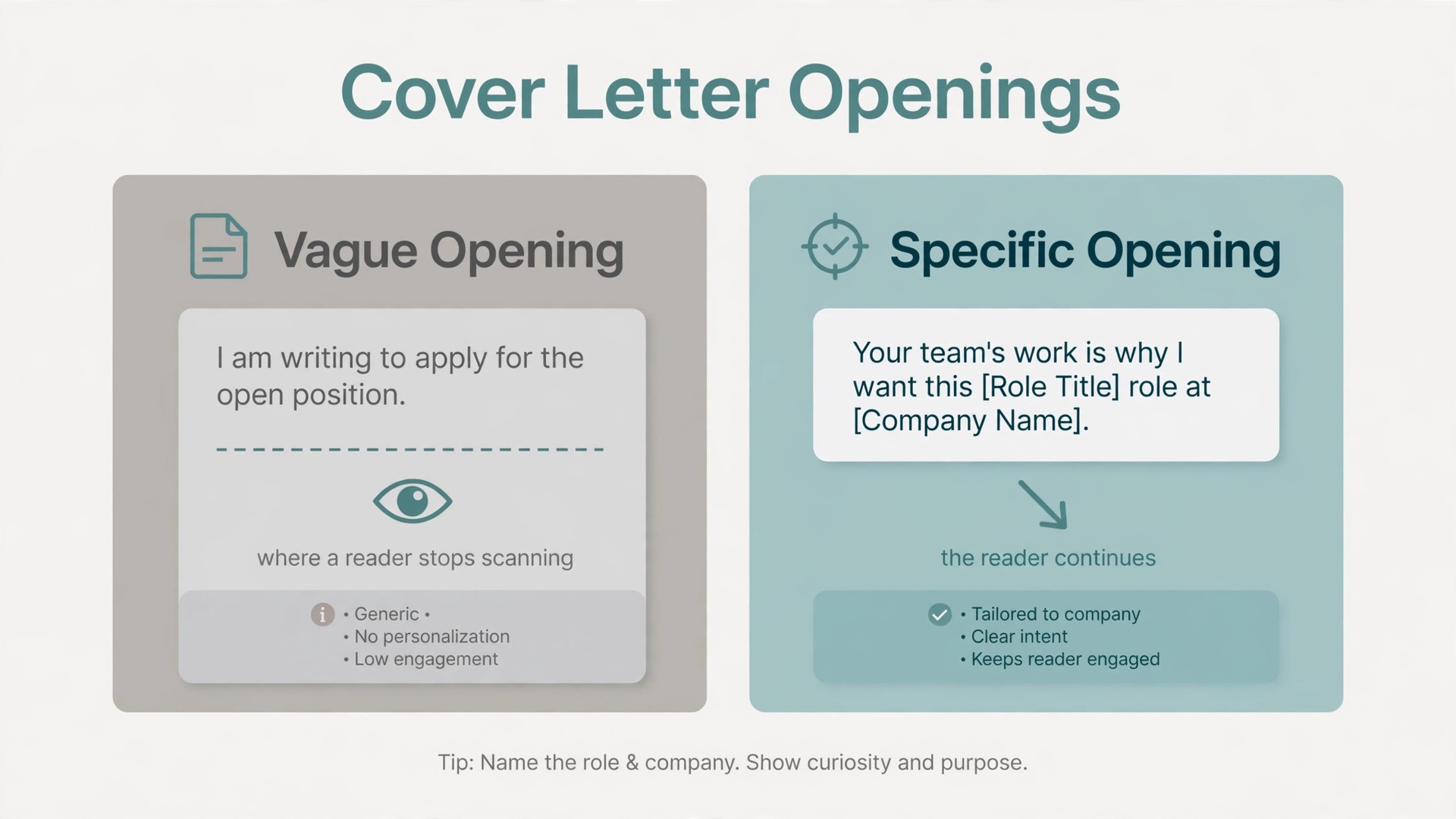
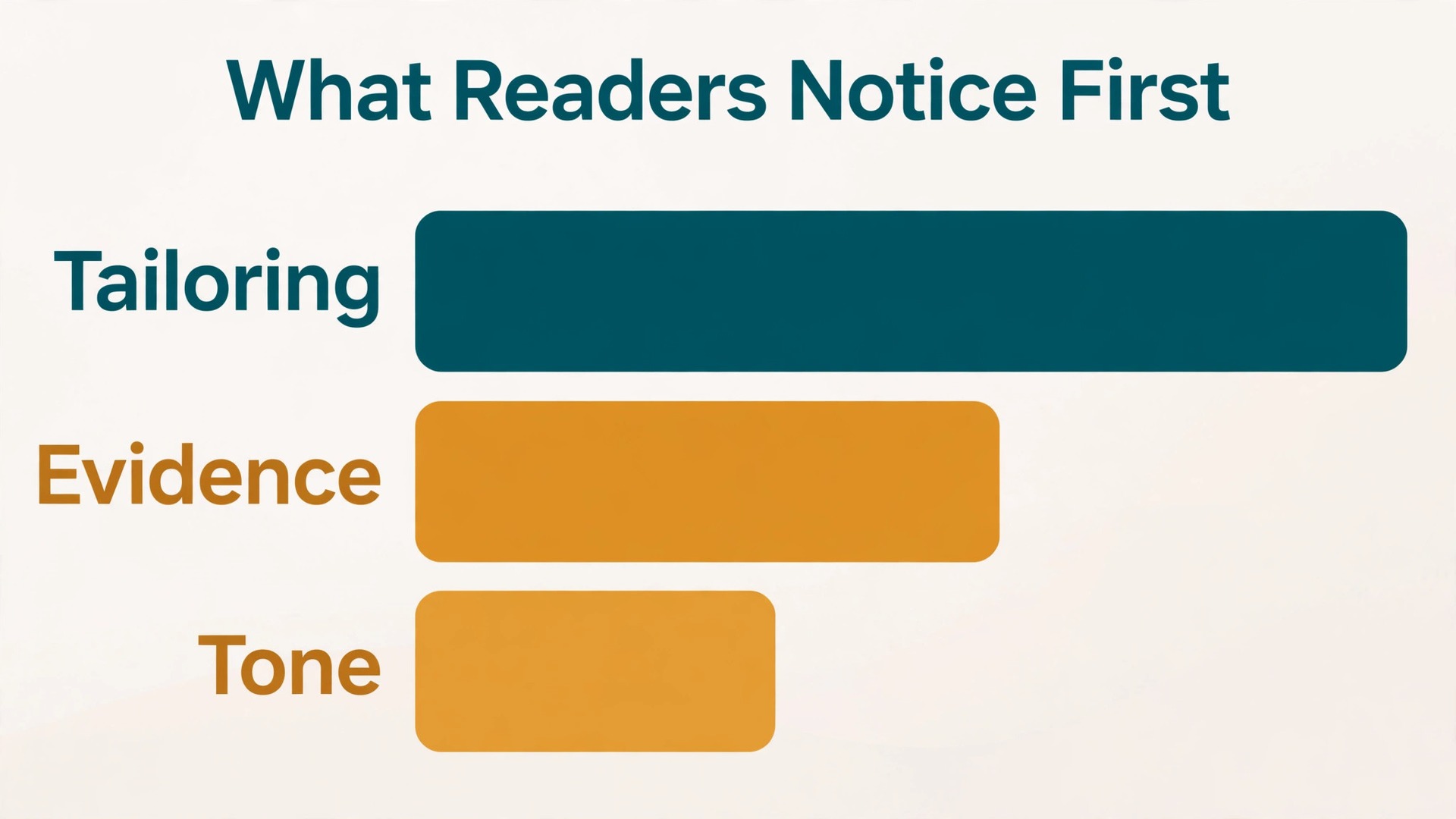
Hiring managers do not read cover letters the way applicants write them. They do not start at the first word and savour each sentence to the end. They scan. They look at the opening lines for the role and the reason you are writing, they glance down the page for evidence tied to the job, and they check the close for a clear next step. A letter that buries its point in paragraph four loses to a letter that states it in paragraph one, even if the second letter is less elegant. Structure is therefore the first editing job, and it comes before any tool check.
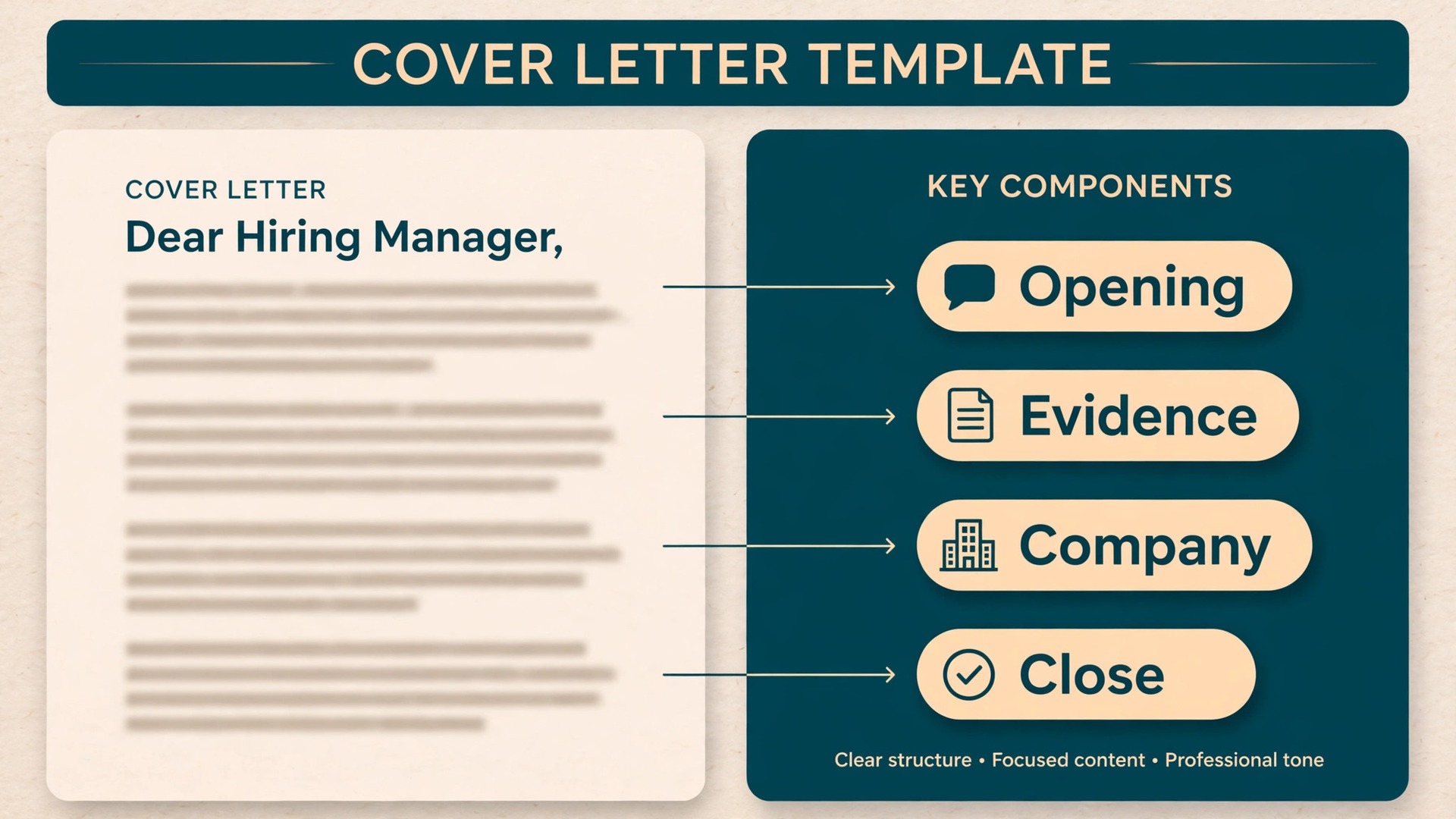
The strongest structure for most roles has five parts, and each part earns its place. The opening names the role and gives one sharp reason you fit it, in two or three sentences at most. The second paragraph connects your strongest, most relevant experience to the work the job actually involves, with one concrete result. The third paragraph shows you know something specific about the company, a product, a market, a problem it faces, and explains why that matters to you. The fourth paragraph covers fit in a broader sense, such as the way you work, the teams you have helped, or a skill the posting calls out that your resume only hints at.
The close asks for a conversation, names your availability in general terms, and thanks the reader without grovelling.
Length discipline matters as much as structure. Aim for one page, roughly 250 to 400 words for most applications, and never let a cover letter sprawl to two pages unless a senior or academic role genuinely requires it. A 300 word letter with one quantified result, one company specific observation and one clear ask beats a 700 word letter that restates every job on your resume.
Paragraph length is part of scannability too. Keep most paragraphs to three or four sentences. A wall of eight sentences looks like work to a tired reader, and tired readers skip. White space signals that the writer respects the reader’s time, and it makes the one paragraph with real evidence stand out. Read your draft on a phone screen before you send it, because many recruiters first open applications on a phone.
One more scanning habit is worth knowing. Readers remember the first and last lines of a letter far better than the middle. That is why the opening must carry the role, the fit and a hint of evidence, and why the close must carry confidence rather than apology. Phrases that apologise for taking up time, or that beg for a chance, linger in the wrong way. A calm, direct close leaves the reader with a simple next step.
How to use Grammarly for cover letter writing, Step by Step
Start with your own draft, not with a generated one. Write the five part structure above in your own words first, even if the sentences are rough. This matters for two reasons. First, Grammarly works best as an editor of your thinking, and it cannot supply the specific evidence, the company knowledge or the judgment that make a letter convincing. Second, a letter written entirely by a tool tends to read as if it were written by a tool, and hiring managers are increasingly alert to that flat, over polished sound. Your rough draft is the raw material. The tool refines it. It does not replace it.
Set the document up properly before you accept a single suggestion. Paste or type your draft into the Grammarly editor, or open it in Google Docs or Word with the Grammarly extension running, so that checks follow you into the app where the letter will live. Then set your writing goals. In the Grammarly editor, goals let you tell the tool about your audience, formality, domain and intent, so its suggestions match the job instead of defaulting to generic business English. For a cover letter, choose an audience of knowledgeable readers, a formal tone, a business domain, and an intent to convince.
Those four choices change which suggestions appear, and they keep the tool from pushing your letter toward casual phrasing that would suit a blog post but not a job application.
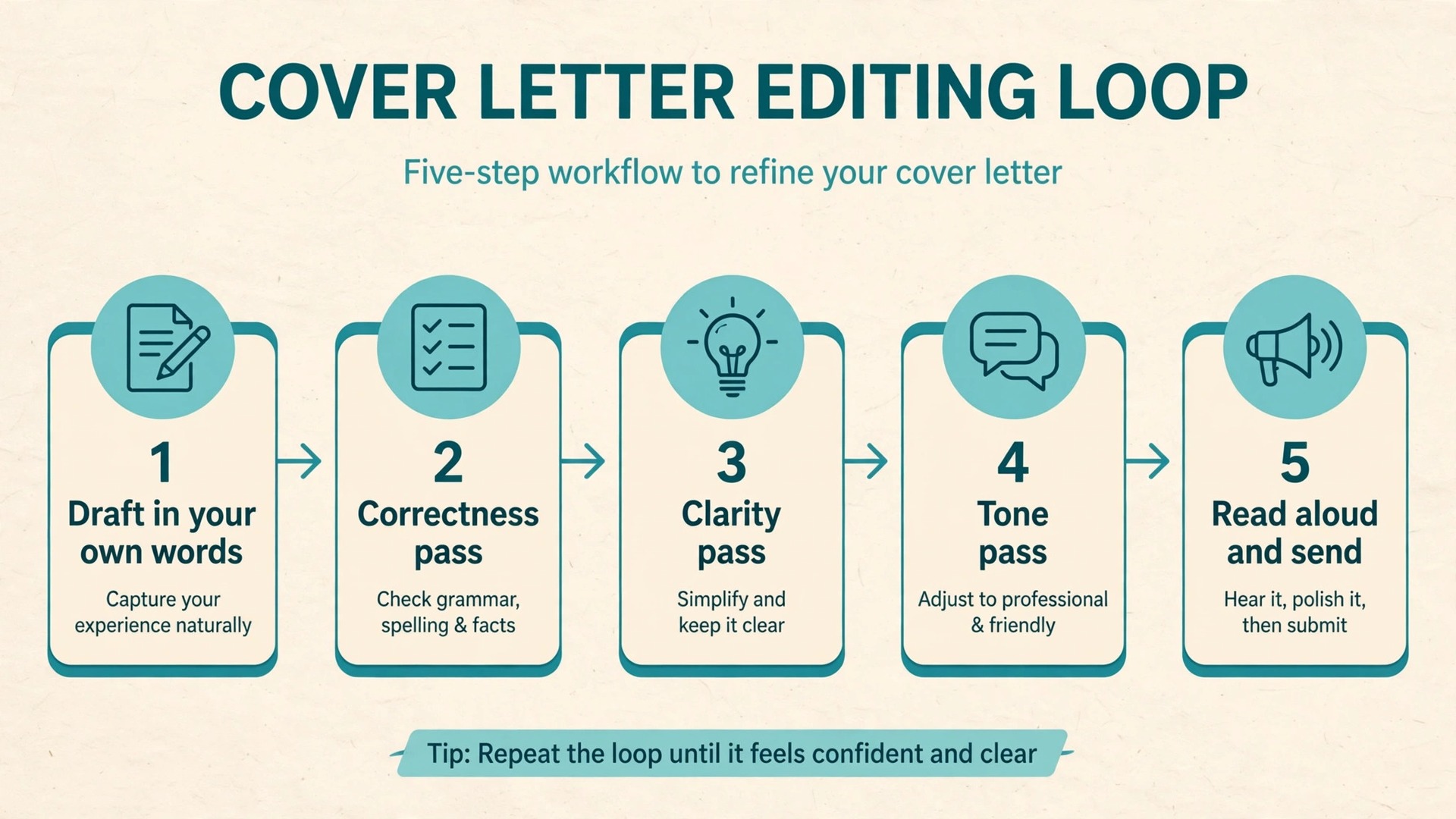
Work through suggestions in passes, not all at once. Pass one is correctness only. Accept clear grammar, spelling and punctuation fixes, and fix any error the tool flags but cannot correct, such as a misspelt company name or a wrong job title, by hand. Pass two is clarity. Look at every sentence the tool calls wordy or hard to read, and rewrite it yourself before accepting a rewrite, so you control the meaning. Pass three is tone and delivery.
This is where the tool earns its keep on a cover letter, because it can show you how a sentence might sound to a reader, and that outside view is hard to get from your own head after your tenth read through.
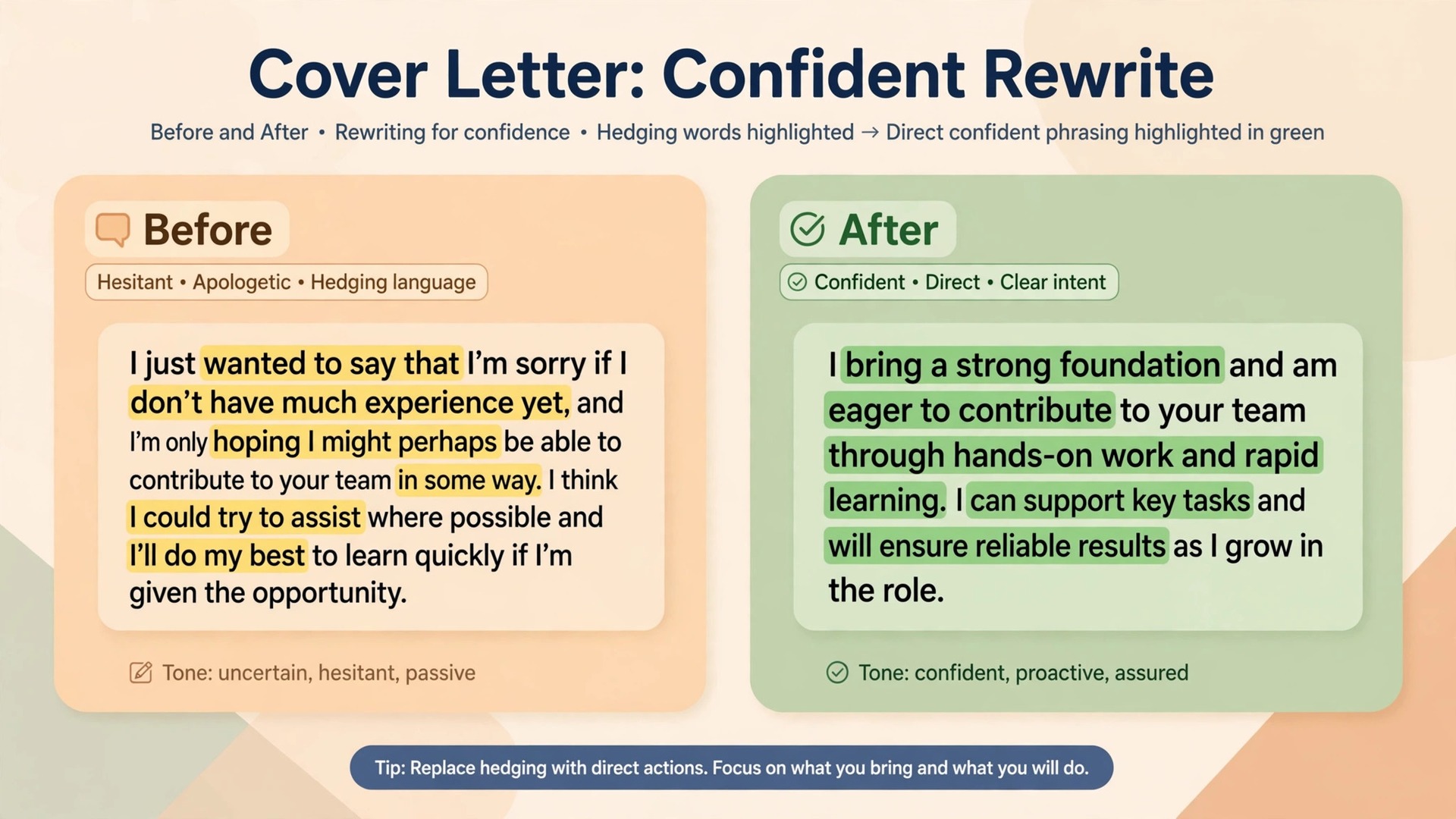
Use the tone detector deliberately, and understand what it can and cannot do. The tone detector needs at least 90 characters of text before it activates, so it will not judge a single line. It analyses signals such as word choice, punctuation and capitalisation, and it reports the tones it detects, such as confident, friendly, formal or concerned. Treat that report as a second opinion, not a verdict. If you aimed for confident and formal and the detector reports uncertain and apologetic, you have a real problem to fix, usually caused by hedging words such as just, maybe, hopefully and I think.
Know the limits of the free and paid plans before you build a workflow around a feature you do not have. Grammarly’s free plan covers grammar, spelling and punctuation checks, basic tone detection and a limited monthly allowance of AI prompts, listed as 100 prompts a month. Grammarly Pro, the paid plan that replaced the old Business plan, adds full sentence rewrites, tone adjustment, a plagiarism checker and AI text detection, and raises the AI prompt allowance to 2,000 prompts a month. Pro pricing from Grammarly’s own support pages is 30 dollars a month on monthly billing, 60 dollars for three months on quarterly billing, or 144 dollars a year on annual billing, which averages 12 dollars a month.
Check the plans page at checkout before you pay, because prices and limits change, and tax may be added depending on your billing address.
A practical workflow for one letter looks like this.
- Draft the five part structure in your own words.
- Set goals and run pass one for correctness.
- Run pass two for clarity, rewriting flagged sentences yourself.
- Run pass three for tone against your industry target.
- Read aloud, fix voice issues, then copy into your application.
That five step loop takes about 20 to 30 minutes for a tailored letter once you know it, and it is time well spent. A generic letter sent fast is not efficient. It is a fast rejection.
Tone Calibration by Industry
Tone is where most cover letters fail quietly. The grammar is correct, the structure is sound, and yet the letter feels wrong for the company. That wrongness usually comes from a mismatch between the writer’s tone and the industry’s norms. A letter that would charm a design studio can sound unserious to a law firm. A letter that would reassure a bank can sound stiff to a startup. Grammarly’s tone tools help you spot the mismatch, but you have to know the target tone before you start adjusting.
For technology companies and startups, aim for confident and direct, with energy but without hype. Name the product or problem, name what you built or shipped, and let results carry the enthusiasm instead of adjectives. Avoid slang, but do not hide behind corporate phrasing either. A sentence that says you improved onboarding completion by a specific percentage, and then says what you changed to do it, sounds like a technologist. A sentence that says you are passionate about innovation and eager to chase empty buzzwords sounds like a template. Hiring managers at startups read dozens of the second kind every week, and they skim past them.
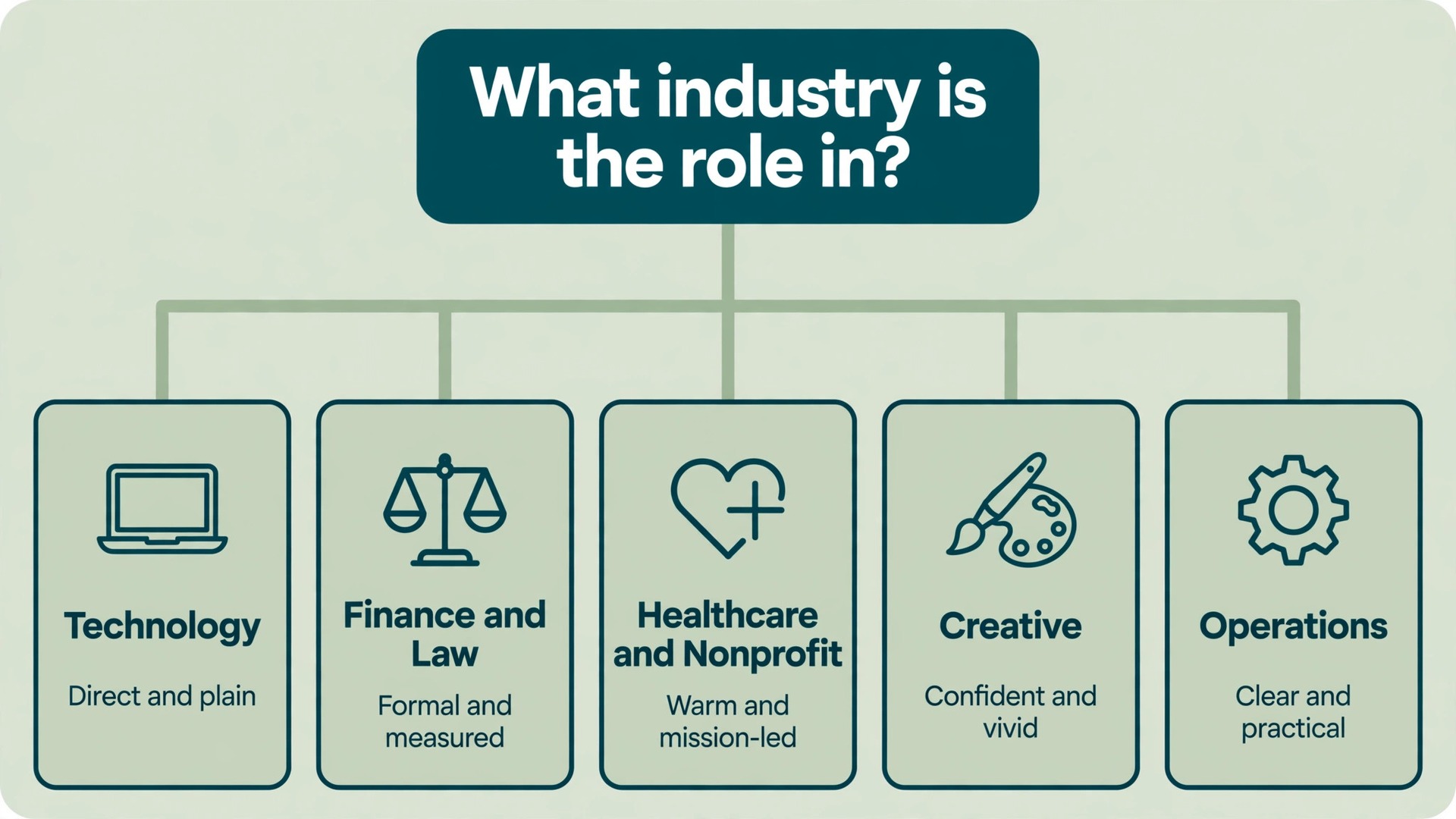
For finance, law and consulting, aim for formal, precise and restrained. Every claim should be checkable, every number exact, and every superlative earned. Do not round a result up, do not claim sole credit for team work, and do not use casual openers. The tone detector should report formal and confident here, and if it reports friendly and casual, tighten the language. Short sentences help, because precision reads as control in these fields. A letter that is calm, specific and free of exaggeration signals the judgment these employers are actually hiring for.
For healthcare, education and nonprofit roles, aim for warm and professional, with the mission visible but not sentimental. Hiring managers in these fields want evidence of care and competence in the same paragraph, not one at the expense of the other. Describe the people you served or the students you taught in concrete terms, then describe the outcome. Avoid emotional language that promises more than you can show, and avoid clinical coldness that makes the mission sound like an afterthought.
For creative roles in design, media and marketing, aim for a voice with personality, but keep the structure disciplined. Creative hiring managers forgive an unusual opening line, and they punish a boring one, but they still want to see the role named, the work shown and the result stated. Let one sentence carry your voice, perhaps the opening or the company paragraph, and keep the rest of the letter clean and direct. A portfolio link or a single vivid project detail does more than three paragraphs of adjectives about creativity. If the tone detector reports only formal and cautious for a creative role, loosen one paragraph deliberately, then check again.
For operations, logistics, manufacturing and customer service roles, aim for practical and dependable. These hiring managers care about reliability, process and results under pressure, and they distrust letters that sound like marketing copy. Name the systems you ran, the volumes you handled, the shifts you covered or the problems you solved, and state outcomes in plain numbers where you can. A letter that cites a real improvement, with before and after figures, will beat a letter that calls you a dynamic team player every time. Grammarly’s clarity suggestions help here, because they push you toward shorter sentences that suit practical writing.
Whatever the industry, three tone traps appear again and again. The first is over apologising, with phrases that ask forgiveness for applying, for a career gap, or for taking up time. State facts about a gap briefly if you must, then move on to what you offer now. The second is over claiming, with words such as expert and world class applied to ordinary experience. Let evidence carry the weight, and let the reader decide how impressive it is. The third is empty enthusiasm, with passion declared for every company in identical words. If your enthusiasm paragraph could be pasted into a letter to a different company without changing a word, it is filler, and hiring managers recognise it instantly.
The Letter Template You Can Adapt
A template is useful only if you treat it as scaffolding, not as a letter. Copy the shape, replace every bracketed line with your own specifics, and delete any line that does not apply to your application. A letter built from this template but filled with generic lines is still a generic letter. A letter built from this template and filled with one real result, one real company observation and one real reason you want the role is a strong letter.
Dear hiring manager line. Use the hiring manager’s name when the posting gives it, and use a neutral greeting when it does not. Never guess a name, and never use a greeting that assumes a gender you do not know.
Opening paragraph. I am applying for the [exact role title] at [company name]. My work in [relevant area] fits this role because [one sharp reason tied to the posting]. In my current or most recent role at [employer], I [one concrete result with a number where possible].
Experience paragraph. The work I would bring to this role centres on [skill or responsibility from the posting]. At [employer], I [specific project or responsibility], which led to [measured outcome or clear improvement]. I also [second relevant skill or experience], which matters here because [link to a need in the posting].
Company paragraph. What draws me to [company name] is [specific product, project, market or value, stated in your own words]. I followed [a real detail, such as a launch, a report or a change in the market], and I see a chance to contribute by [specific contribution, not a vague promise].
Fit paragraph, optional for shorter letters. I work best in [honest description of how you work, such as small teams, fast moving projects or structured environments]. That fits this role because [reason drawn from the posting or the company].
Closing paragraph. I would welcome a conversation about how my experience in [area] could help [company name] with [specific goal or problem]. Thank you for considering my application. I am available for an interview at your convenience, and my resume gives further detail on the work described here.
Sign off. Use a professional sign off and your full name, followed by your phone number and email address on separate lines if the application system does not already capture them.
Now test the template against the most common failure. Read each paragraph and ask whether it would still make sense if you swapped in a different company name. If the answer is yes for more than one paragraph, the letter is not tailored yet. The company paragraph should collapse without its specific detail, and the experience paragraph should collapse without its specific result. That test takes two minutes, and it catches the exact problem that makes hiring managers stop reading.
What to Edit by Hand After the Tool
Grammarly is an excellent proofreader and a poor judge of truth. It can tell you a sentence is grammatically correct while missing that the sentence claims something you never did, names the wrong company, or repeats a figure from a different job. The hand edit is where you protect accuracy, and it should happen after the tool passes, not before, so you are reading a clean draft with fresh eyes for meaning rather than for commas.
Start with facts. Check every company name, job title, date, number and product name against your resume and the posting. Tools do not know your history, and they will happily polish a wrong number into a confident wrong number. Check that the role title matches the posting exactly, that the company name is spelt as the company spells it, and that any percentage or amount you cite is one you can explain in an interview. If you cannot explain a number under questioning, cut it.
Next, check for voice flattening. Read the letter aloud and mark any sentence that sounds like it could have been written by anyone. Those sentences are usually the ones where you accepted a full rewrite without thinking. Restore your own phrasing where the tool’s version lost a detail, a rhythm or a word that matters in your field. Technical terms are a frequent casualty here. If Grammarly suggests replacing a standard term in your industry with a simpler word, keep the standard term. Hiring managers in your field expect it, and simplifying it can make you sound less experienced, not clearer.
Then check for claims the tool cannot verify. A sentence that says you led a project should mean you led it, not that you contributed to it. A sentence that says you increased revenue should say whether the increase came from your work, your team’s work, or a market change you happened to ride. Grammarly cannot ask these questions, so you must. Honest precision is credibility, and credibility is what survives reference checks and interviews.
Also watch for repetition the tool misses. Cover letters often repeat the same strength in three paragraphs with different words, because the writer is anxious to be understood. A human read catches that pattern fast. If you mention a skill in the opening, do not restate it in the same words in the experience paragraph. Develop it, give it a result, or leave it out. If every paragraph calls you passionate, dedicated and driven, none of those words means anything by the third use. Pick one quality per paragraph and prove it, rather than declaring all of them everywhere.
Finally, check the letter against the posting one more time, line by line. Does it answer the top three requirements in the posting, or does it answer the requirements you wish the posting had? Applicants often write the letter for the job they want in general, not the job advertised. Match your evidence to the actual posting, and if a requirement is missing from your experience, address it honestly in one sentence rather than ignoring it. A brief, honest sentence about a gap, followed by adjacent experience, reads far better than silence, because silence lets the reader assume the worst.
The Final Proofing Pass Before You Send
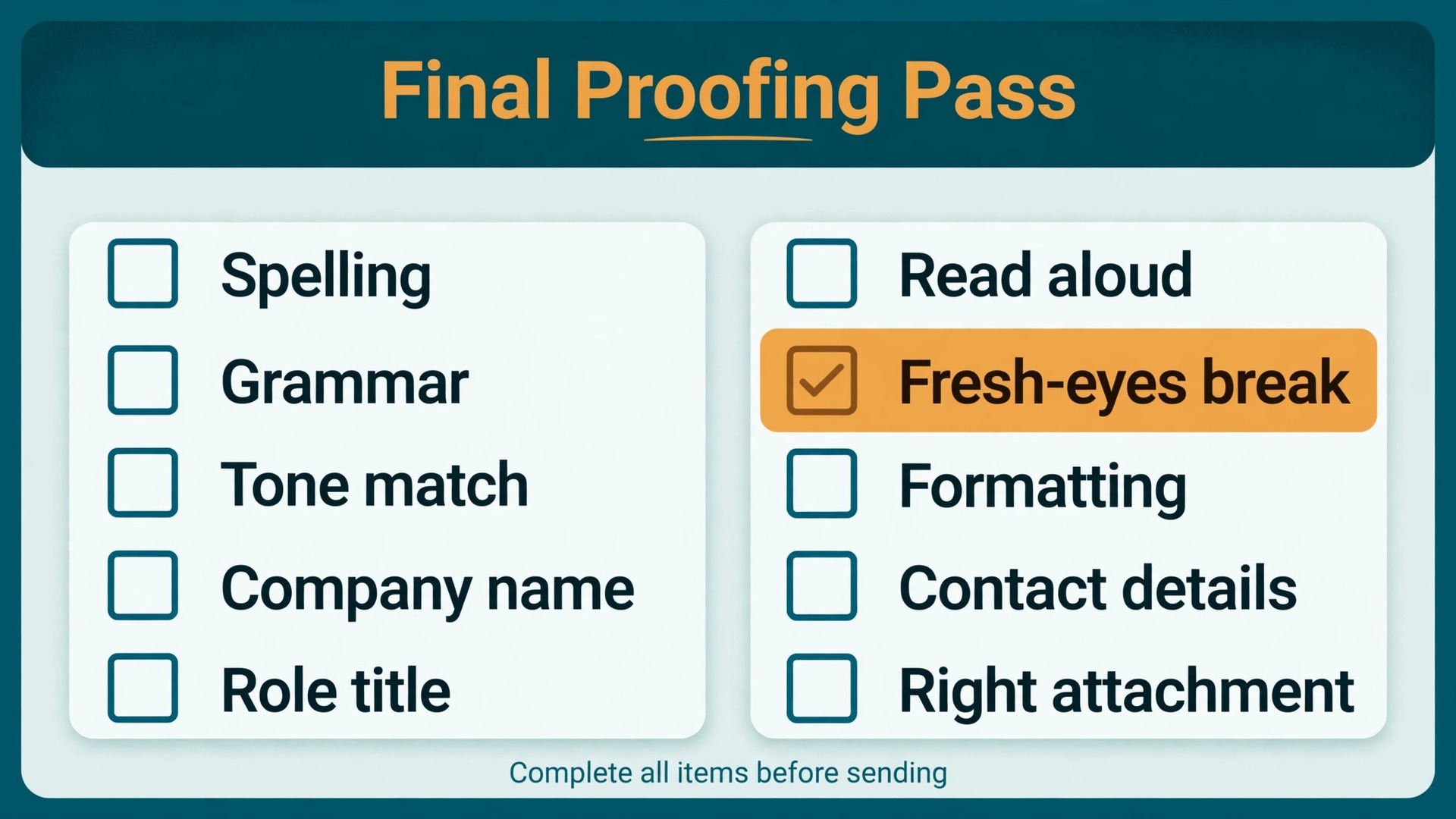
This is the checklist to run on every letter, after the tool passes and after the hand edit, and before the letter leaves your computer. Work through it in order, and do not skip steps because the letter feels finished. Letters feel finished long before they are finished.
- Role and company check. The role title, company name and hiring manager name, where used, match the posting exactly.
- One page check. The letter fits on one page in the format you will send, with normal margins and a readable font size, and it reads cleanly on a phone screen.
- Tailoring check. At least two paragraphs collapse if you swap in a different company name, because they carry specifics only this employer could match.
- Evidence check. At least one result carries a number, a scale or a concrete outcome, and every number in the letter is one you can explain.
- Tone check. The tone detector report matches the industry tone you aimed for, and no sentence apologises for applying or begs for a chance.
- Voice check. Read the letter aloud once, slowly. Every sentence sounds like you on a good day, and no sentence sounds like a template.
- Consistency check. Job titles, dates and terms match your resume exactly, and the same term is used the same way throughout the letter.
- Attachment check. The file name is professional, the format matches what the posting asked for, and the letter opens correctly from the file you will actually send, not only from your draft.
- Contact check. Your name, phone number and email address are correct in the letter and in the application form, and the email address is one you actually monitor.
- Fresh eyes check. If possible, leave the letter for an hour or overnight before this pass, and read it once more from the top without editing in between.
If any item fails, fix that item and run the checklist again from the top, because a fix in one place can break consistency in another. That discipline sounds slow, and it is, by about ten minutes. It is also the difference between a letter you hope is fine and a letter you know is fine. Hiring managers can feel that difference, even if they cannot name it, because a letter that has survived a real proofing pass reads as calm and controlled from the first line to the last.
For related reading, best AI cover letter generators compares tools that draft letters from scratch, which is a useful contrast to the editing workflow here, and Grammarly alternatives is worth reading if you want a different checker for the same job. If tone is your main worry, how to use AI to write better emails goes deeper on sounding confident without sounding stiff, and best AI writing tools for non-native English speakers covers the wider field for writers working in a second language.
The workflow in this guide, where you use Grammarly for cover letter writing as an editor of your own draft, pairs well with any of those tools, because the structure and the proofing pass stay the same even when the checker changes.
Frequently Asked Questions
Should I let Grammarly write my cover letter from scratch?
You can ask it to draft, but you should not send that draft unchanged. A generated letter usually gets the structure right and the specifics wrong, because it does not know your results, your reasons for wanting the role, or the detail that makes the company paragraph believable. Write your own draft first, then use Grammarly for cover letter writing as an editor of that draft. That order keeps the letter true, specific and recognisably yours, and it avoids the flat sound that hiring managers now associate with fully generated applications.
Is the free plan enough for cover letters?
For most job seekers, yes. The free plan catches grammar, spelling and punctuation errors and gives a basic tone report, which covers the two most common cover letter problems. Upgrade to Pro when you want full sentence rewrites, tone adjustment and the plagiarism checker, or when you are applying at volume and want faster editing across many tailored letters. If you are sending one or two letters a month, spend the money on nothing and spend the time on tailoring instead.
How do I stop Grammarly from making my letter sound generic?
Accept suggestions in passes and reject rewrites that remove a detail, a number or a field specific term. After each pass, read the letter aloud and restore any sentence where the tool’s version lost your meaning or your voice. Keep at least one sentence per paragraph that only you could have written, such as a specific project, a specific company observation or a specific result. Generic sound comes from accepting every suggestion, and that discipline is the core habit when you use Grammarly for cover letter writing well.
What tone should I aim for in a cover letter?
Aim for the tone your industry expects, not a single universal tone. Finance, law and consulting reward formal and restrained language. Technology and startups reward confident and direct language. Healthcare, education and nonprofits reward warm and professional language. Creative roles reward a disciplined letter with one vivid, personal passage. Set Grammarly’s goals to match that target before you edit, then check the tone detector report against it. If the report and your target disagree, change the words that carry the wrong tone, not just the words the tool underlines. That comparison is one of the most valuable steps when you use Grammarly for cover letter writing.
Should I mention a career gap or a missing requirement in the letter?
Address it briefly and honestly if it is obvious from your resume, and do not apologise at length. One sentence stating the fact, followed by what you offer now, reads as confident. Silence lets the reader assume the worst, while a long explanation makes the gap the subject of the letter. The same rule applies to a missing requirement. Name it in one sentence, point to adjacent experience, and return to your strongest evidence. Hiring managers respect a candidate who is straight about a gap and strong on the rest of the case.
How long should a cover letter be, and does Grammarly check length?
One page, roughly 250 to 400 words, suits most roles, and Grammarly does not enforce a length for you. Its clarity suggestions will shorten wordy sentences, which helps, but only you can decide what to cut. If your letter runs past a page, cut the weakest paragraph first, usually the fit paragraph or a repeated strength, before you trim evidence. A short letter with one real result and one real company detail will outperform a long letter that restates your resume, no matter how clean the grammar is.
Send a Letter That Sounds Like You on Your Best Day
That is the real standard, and it is simpler than any checklist. A strong cover letter does not sound like a perfect writer. It sounds like you, on a day when you are clear, confident and specific about what you can do. The tool helps you reach that standard by catching the errors you miss, flagging the tone you did not intend, and tightening the sentences that wander. It cannot supply the evidence, the company knowledge or the judgment, and when you use Grammarly for cover letter writing with that boundary clear, it becomes a genuine advantage rather than a crutch.
Write your draft, run the three passes, edit by hand for truth and voice, and run the final checklist before you send. Then send the letter and move on to the next tailored application, because the job search rewards the candidate who sends ten strong, specific letters far more than the candidate who polishes one generic letter for a week. Each time you use Grammarly for cover letter writing, let each letter carry one result, one company detail and one clear ask. That is how a short letter earns a conversation, and a conversation is the only outcome a cover letter needs to deliver.