
A 0.3 percent difference in card processing on 80,000 dollars a month in card sales costs a bar 2,880 dollars a year. That single number explains why choosing the best pos system for bars and pubs is a money decision before it is a software decision. The monthly subscription is the smallest line on the bill. Processing fees, hardware, and the cost of a slow till on a busy Friday night are the lines that decide whether the system pays for itself or quietly eats the margin.
A bar till has a harder job than a shop till. It must hold open tabs for hours, split a round across several cards, apply a happy hour price at 6 pm and remove it at 7 pm, track every pour against stock, and keep serving when the internet drops. A generic retail system can ring a sale, but it often struggles with tabs, pre authorization, and pour level inventory, which are the daily realities of a bar. The right system handles those jobs as core features, not as workarounds.
This guide compares 5 platforms across tab management, speed, happy hour pricing, inventory and pour cost, staff controls, hardware, and total cost. Prices come from vendor pages and recent published comparisons, and they change often, so check the vendor pricing page before you budget. Shortlist two tools, then test each one on a real Friday night, including a large tab, a split bill, a happy hour changeover, and a card failure, because those four cases expose more than any sales demo.
How the best pos system for bars and pubs pays for itself
A bar system pays for itself in three places. First, it serves faster, through a till layout built for drinks, quick modifiers, and handheld ordering that lets staff take orders from the floor instead of queueing at the bar. Second, it protects margin, through recipe costing, pour tracking, and stock counts that show exactly where product disappears. Third, it collects money reliably, through pre authorized tabs, automatic tab closure, and card processing at a rate you negotiated in writing. Judge every platform on those three returns, not on its feature list alone.
The table below gives a fast first sort. Use it to remove tools that clearly do not fit your bar, then read the full sections for the survivors. Price notes reflect listings that disagree across sources, so check the vendor pricing page before budgeting, and ask for the total cost including software, processing, hardware, and any add ons for kitchen screens or loyalty.
| Tool | Best for | Standout strength | Price note |
|---|---|---|---|
| Square | New and small bars | Free plan with no contract | Free, Plus from 49 dollars a month |
| Toast | High volume bars | Deep bar features and handhelds | Starter 0 dollars, POS from 69 dollars a month |
| Lightspeed | Craft cocktail bars | Recipe costing and inventory depth | Reported from 69 dollars a month |
| Shift4 Dine | Value with free hardware | Free terminals at a flat fee | 29.99 dollars a month flat |
| Epos Now | UK pubs and small bars | Hardware bundle with local support | Software from 39 dollars a month |

Best pick by job
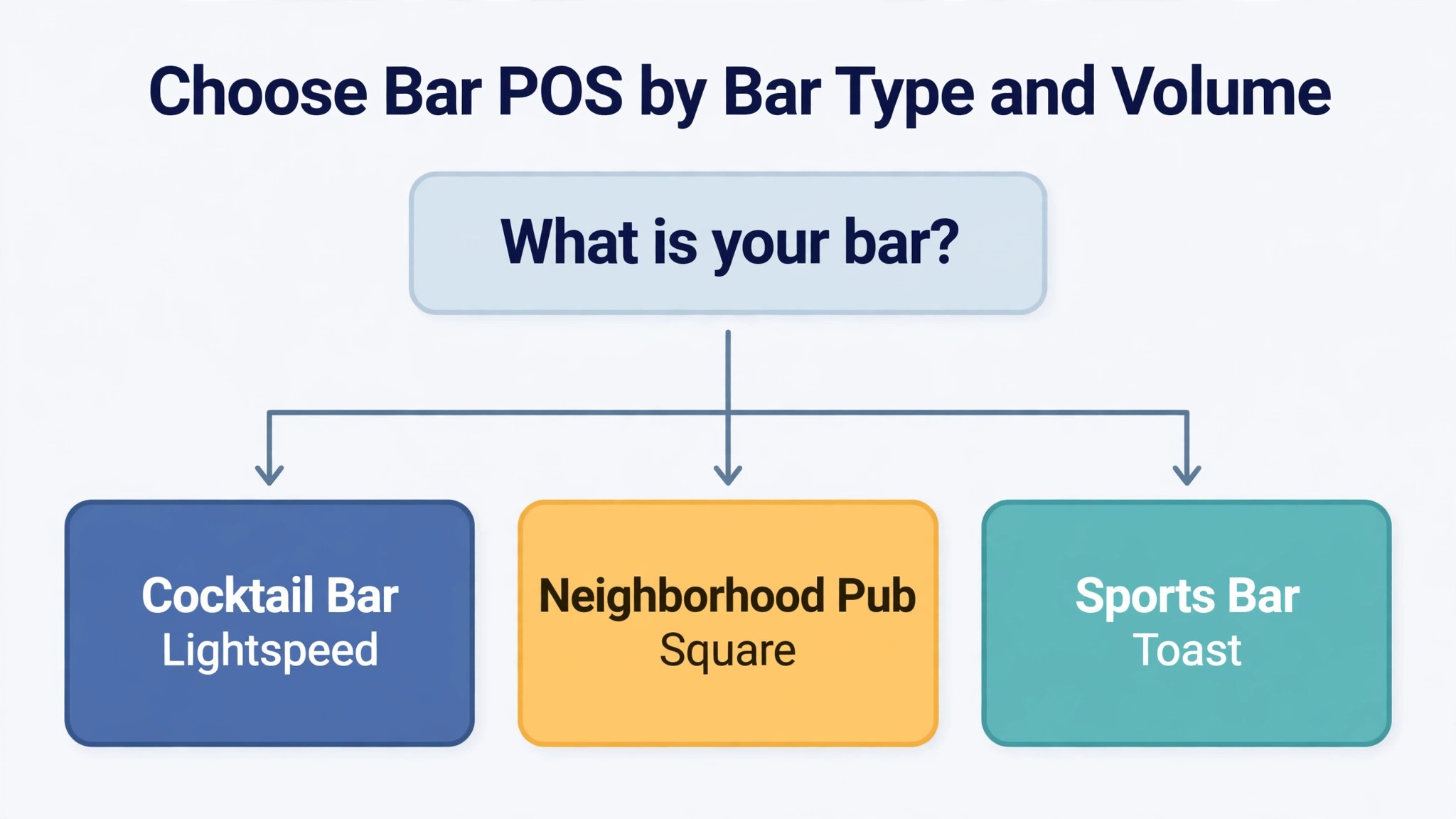
The table below names a lead pick for each segment in this guide for the best pos system for bars and pubs, with a second option worth testing. Test the lead pick on your hardest real service, whether that is a cocktail list with measured pours, a pub quiz night with fifty tabs, or a match night with a full house, before signing.
| Segment | Lead pick | Also test | Why it fits |
|---|---|---|---|
| Cocktail bars | Lightspeed | Toast | Recipe costing and pour control suit measured drinks |
| Neighborhood pubs | Square | Epos Now | Low cost and simple tabs suit a local crowd |
| Sports bars | Toast | Shift4 Dine | Handhelds and speed suit high volume match nights |
What matters most in a bar till
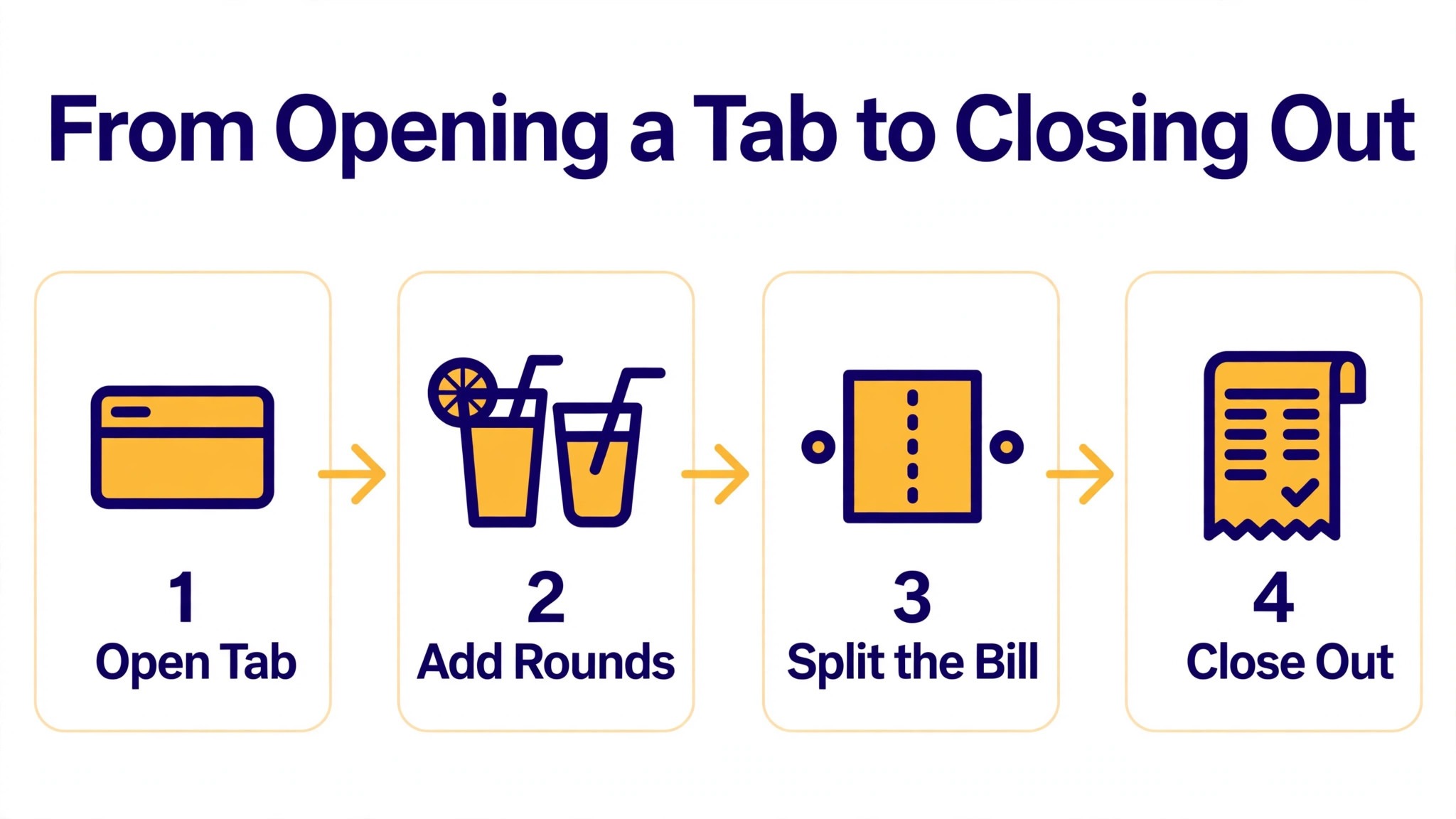
Tab management comes first, because a bar lives on tabs. Test the full tab journey on a busy night, from opening a tab with a pre authorized card, to adding rounds, to splitting the bill across several cards, to closing automatically at the end of the night. A system that makes tabs easy keeps the queue moving, while a system that makes tabs awkward creates a pile of open tabs and a long close at midnight.
Speed comes second. The till layout must let a bartender ring a round in seconds, with modifiers for doubles, mixers, and garnishes that do not bury the drink list. Handheld ordering matters for the same reason, since staff who take orders from the floor serve more guests than staff who wait behind the bar. Ask to see the till on a real Friday menu during a trial, not on a demo menu with ten items.
Pour cost and inventory come third. A bar that does not track pours against stock cannot tell whether a missing bottle is waste, over pouring, or theft. Recipe costing turns each cocktail into a known margin, and stock counts turn the cellar into a number the owner can check weekly. A platform that reports pour cost by drink helps an owner price the menu correctly, while a platform that reports only total sales hides the drinks that lose money.
Offline mode and staff controls complete the picture. A bar cannot stop serving because the internet dropped, so the till must keep ringing offline and sync later. Staff controls must limit voids, discounts, and free drinks to managers, with a clear audit trail for every change. A platform that logs every void and discount protects the owner, while a platform that lets anyone void a sale invites losses that never appear on a report.
The 5 tools in detail
1. Square
Square for Restaurants is the lowest risk starting point for a new or small bar, because the free plan costs nothing per month and there is no contract. It covers tables, tabs, modifiers, open bills, and a floor plan, with item and seat splits on the Plus plan, and it runs on hardware from a free card reader to a full terminal. A bar can open with Square, learn what it actually needs from a till, and upgrade or switch later without breaking a contract. That freedom is worth real money for a bar that is still finding its feet.

Pricing starts at 0 dollars a month for the free plan, with Plus from 49 dollars a month per location and Premium from 149 dollars a month in published comparisons. In person processing runs 2.6 percent plus 15 cents on the free plan, dropping to 2.5 percent on Plus.

The Plus plan adds team management, advanced inventory, loyalty, and email and text marketing, which are the features a growing bar actually uses. The free plan cannot split a bill by item or seat, which matters on a busy night, so price the Plus plan if split bills are a daily job. Square suits new bars, neighborhood pubs, and small venues that want to start with no software fee and no lock in. A high volume cocktail bar that needs deep recipe costing should compare Lightspeed first.
2. Toast
Toast is the restaurant industry standard, and its bar features are built for high volume service rather than adapted from retail. It covers table and course management, handheld ordering with Toast Go, kitchen display screens, online ordering, loyalty, and gift cards, with tab management and pre authorization designed for a busy bar. Toast runs in more than 171,000 restaurant locations, which means most experienced bar staff have already used it, so training a new hire takes hours rather than days.
Pricing starts with a 0 dollar Starter Kit with no upfront hardware cost but higher processing at 3.09 to 3.69 percent plus 15 cents, or the Point of Sale plan from 69 dollars a month with processing at 2.49 percent plus 15 cents. Hardware is usually bought or financed separately, with a full setup reported from about 1,024 dollars, and contracts commonly run two to three years. That contract is the key trade off. Toast suits high volume bars, sports bars, and nightclubs that need handhelds, kitchen screens, and a system the whole team already knows. A small bar that wants no contract and a lower processing rate should test Square or Shift4 Dine first.
3. Lightspeed
Lightspeed Restaurant is the pick for a craft cocktail bar, because its inventory and recipe costing go deeper than any other tool in this list. It covers multi room floor plans, modifiers, tabs, inventory tracking down to the ingredient level, recipe costing for every cocktail, multi location menu management, and detailed analytics. A bar that prices cocktails by measured pour can see the margin on each drink, track which ingredients run out first, and spot over pouring before it becomes a monthly loss.
Pricing is reported from 69 dollars a month for Starter, with Essential near 189 dollars a month and Premium near 399 dollars a month in published comparisons, though the billing period is not always stated on the vendor page, so check the vendor pricing page for the current terms. Processing is quoted rather than published in many listings, with some guides reporting 2.6 percent plus 10 cents, and the kitchen display costs extra at about 30 dollars per screen a month. Lightspeed suits cocktail bars, multi site operators, and bars where inventory accuracy decides the profit. A small pub that only needs tabs and speed will pay for depth it never opens, and should test Square first.
4. Shift4 Dine
Shift4 Dine, formerly known as SkyTab, is the value pick for independent bars in 2026, and the reason is simple math. It offers free hardware, including terminals, handhelds, and kitchen screens, at a flat monthly fee of 29.99 dollars, with tab management, pre authorization, tableside ordering, and QR ordering included. The product rebranded from SkyTab to Shift4 Dine in May 2026, and it is the same product, pricing, and hardware under the new name, so older SkyTab reviews and guides still describe the current system.
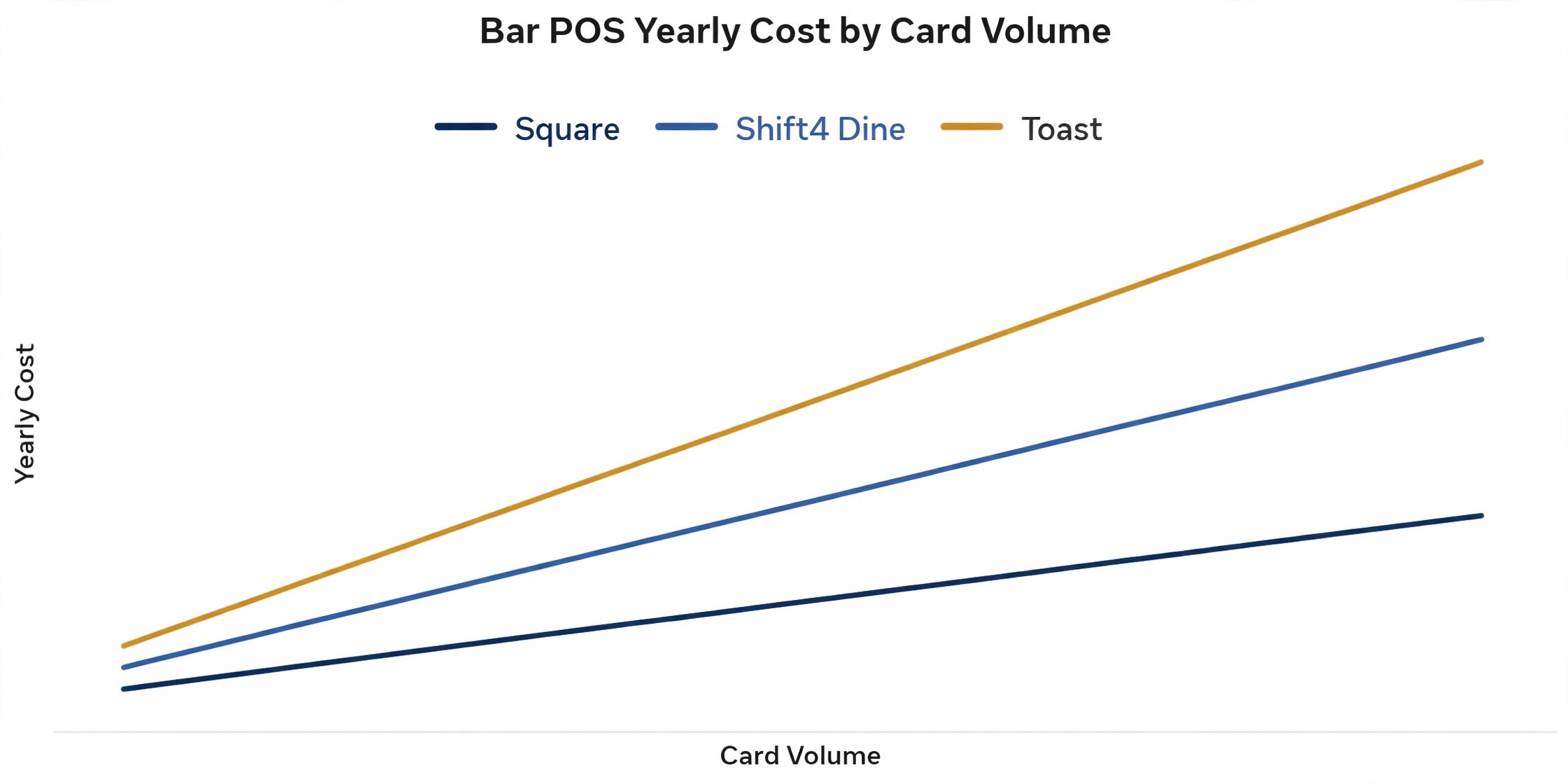
Pricing is 29.99 dollars a month flat with no tiered plans, and processing is reported at 2.75 percent plus 15 cents, with some guides reporting a negotiable range from 2.4 to 2.75 percent plus 15 cents. At that flat fee, a single terminal bar pays about 360 dollars a year in software costs, against 828 dollars or more a year for Toast at 69 dollars a month, before hardware is counted.
The trade off is a contract, with a 36 month term reported in published comparisons, so get the full term in writing before signing. Shift4 Dine suits independent bars and pubs that want free hardware and predictable cost. A bar that wants to negotiate processing as it grows, or to leave without a long contract, should test Square first.
5. Epos Now
Epos Now is a UK born system with strong support for pubs and bars, and it prices around a hardware bundle rather than software alone. It covers till operations, tabs, table management, inventory, staff scheduling, and third party integrations, with a focus on single location and small multi location operators. For a UK pub that wants local support and a complete system in one box, the bundle is attractive, since hardware, software, and card processing arrive together instead of from three vendors.
Pricing varies sharply by region, so treat any single figure with care. United States listings report software only from 39 dollars a month, with a Complete System at 349 dollars upfront plus 79 dollars a month including hardware, and processing at 2.6 percent plus 10 cents.
United Kingdom listings report a bundle from 299 pounds with a 54 pound monthly subscription, or software from 25 pounds a month in older comparisons, so check the vendor pricing page for your market. Epos Now suits UK pubs, small bars, and operators that want a bundled system with local support. A United States bar comparing on price alone should test Square or Shift4 Dine first, since the Epos Now bundle math differs by market.
Tab management and speed on a busy night
Tabs are where a bar till earns its keep or fails in public. A good system opens a tab with a pre authorized card in seconds, shows the running total to the bartender, lets a guest add a round without handing the card over again, and splits the final bill across several cards without retyping. A weak system makes each of those steps slow, and slowness at the bar is visible to every guest in the queue. During any trial, run a tab with six guests, split it three ways, and time the whole process.
Speed also depends on the till layout. Drink buttons must sit where the hand expects them, modifiers must be one tap, and happy hour prices must change automatically at the set time. A system that forces a bartender to search for a drink, scroll for a modifier, or manually apply a discount will cost a round per hour on a busy night. Handheld ordering adds speed for a different reason, since staff take orders from the floor and the bar starts pouring before the guest reaches the till.
Pour cost, inventory, and theft control
Pour cost is the number that separates a profitable bar from a busy bar that loses money. Recipe costing turns each cocktail into a known cost and a known margin, so the owner can see which drinks earn money and which ones only look popular. Without it, a bar can sell out every Friday and still wonder where the profit went. Lightspeed leads here, Toast and Square cover the basics, and every platform in this list reports sales, though only some track ingredients.
Inventory control turns the cellar into a checkable number. A weekly stock count that matches sales tells the owner the bar is tight, while a gap between stock and sales points to waste, over pouring, or theft.
That weekly count is one of the clearest tests of the best pos system for bars and pubs, since a till that cannot reconcile stock against sales leaves the owner guessing every month. Staff controls support the same goal, since voids, discounts, and free drinks should need a manager code and leave an audit trail. Test the void report during any trial, and check how many steps a bartender needs to give a free drink. A system that makes a free drink easy and invisible is a system that will lose stock quietly for months.
Hardware and offline mode
Hardware decides the first year cost as much as the software does. Shift4 Dine includes terminals, handhelds, and kitchen screens at no upfront cost, which is why its flat fee looks so strong. Square starts with a free card reader and a terminal near 299 dollars, so a small bar can open cheaply and add hardware later. Toast bundles hardware into its Starter Kit at no upfront cost, but charges for hardware on paid plans, with a full setup reported from about 1,024 dollars. Lightspeed and Epos Now sell hardware separately or as a bundle, so price the full kit before comparing monthly fees.
Offline mode is the feature a bar notices only when it fails. A till that stops when the internet drops leaves a full bar unable to pay, which is the worst possible failure at midnight on a Saturday. Square, Toast, Lightspeed, and Epos Now all offer offline modes, but the details differ, including which features keep working and how long the till can run offline. Test offline mode during a trial by disconnecting the network and ringing a tab, splitting a bill, and closing out. A system that handles that test cleanly is a system you can trust on a busy night.
How to choose without a costly contract
Start from your bar model, because that choice filters the best pos system for bars and pubs faster than any feature table. A cocktail bar needs recipe costing, measured pours, and inventory depth. A neighborhood pub needs simple tabs, low cost, and no contract. A sports bar needs handhelds, speed, and a till that survives a full house on match night. Write that model down before any demo, and score each tool against it.
Next, run a realistic trial night. Open a tab with a pre authorized card, add three rounds, split the bill across two cards, apply a happy hour price, void one drink with a manager code, and close the tab. Then check that the sales, the voids, and the card payments all agree. A tool that passes that night will handle most real nights, and a tool that fails it will fail again at the busiest point of the week.
Finally, price the second year, not the first month. Add software, processing at your real card volume, hardware, kitchen screens, and any add ons for loyalty or online ordering, and model the price at your expected sales. Ask about contract length, renewal terms, and data export, because switching tills later means retraining the whole team. A short contract with clean data export is worth more than a small first month discount.
Rollout checklist for a live bar
When you switch till systems, remember that a bar cannot close for a software switch, so the rollout must run alongside live service, live tabs, and live guests. Clean the data first, test tabs and splits on real orders, and keep the old till visible until the new one proves itself. The steps below give a safe sequence.
- Export your drink list, prices, happy hour rules, and staff records, then check a sample by hand for incorrect prices and duplicate items.
- Build your menu first, including drink buttons, modifiers, happy hour pricing, and tab rules, before training any staff.
- Set staff permissions next, including who can void, discount, and give free drinks, and confirm every change leaves an audit trail.
- Connect payments and run a test tab with a real card, then refund it, to confirm pre authorization, splitting, and closing before any guest is charged.
- Run one quiet service on the new till with the old till still visible, so staff can compare totals and catch errors without pressure.
- Train the whole team on tabs, splits, voids, and offline mode, because those four jobs cause most support questions in the first month.
- Keep old sales records accessible for at least a year, so no dispute, refund, or tax question is lost in the move.
Mistakes that cost bars margin
The first mistake is choosing on the monthly subscription alone. Processing fees are the larger cost for any bar with real card volume, and a 0.3 percent rate difference on 80,000 dollars a month in card sales costs 2,880 dollars a year. Compare the full year cost at your real volume, including processing, hardware, and add ons, before signing anything.
The second mistake is signing a long contract without testing the exit. A 36 month term with expensive hardware lock in can trap a bar in a system it has outgrown. Read the contract before signing, confirm the notice period, and test data export during the trial, not after the relationship has soured.
The third mistake is skipping the pour cost check. A bar that never counts stock against sales cannot tell whether a missing bottle is waste, over pouring, or theft. Run a weekly stock count from the first month, compare it against sales, and act on the gap while it is small.
The fourth mistake is launching on a Friday night. A new till always has a learning curve, and a busy service is the worst place to learn it. Launch on a quiet Tuesday, run the full tab and split flow with real staff, and move to Friday only after a clean quiet service.

What bar POS really costs
Bar till pricing looks simple in a listing and becomes complex in a quote, because the total includes more than the monthly subscription. Software, processing, hardware, kitchen screens, and add ons for loyalty or online ordering can each add a meaningful amount. A platform that looks cheap on software alone may cost more in total than a platform with a higher subscription and free hardware.
Free and low fee plans, used by Square and Toast Starter, keep the monthly software cost near zero but charge higher processing rates, which suits a new bar with low volume. Flat fee plans, used by Shift4 Dine, give a predictable bill with free hardware, which suits an independent bar that wants to budget with confidence. Tiered plans, used by Lightspeed and Toast paid tiers, add depth as the price rises, which suits a bar that will actually use recipe costing and multi site reporting. Compare all three models on your actual card volume, not on a headline rate.
Before signing, ask for a written total that covers the software, processing at your real volume, hardware, kitchen screens, and any add ons. The best pos system for bars and pubs is the one whose full year total stays defensible as volume grows, not the one with the lowest monthly software fee. Ask how the price changes when card volume grows by half or when you add a second terminal. A clear answer to those questions is a good sign. A vague answer is a warning that the first busy month will surprise you.
Related Guides
Keep exploring with these guides on Stratilyze:
- Best POS System for Boutiques (15 Tools)
- Best POS System for Pet Stores (14 Tools)
- Best POS System for Farmers Market Vendors (8 Tools)
Frequently Asked Questions
How much should a small bar pay for a POS system?
Most small bars pay between 0 dollars and 70 dollars a month for software at entry level, with processing adding far more than the subscription once volume grows. A bar doing 50,000 dollars a month in card sales pays roughly 1,250 to 1,400 dollars a month in processing alone at typical rates, so compare the full year cost, not the monthly software fee.
Does bar POS handle tabs and split bills?
Yes, when tab management is turned on and configured with your real rules. The best pos system for bars and pubs should open a tab with a pre authorized card, hold it for hours, split the bill across several cards, and close open tabs automatically at the end of the night. Test a six guest tab split three ways during a trial, because a till that struggles with splits will slow every busy service.
Can a bar till keep working when the internet drops?
Yes, when offline mode is turned on and tested before launch. The till should keep ringing sales, holding tabs, and printing orders, then sync when the connection returns. Test offline mode during a trial by disconnecting the network and running a full tab through to payment, since a till that fails offline leaves a full bar unable to pay.
How long does it take to switch bar POS?
Most small bars can switch in one to two weeks, including menu setup, payment testing, and staff training. A bar with a large cocktail list, complex happy hour rules, or several terminals should allow two to four weeks. Avoid switching just before a holiday weekend, because a till error then affects every table at once.
Should a small bar choose Square or Toast?
Choose Square when you want no contract, a free start, and the freedom to leave any month, which suits a new bar or a neighborhood pub. Choose Toast when you need handhelds, kitchen screens, and a system most experienced staff already know, and you accept a two to three year contract. Many bars start on Square and move to Toast only when volume justifies it.
What should I check about processing rates before signing?
Check whether the rate is fixed or negotiable, whether it changes by plan, what the per transaction fee is, and whether the contract locks the rate or lets it rise. Confirm the total processing cost at your real monthly volume in writing, and compare it across vendors, since a small rate difference costs thousands a year at bar volumes.
The bar shortlist, by how you trade
Cocktail bars should test Lightspeed first, with Toast as the high volume alternative. Neighborhood pubs should test Square first, with Epos Now as the bundled hardware alternative. Sports bars should test Toast first, with Shift4 Dine as the value alternative with free hardware. In every case, the deciding test is a real Friday night from first tab to last close, plus one full stock count. The best pos system for bars and pubs is the platform that handles that night cleanly, at a written total cost you can defend.